Does approval for backup maintenance authorize disabling a protection?
No. Review the exact operation, affected recovery points, current safeguards, and independent approver. A maintenance ticket does not establish permission to weaken retention or remove protection.
A request to relax backup protection needs more than a maintenance ticket. Before approving it, the backup owner should ask: what recovery option would this operation remove, and who is authorized to accept that consequence? Even a temporary change can affect recovery points the business still needs.
Translate “fix the backup” into an operation
Ask the requester to identify the affected service, vault, workload, proposed operation, and expected result. Reducing retention, stopping a backup job, deleting existing recovery points, and changing who can authorize those actions are different decisions. A ticket that merely says “maintenance” is incomplete.
Record the business requirement separately. If a job is failing, the desired result might be a successful future backup. That does not establish that deleting earlier copies is necessary. The administrator should explain the dependency and an alternative that preserves the existing recovery options, if one is available.
Social engineering can exploit this gap between a useful objective and a consequential implementation step. Tell the service owner about the deadline, but review the proposed change before approving it.
Three safeguards answer different questions
An additional approver, an immutable recovery point, and a recovery window after deletion do different jobs. Avoid recording them all as “backup protection enabled.”
Microsoft’s Resource Guard supports multiuser authorization for specified Azure Backup operations. Its intended separation requires a different owner and prevents the vault administrator from already holding the Resource Guard roles that authorize those operations. For an approved task, temporary Backup MUA Operator access can provide the additional authority; that role does not permit deleting Resource Guard. Protection applies to the documented operations on vaulted backups, not actions directly against the source workload. Microsoft: Resource Guard permissions and process
The protected-operation list differs between Recovery Services vaults and Backup vaults. Some operations are mandatory; others can be excluded. For example, restore protection is optional and disabled by default in the current tables. Check the actual vault type and configured coverage before describing an operation as independently gated. Microsoft: critical operations
Immutability addresses whether protected recovery points can be altered or removed under the applicable rules. Azure distinguishes enabled immutability from enabled and locked immutability. Locking is irreversible. The current guidance also distinguishes policy-based retention from a specific immutability duration, so “locked” should not be interpreted as “every copy is protected forever.” Operational backups of resources such as blobs, files, and disks are outside this vault immutability scope. Microsoft: immutable vault concepts
Soft delete provides a recovery interval after deletion. Microsoft’s current secure-by-default guidance makes its behavior dependent on the vault type, rollout status, and, for some preview paths, client or API version. Do not assume that an older instruction to disable soft delete remains possible in a current environment. Have the backup owner check the applicable support table and actual configuration. Microsoft: secure by default with soft delete
These controls can coexist. Extra authorization does not override an irreversible lock or guarantee that another service check will permit the operation.
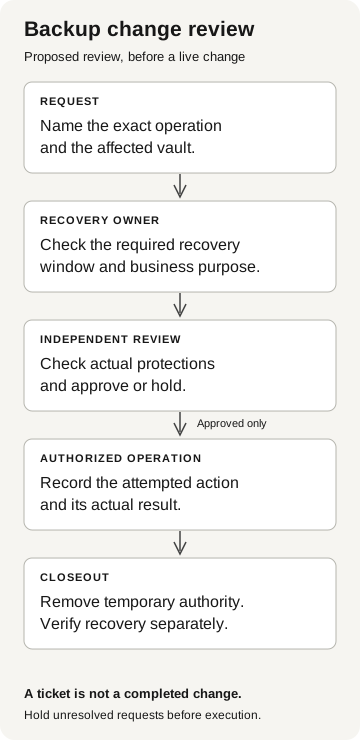
Backup change review
Proposed review before a live change
- Request
Name the exact operation and affected vault.
- Recovery owner
Check the required recovery window and business purpose.
- Independent review
Check actual protections and approve or hold.
Approved only
- Authorized operation
Record the attempted action and actual result.
- Closeout
Remove temporary authority. Verify recovery separately.
A ticket is not a completed change. Hold unresolved requests before execution.
Check which recovery points the business still needs
During a migration, the project owner and recovery owner may have different requirements. The cutover team wants the next backup to succeed; the recovery owner may still need older recovery points for reconciliation. Confirm both requirements through established contacts before approving a retention reduction.
A verified requester can still propose an incorrect change. Review the affected objects and time periods, whether an existing lock permits the operation, and whether the approval role grants only the authority needed for the task. Hold the protection change while the infrastructure team diagnoses a failure whose cause remains unclear.
Record the change so someone else can review it
Give the next reviewer more than a screenshot labeled “approved”:
- Requested result: what the service needs, and who owns that requirement.
- Exact operation: the vault, workload, proposed setting, and affected recovery window.
- Current protections: the applicable configuration, excluded operations, and any irreversible setting.
- Decision: the independently reached approver, rationale, and conditions for proceeding.
- Execution evidence: what actually changed, or why the operation was not attempted or was rejected.
- Closeout: who removes temporary authority and checks the remaining recovery options.
These are proposed review fields, not Azure log property names. Keep approval, attempted execution, and completed change as separate states. An approved ticket is not evidence that a configuration changed; a successful configuration update is not evidence that a restore will work.
Verify recovery separately
A lab test can examine an authorization boundary with synthetic backups and explicit permission. Agree on the operation, expected result, and cleanup before starting. Never make a production protection weaker merely to demonstrate that the review process can stop it. Our technical follow-on guide explains the distinction between a conversation exercise and an authorized technical test.
For real operations, the backup owner should retain the change result and verify temporary privileges were removed. The recovery owner should separately assess the remaining restore options and arrange an approved recovery test where appropriate. If a protection stopped an operation, report that specific result; it does not prove that every backup or source workload has the same protection.