Review source changes, build and release workflows, and package distribution as separate permissions. Match each grant to the work, inspect the actual platform controls, and retain an accountable approval and removal owner.
Before giving someone maintainer access, translate the title into actions. Do they need to label issues, merge source changes, modify a release workflow, publish a package, or appoint another owner? Those decisions may live in different systems and affect different people downstream.
A takeover attempt can look like maintenance help
In April 2024, OpenSSF and OpenJS reported a credible but unsuccessful attempt to obtain maintainer access to an OpenJS-hosted JavaScript project. Messages urged fixes for unspecified critical vulnerabilities and sought maintainer status despite limited prior involvement. OpenJS stated that the people involved had not received privileged access.
The foundations compared the approach with the XZ Utils backdoor, while describing warning patterns such as coordinated endorsements, escalating pressure, and urgency that weakens review. That comparison does not establish a shared actor or a particular government’s involvement. OpenSSF and OpenJS: original warning
Use that report to ask better questions about an access request, not to diagnose intent from a person’s writing style or background. A busy contributor, a new account, and an urgent bug report can all be legitimate. The proposed permission and the approval process are things the project can examine directly.
Replace the title with three decisions
Start with three plain-language statements: who may change the source, who may change the machinery that builds it, and who may deliver a new version to users. A small project may assign all three to one person. The review should still name them separately.
Source authority concerns changes to the repository. A proposed patch can be reviewed without granting the author standing power to merge future patches. Identify the branches and paths involved and the rules that actually apply to them.
Build and release authority concerns automation and release preparation. A workflow is executable configuration. Changing it can alter what gets built, which dependencies are fetched, or which authorized operations run. The reviewer needs to understand this permission even if the requested source-code change is small.
Distribution authority concerns the place where consumers obtain the package. A registry account or automated publisher may have authority that is separate from a human’s repository membership. Removing repository membership does not tell you whether that person can still publish a package.
Platform roles can overlap these responsibilities. Read the actual definitions before selecting one.
GitHub role names are not a complete release policy
For organization repositories, GitHub distinguishes Read, Triage, Write, Maintain, and Admin roles. Triage is intended for managing issues and discussions without write access. Write includes substantial capabilities, including pushing and merging code, working with Actions workflows, and creating releases. The effective result also depends on repository and organization controls. GitHub: repository role permissions
A request to “help with issues” therefore deserves a different review from a request to run releases. Do not choose Maintain merely because the person will be called a maintainer in the project’s community. The job description and the platform role are separate things.
Inspect inherited access as well as the invitation you are about to send. A narrow individual role may not describe the person’s full authority if another team or organization setting already grants more. Ask the repository owner to review the effective configuration rather than relying on the wording of one approval email.
Review the review rules themselves
GitHub’s CODEOWNERS file associates paths with responsible people or teams. Review requests can be generated from it, but requiring their approval needs the applicable protection configuration. Listing two owners does not by itself require both to approve: GitHub documents that one matching code owner’s approval can satisfy the code-owner requirement. GitHub: CODEOWNERS and branch protection
This distinction matters in a handoff. If the new contributor becomes an owner of the release configuration, determine whether an independent approval is still required. Check protection of the ownership file itself and the applicable bypass permissions. A policy that says “two reviewers” should be tested against the configured merge rule, not inferred from two names in a file.
For a small project, make this manageable: nominate the sensitive paths and the backup reviewer before inviting someone into a broader role. The goal is to keep a second person able to understand and stop a consequential change, without making every documentation correction wait for a release committee.
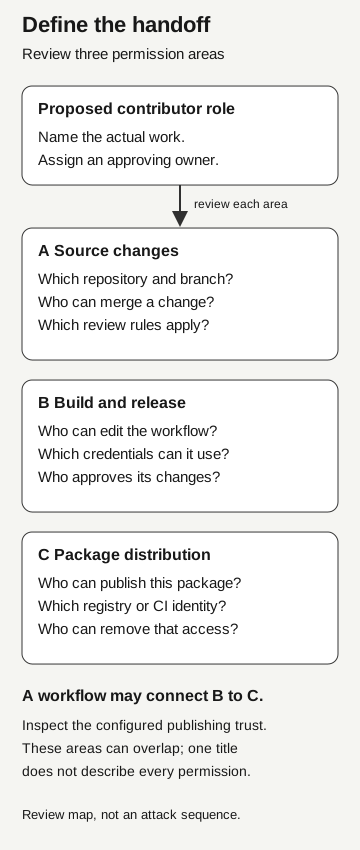
Define the handoff
- Source changes
Which repository and branch? Who can merge? Which review rules apply?
- Build and release
Who can edit the workflow? Which credentials can it use? Who approves changes?
- Package distribution
Who can publish, through which registry or CI identity? Who can remove access?
Name the work and approving owner first. A workflow may connect build and release to distribution; inspect that trust. Areas can overlap. This is a review map, not an attack sequence.
Check the registry independently
In npm’s current owner-command documentation, adding a package owner enables that user to change metadata, publish new versions, and add other owners. That is a meaningful delegation, not a way to acknowledge someone in the project credits. The command’s owner model should not be generalized to every registry or every organization-team permission arrangement. npm v12: package owners
A handoff should identify the exact package and registry account. Similar usernames across GitHub and npm are not enough to establish that two accounts belong to the same approved contributor. Confirm the account references through the project’s established governance process, then have the registry owner review the requested action.
Keep the consumer-facing package separate from any disposable test package. A successful rehearsal against a test namespace demonstrates that rehearsal, not permission to publish under the established production name. Before the first real release, the release owner should confirm the intended version, artifact, and publication route.
Automation moves the review to another place
npm trusted publishing allows an authorized CI/CD workflow to authenticate using short-lived credentials through OpenID Connect. For GitHub Actions, its configuration identifies an organization or user, repository, and workflow filename, with an optional environment. Current settings distinguish allowed publishing actions, so inspect the configured connection instead of assuming all trusted publishers can directly release a package. npm: trusted publishing
During the handoff, ask who can change or run the authorized workflow. Removing a long-lived registry token does not make edits to the release machinery harmless. The registry may correctly recognize an approved workflow while that workflow’s contents have changed.
GitHub’s Actions security guidance emphasizes restricting workflow credentials and token permissions to what is required. Review which secrets or permissions are available to the relevant jobs and under what conditions. Do not assume a collaborator can reveal every secret through a settings page; the question is what an authorized workflow can access or do. GitHub: secure use of Actions
For the access decision, record the publishing connection’s identifier and its owner, without copying credentials into the approval document. Explain how the release is initiated and which independent checkpoint remains. If nobody can explain the route from a merged change to a published package, the handoff review is unfinished.
Start with the permissions the work needs
Separate issue management from release authority. A contributor can begin with a role appropriate to triage, prepare release notes, or submit a source change for review without receiving registry ownership. Check the platform’s current role definitions before applying that arrangement.
Keep approval of release automation and publishing configuration with the responsible owners until those responsibilities are explicitly delegated. The contributor gets a clear route to more responsibility, and the reviewer gets a concrete request instead of “maintainer access” in the abstract.
Keep an urgent patch separate from standing access
A security report creates two questions: does the defect require urgent remediation, and is a new permission grant necessary to deliver the fix? If an existing release owner can publish the reviewed patch, the work can proceed while a broader handoff remains under review.
If that owner is unavailable, use the project’s documented backup or emergency process and record the exception approver. Urgency explains the deadline; it does not define the account or permission to grant. The team can refuse a permission change while the security contact continues investigating a potentially real problem.
Record who can grant and remove access
When broader access is approved, record the exact account, affected repositories or packages, business reason, approving owner, and review date. Identify which person can remove the grant and which independent review remains in place. Keep the record accessible to the backup owner, rather than solely in the departing maintainer’s private notes.
After the change, inspect the resulting permissions against the approved record. Where a behavioral check is needed, use a disposable repository or package and an agreed test plan. A screenshot of a successful invitation confirms an administrative step; it does not prove that the intended restrictions hold across every release route.
If concerns arise later, review repository membership, registry ownership, publishing connections, and other delegated access separately. Our integration containment guide explains why closing one credential path does not establish closure of another. Let the responsible incident team decide what to pause, preserve, or revoke in a live case.