Does a verification code prove a new AWS root email address is approved?
It confirms access to the proposed address within the update flow. Your organization must separately approve who should control that address and verify the account and recovery configuration.
An AWS account’s root user email address is associated with a highly privileged identity and can participate in account recovery. Before changing it, establish the exact account, the approved destination, and the people who will control the inbox. Reaching that inbox does not mean the organization approved it.
Identify which account you are changing
This guidance concerns AWS accounts using the advanced sign-up option or accounts where advanced features have been activated. AWS distinguishes standalone accounts, an organization’s management account, and its member accounts. The available update path depends on that distinction.
For standalone and management accounts, AWS documents updating the root email through the console while signed in as the root user; an IAM user or role cannot use that procedure. Eligible member accounts can instead have their root email updated centrally by an authorized principal in the management or delegated administrator account, with trusted access for Account Management enabled. The member-account route requires the appropriate permissions. AWS: update the root user email address
Do not turn that description into a universal instruction to sign in as root. Ask the cloud owner to identify the account category and approved administrative route first. The reviewer needs an account identifier from the internal inventory, rather than relying on the requester’s nickname for the project.
Central member-account updates require the organization to use all-features mode; consolidated-billing-only mode does not qualify. AWS also explains that authorized central updates can remain available when access to a member account’s original root email or administrative credentials has been lost. That resilience is valuable, and it makes central update authority worth reviewing during an account handover. AWS: member-account email updates
Receiving the code does not approve the inbox
The documented update flows send a verification code to the proposed new address. Completing verification shows that someone supplied the code sent to that inbox. Your organization still needs to approve the address. AWS: email update verification
A request could name a plausible-looking inbox while leaving its membership, forwarding, or future owner unresolved. Your approval process should settle those questions before the authorized administrator completes the change. Do not collect passwords or verification codes in the ticket or an awareness exercise.
AWS recommends a business-managed group email address dedicated to root credentials, alongside restricted access to recovery mechanisms. Its guidance also discusses separating control of email and phone recovery channels and monitoring root activity. These are practical reasons to involve both the cloud owner and the owner of the receiving mailbox. AWS: root user best practices
Record who can access the inbox and who is responsible for removing that access. “The team has the inbox” is difficult to verify when the team changes.
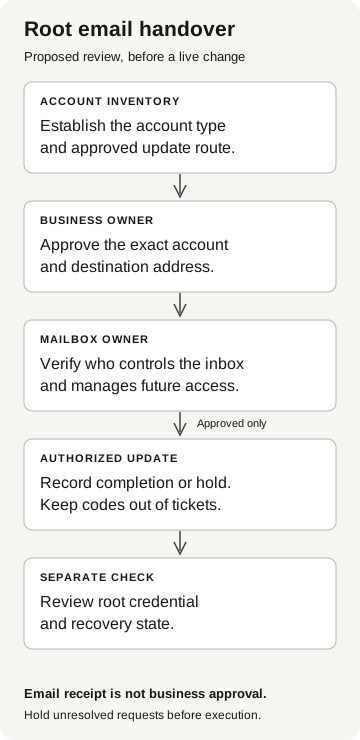
Root email handover
Proposed review before a live change
- Account inventory
Establish the account type and approved update route.
- Business owner
Approve the exact account and destination address.
- Mailbox owner
Verify who controls the inbox and future access.
Approved only
- Authorized update
Record completion or hold. Keep codes out of tickets.
- Separate check
Review root credential and recovery state.
Email receipt is not business approval. Hold unresolved requests before execution.
Approve the exact address
An employee departure explains why a handover is needed. It does not approve every proposed replacement address. Compare the account inventory, the cloud owner’s handover approval, and the destination mailbox’s membership record before making the change.
If the handover specifies an operations group inbox but the ticket names a migration mailbox controlled by an external participant, hold the change and resolve the discrepancy with the cloud owner through the established route. A deadline does not settle who should control recovery messages.
For the approved inbox, identify its membership owner, forwarding controls, and the plan for removing the departing employee’s access. Keep those details in the handover record so the next owner can manage access.
Check what recovery allows on this account
A root email change does not, by itself, demonstrate that anyone can sign in as root. Current credential state and the applicable recovery controls matter.
AWS supports centralized management that can remove member-account root credentials. In that arrangement, affected member accounts cannot sign in as root or perform root password recovery while those credentials are absent. An authorized privileged task can allow recovery when needed. This is a separate administrative decision from changing the email address. AWS: centralized root access
Record the state that the cloud administrator actually verifies. Avoid writing “root access secured” simply because the desired email appears on the account. Likewise, an unexpected address merits investigation, but it is not proof that resource access occurred.
This distinction follows the same reasoning as our recovery trust-boundary guide: receiving a message, completing a recovery step, and using an application or cloud resource are different observations.
Close the handover with a usable record
The cloud owner and mailbox owner should be able to answer these questions without asking the departed employee:
- Which account was reviewed, and which administrative route applied?
- Who approved the purpose and exact new address through an established channel?
- Who controls the destination inbox and its access or forwarding changes?
- Was the update completed, declined, or left unresolved?
- What root credential and recovery state was checked separately?
- Who owns follow-up review and incident escalation?
Preserve the approval and resulting configuration together. Identify any configuration checks still outstanding.
If the actual destination differs from the approved record, escalate to the cloud security owner and the mailbox owner. They should review the change history, relevant account activity, and recovery state under the incident process. Correcting the address does not establish what happened while it was different.