What belongs in a recovery change contract?
Record the reported problem, the exact action authorized, the verification conditions, the evidence to collect, and the next owner. A password reset, authenticator replacement, Temporary Access Pass, and device enrollment change different states and require different completion checks.
“I cannot sign in” is a symptom. It is not a complete instruction to reset a password, replace an authenticator, issue a Temporary Access Pass, or enroll a device. Those actions change different things, and the support team should know which change it is authorizing before performing it.
The caller-verification guide addresses whether a request can proceed. This comparison addresses what the ticket authorizes once verification is complete. A help-desk lead and identity engineer can use it to specify four different recovery actions without turning “restore access” into permission to change everything.
Write down five things: the problem reported, the exact change approved, the conditions required, the evidence collected, and the owner of the next decision. Use it to make recovery tickets specific enough that another agent can continue the work without guessing.
Four versions of “I cannot sign in”
Maya works for the fictional company Alder Workshop. She uses a company laptop and an authenticator for work sign-ins. Alder has a designated recovery owner, an endpoint team, and application owners. The four cases assume a Microsoft Entra deployment.
Consider four alternative versions of Maya’s support request: a forgotten password, a damaged phone, registration of a replacement passwordless method, or a replacement laptop. The support desk receives four similar descriptions of difficulty signing in, but the appropriate review question changes with each request.
“MFA” means multifactor authentication. “TAP” means Temporary Access Pass. “Enrollment” needs a named object: an authentication method, a device identity, or a management relationship. Avoid using that word without explaining which one is involved.
Each case is a separate recovery request, with its own authorization and completion checks.

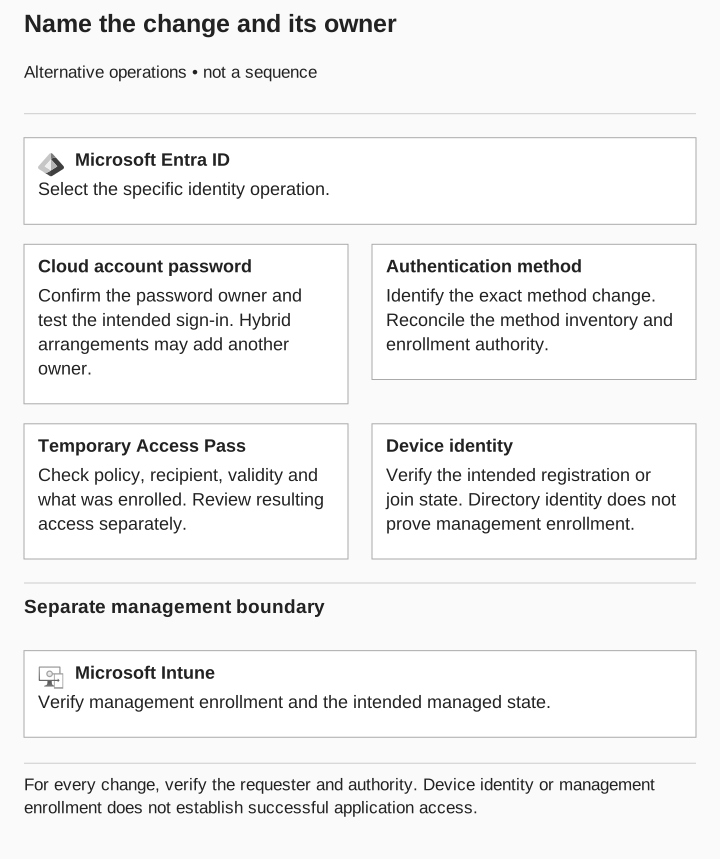
Name the change and its owner
Alternative operations, not consecutive steps
Microsoft Entra ID
- Cloud account password
Confirm the password owner and test the intended sign-in. Hybrid arrangements may add another owner.
- Authentication method
Identify the exact change; reconcile enrollment authority and method inventory.
- Temporary Access Pass
Check recipient, policy, validity and what was enrolled.
- Device identity
Verify registration or join state. This does not prove management enrollment.
Microsoft Intune
- Separate management boundary
Verify management enrollment and the intended managed state.
Verify requester and authority for every change. Test resulting application access separately.
Case one: a forgotten password
Maya reports that she cannot remember her password. The agent should first establish the account and the approved verification path, then determine whether a password reset is the intended action. The request does not, by itself, justify changing the employee’s registered authentication methods.
Microsoft’s administrative documentation distinguishes resetting a password from requiring MFA re-registration and revoking sessions. Its described password reset assigns a temporary password that the user changes at the next sign-in. Microsoft: manage user authentication options
The approved action is a password reset for Maya’s designated work account. The identity owner confirms that the agent has the required role for the account and that the normal recovery procedure applies. The agent records how Maya was verified before authorizing the action.
Now introduce a mismatch: the requester asks the agent to remove the authenticator as well because signing in “takes too long.” That is a second requested change. Have the agent identify it explicitly and route it through the appropriate decision path rather than treating it as an automatic extension of the password ticket.
Agree on a harmless check to confirm recovery worked. Maya should be able to complete the intended sign-in under the approved authentication requirements and open the agreed test resource. The identity team should also establish that unrelated methods were not changed as part of this exercise.
If the reset action succeeds but the sign-in fails, preserve both observations. Ask the identity owner what requirement remains unsatisfied. Do not repeat increasingly broad recovery actions until something works without recording why each action is justified.
What to put in the password-reset ticket
Problem: the employee cannot use the current password. Approved change: reset the password for the identified account. Required condition: completed approved identity verification. Evidence: verification reference, administrator action, and the result of the scoped recovery check. Next owner: identity support if the expected sign-in still fails.
In a tabletop review, ask a second agent whether that record authorizes removing MFA. The answer should be no. The contract names the approved change and prevents the original symptom from becoming an unlimited recovery mandate.
Case two: a replacement authenticator
In this version, Maya reports a damaged phone. She needs to replace a registered authentication method. The support team should establish which existing method is affected, what replacement is permitted, and how the legitimate employee will be connected to that replacement.
In Entra, “Require re-register MFA” is a specific administrative action. Microsoft lists phone numbers, Authenticator registrations, and software OATH tokens among the methods it removes, while hardware OATH tokens are deactivated. Do not treat that action as a generic promise to remove every credential associated with the account. Microsoft: authentication-method management
The identity owner chooses the approved replacement process. The help-desk agent records the old method’s relevant reference, the intended replacement, and the verification decision. Sensitive values belong only in the approved operational system, not in a broadly shared review.
The important boundary is who is allowed to establish the replacement. Knowing the employee’s job is insufficient grounds to authorize a new authentication method. Apply the organization’s verification criteria and exception route.
Add a realistic constraint: Maya cannot access the usual verification channel because it was on the damaged phone. This is where the alternative recovery procedure matters. Have the agent demonstrate the escalation path and identify who can approve the exception. Do not ask frontline staff to invent a stronger identity check during the call.
After the approved replacement, compare the method inventory with the intended state. Ask whether the expected method is present and whether the affected old method was handled according to the recovery plan. Then perform the authorized sign-in check. A method’s presence and its successful use answer different questions, so retain both results if both are tested.
Can the next agent tell which method changed?
Use a fictional ticket that says only “MFA reset done.” Ask the reviewer to determine what changed. If the record cannot answer, the exercise has identified a documentation defect even before any sign-in is attempted.
The improved entry should name the exact operation and its result. The remediation owner can then update the ticket template so that the next recovery records the intended method change instead of a broad label. Retest the template by giving it to an agent who did not design it and asking them to explain the permitted next step.
Case three: a Temporary Access Pass
In this version, Maya needs an approved way to register a replacement passwordless method. In Microsoft Entra, a TAP is a time-limited passcode that can support onboarding and recovery. Its use depends on the relevant authentication-method policy and user scope; it can be configured for one-time or multiple use. Microsoft: Temporary Access Pass
Treat issuance and use as distinct review points. The support team needs to establish who may issue the pass for this account, why it is needed, how it reaches the verified employee, and what recovery action it is intended to support. The employee’s original request should not leave all four questions implicit.
The identity owner approves a pass for a specific registration task. The help desk confirms the delivery procedure without copying the pass into the exercise report. The record describes the permitted recipient, validity decision, intended use, and responsible administrator.
Introduce a variation: the registration does not finish within the expected recovery window. Have the agent explain the approved way to resume the process. The useful behavior is a documented decision by the appropriate owner, not repeatedly issuing new passes without checking the reason the prior attempt failed.
A second variation concerns completion. The employee says the pass has expired, so the ticket can be closed. Ask what was registered during its use. The pass’s lifetime and the resulting method’s intended lifecycle are separate review questions. Microsoft documents a maximum lifetime cap for tokens issued during a TAP sign-in, set from the TAP expiration at issuance. It also distinguishes established sessions, whose behavior depends on session controls. Expiration alone does not establish that those sessions ended. Microsoft: TAP expiration
For the acceptance check, reconcile the new method with the authorized registration, verify its intended use through the agreed test, and handle the pass according to the recovery procedure. Do not use expiration alone as the evidence that every related access question is resolved.
For the lifecycle details, use the Temporary Access Pass review. This ticket needs the intended registration, its recipient, and the evidence that the replacement method matches that authorization.
Case four: a replacement laptop
In this version, Maya receives a replacement laptop. The support desk needs to determine whether the work concerns device identity, management enrollment, authentication-method registration, or an application problem. A new machine may require more than one approved action, but the ticket should identify them separately.
Entra registration and enrollment in device management are different relationships. Microsoft describes registered-device scenarios that can use personal devices and separately discusses enrollment in management services. Entra join describes an organizational identity relationship, including organizational account sign-in to the device. Microsoft: registered devices and joined devices
For the laptop replacement, have the endpoint owner specify the approved device onboarding procedure. The identity owner identifies the expected directory relationship. The application owner defines the harmless operation Maya should be able to complete afterward. Keep those responsibilities visible even if one small team performs all three jobs.
Now add a mismatch: the new device appears in the directory, but the endpoint owner cannot find the corresponding management enrollment. You have found the device identity, but still need to check management enrollment. Keep that work open.
If the organization uses a compliance requirement for the selected application, ask which assessment and access policy should apply. Intune compliance results can inform Conditional Access decisions when the relevant access control is configured. Device presence alone does not establish that this requirement was evaluated for the operation under review. Microsoft: compliance and Conditional Access
The test should therefore include the required device context and the selected resource. Record the intended allowed case and a separately authorized prohibited case if the assessment is evaluating the restriction. A generic successful sign-in should not replace the operation the application owner agreed to test.
If device onboarding remains incomplete, record the outstanding requirement and receiving endpoint team before closing the help-desk task. The device-state guide explains how to distinguish directory identity, management, and compliance evidence.
What each recovery ticket needs to say
| Reported problem | Change to identify | Decision that must remain separate | Acceptance evidence |
|---|---|---|---|
Forgotten password |
Password reset |
Any change to other methods |
Approved reset and scoped sign-in result |
Lost authenticator |
Specific method replacement |
Ownership and authorization of replacement |
Intended inventory and approved use |
Registration recovery |
TAP issuance and intended use |
Resulting method and session lifecycle |
Authorized registration and follow-up check |
Replacement laptop |
Device identity and management actions |
Compliance and application access |
Matched records and named operation |
Apply your organization’s services, roles, and recovery rules to these questions. If a row cannot be completed without broad phrases such as “restore access,” have the process owner identify the missing decision before using the template operationally.
A useful review meeting can take one example from each row and ask the same question: what additional action would require new authorization? That exercise reveals where support staff may be treating several distinct permissions as a single repair task.
Reject an overbroad ticket before it reaches the next queue
Consider this fictional ticket: “Verified Maya. Restore access on new laptop. MFA reset done.” A second agent cannot tell which method was removed, whether device enrollment was authorized, or what remains unfinished.
A usable replacement is: “Requester verified using the approved recovery route; evidence reference held in the support record. Approved action: replace the damaged phone’s Authenticator registration. New laptop onboarding is a separate endpoint request. Identity support must confirm the expected method inventory and the agreed sign-in check before this recovery task closes.”
Keep the actual account and method identifiers in the restricted operational record. The handoff note gives the receiving team a specific change to confirm without reproducing recovery secrets.
Now ask the reviewer to find the authority for a password reset or a TAP. Neither is included. If either becomes necessary, add the reason and the required approval before performing it. This is the difference the ticket template should make in daily support work.
Check the revised ticket template
Give a completed example to an agent who did not design the template. Ask them to name the approved change, one action it does not authorize, the completion evidence, and the next owner if recovery fails. If they need to infer any of those answers, revise the relevant field.
For a cross-team exercise, the account-recovery tabletop supplies an agenda and incident injects. In daily support work, the immediate goal is a ticket another agent can act on without guessing.