Does a directory device record prove that a device is compliant?
No. Device identity, management enrollment, compliance assessment, and application access require separate evidence. Check the applicable policy and the resource operation before describing a device as trusted.
Before calling a device “trusted,” check its directory relationship, management enrollment, compliance assessment, and the access decision being investigated.
Connect each record to the device and access attempt under review. These checks also apply when recovery creates a new device association or containment requires removing one.
Start with four separate questions
Microsoft Entra supports registered, joined, and hybrid joined device identities. These describe the device’s relationship with the identity system. They are not three successive security grades. Microsoft: device identity
Management enrollment answers which system manages the endpoint. Device compliance answers how its reported state compares with applicable requirements. In an Intune integration, compliance status can inform an Entra Conditional Access policy that requires a compliant device. That policy must apply to the access being evaluated. Microsoft: Intune compliance and Conditional Access

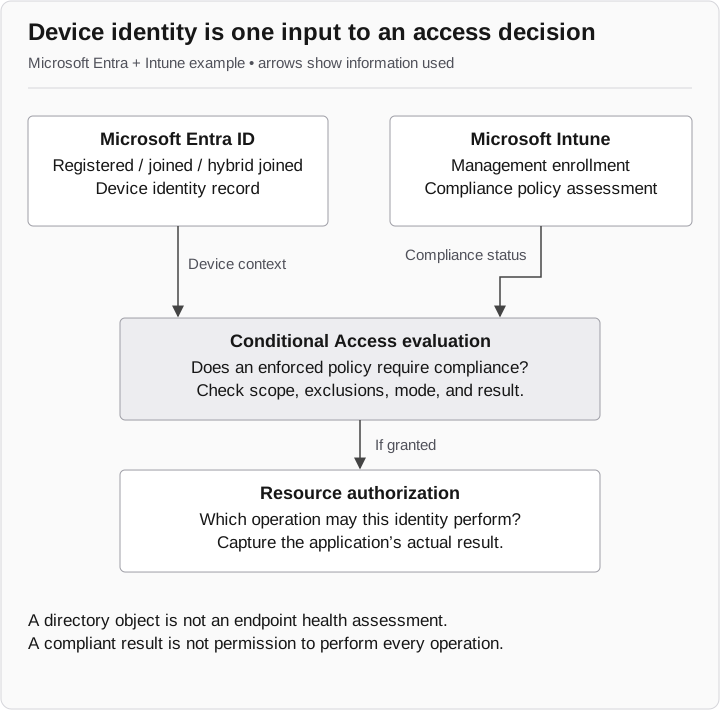
From device state to access
- Microsoft Entra ID
Device identity: registered, joined, or hybrid joined.
- Microsoft Intune
Management enrollment and compliance assessment are separate from directory identity.
- Conditional Access
Device context and compliance status inform applicable policy. Does an enforced policy require compliance? Check its scope and result.
- Resource authorization
Only if access is granted, the resource checks permission for the operation. Capture the actual result.
Registration alone does not prove compliance. Compliance is not permission for every operation.
Which records support each device status?
| Dimension | Record to inspect | What it does not establish by itself |
|---|---|---|
Directory identity |
Device identifier and registration or join relationship |
Physical control, management, or acceptable configuration |
Management |
Matched management enrollment and last contact |
Compliance with every relevant requirement |
Compliance |
Assigned policy, evaluated settings, result, and assessment time |
Enforcement for the application being investigated |
Access |
Applicable policy mode and result, plus the application operation |
Permission to perform other operations |
Use the documented mapping between records. Device names can be duplicated or changed; a friendly name is not a reliable join key. If the sign-in record does not establish the relevant device, record that mapping as unresolved before drawing conclusions from a separate compliant device with a similar name.
Check whether compliance was enforced
A compliance result and a successful protected request do not establish that a compliance requirement was enforced. Determine which policy applied at the request time, its mode, and its result. A report-only result describes evaluation; it does not establish a block. Microsoft: report-only mode
For an authorized validation, compare known compliant and noncompliant device conditions against the same test application and identity. Retain the device mapping and policy evaluation with each resource outcome. A denial is useful to this test only if its reason corresponds to the intended control.
Compliant with which policy, and when?
Check the policy assignment and assessment time, not just the headline status. Intune has a tenant setting for how to treat devices with no compliance policy assigned. A compliant label therefore needs its configuration context. Compliance also depends on reporting and evaluation timing. Microsoft: compliance policy settings
A device can meet configured checks without that being proof that it is free of compromise. Describe the controls assessed and the observation time. Avoid replacing that detail with “healthy” or “trusted.”
Bring the distinction into help-desk reviews
When recovery creates or exposes a device association, ask the identity and endpoint teams to resolve the four rows above. A directory association should not silently close an endpoint investigation.
Device context is one input to access. The next article examines a different source of authority: what an application receives when a user approves its permissions. The two paths meet in containment, where both device associations and app grants need review.