How do you verify what access remains after account recovery?
Review each relevant session, token path, authentication method, device, and application grant. Record the response action and a scoped verification result for each; keep untested access and unresolved ownership visible.
The unexpected authenticator has been removed, but a browser session still opens a protected document. Removing the authenticator did not settle whether that session still had access. Record both the completed removal and the document request that still worked.
Build a before-and-after record of the affected tokens and sessions, devices, and application grants. Each may require a different owner and verification step.
Five places to check for remaining access

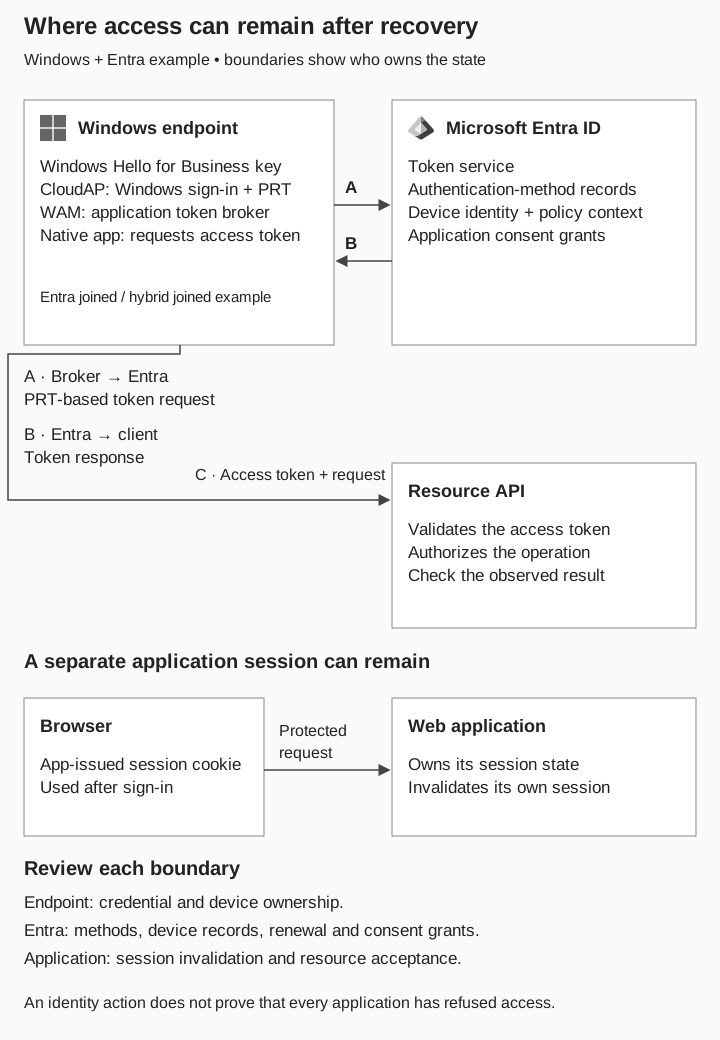
Where access can remain
Windows and Entra example; not a response order
Broker and native application
 Windows endpoint
CloudAP manages the PRT on an Entra joined or hybrid joined device. WAM brokers application token requests. Windows Hello credentials have their own state.
Broker token request → Entra
 Microsoft Entra ID
Evaluates the request. Account, method, device, and app-grant records have distinct roles.
Token response → Broker → Native app
- Native app → Resource API
The app presents an access token, not the PRT. The API validates it and authorizes the operation. Check actual acceptance after response actions.
Separate browser-session path
- Browser → Web application
After sign-in, the browser may send an app-issued session cookie. The application manages that session.
Fresh protected request
- Application result
Check whether the session still permits the operation. Entra revocation alone does not invalidate an app-issued session.
Independent containment checks
- Endpoint
Credential and device ownership.
- Entra
Methods, device identity, renewal, and consent grants.
- Application
Session invalidation and resource acceptance.
Each boundary owns different state. Record the result of each relevant check.
In this Entra joined or hybrid joined Windows example, CloudAP handles Windows sign-in and manages the Primary Refresh Token (PRT). Web Account Manager (WAM) is the broker applications can use to obtain tokens. The native app presents an access token to its resource API, not the PRT. The diagram shows these component boundaries without reproducing the full sign-in protocol. Microsoft: PRT components and token acquisition
The browser-session path is shown separately because the application can own a session that outlasts an identity-side action. Application sessions, tokens, methods, devices and grants require distinct checks; the figure is not a prescribed incident-response order. In a real incident, the incident lead decides when urgent containment takes priority over completing the evidence review.
Review application sessions with the application owner
An application can maintain a session after the identity-provider interaction ends. Entra cannot directly revoke a session token issued by that application. Ask which application-side action invalidates the reviewed session and what protected request will demonstrate the effect. Microsoft: emergency access revocation
Use a fresh server-backed request. Previously loaded content or cached browser data does not establish ongoing server access. Conversely, a network failure is not evidence that authorization was correctly refused. Capture the application’s response and reason where available.
Check token renewal and resource acceptance
Separate the ability to obtain new tokens from acceptance of an already-issued access token. Revoking renewal authority does not guarantee immediate rejection of every existing token. Supported resource and client behavior matters. Microsoft: when access is revoked
Continuous Access Evaluation can respond to specified critical events before normal token expiry in supported combinations. Check coverage and propagation behavior for the application under review; it is not a universal instant-revocation switch. Microsoft: Continuous Access Evaluation
Retain the action reference, affected subject, and observation time. Use restricted evidence references instead of copying live token values into the handover document. If renewal was not tested, say so even when the administrative revocation succeeded.
Check each authentication method
Compare the expected method inventory with what remains. For a disputed recovery, identify which method was added or changed and who should control it. An inventory collected afterward does not establish when every method was created.
Password reset, MFA re-registration, method removal, and session revocation are distinct administrative actions. Verify the action actually performed and its target. Microsoft: manage user authentication options
Review device records alongside enrollment evidence
Match the relevant device identity to the enrollment and endpoint record. Use the four device-state dimensions to resolve ownership and access context. Disabling a directory device is not a wipe of the physical endpoint and does not recover data already obtained.
For an unexpected device association, coordinate identity and endpoint actions. Verify the intended restriction for the affected access path rather than treating the object change as proof of every downstream effect.
Review application grants independently of the password
Identify the actual application and grant, not just a display name. For illicit consent, review current permissions and prior activity, and follow the approved remediation procedure. Removing authority and determining what was accessed are separate tasks. Microsoft: illicit consent investigation
If a behavioral retest would disturb evidence or create unacceptable risk, record the administrative evidence used, the unperformed test, and who accepted that limitation. Do not fill an untested result with the expected outcome.
Assign each check and record its result
Use one row per relevant object or application. Specify the account, resource, and time window once at the top; keep secrets in the restricted incident record.
| Object | Before / expected outcome | Action reference | After / required observation |
|---|---|---|---|
App session |
Named protected request succeeds before response |
Application invalidation action |
Fresh request refused for the intended reason |
Tokens |
Renewal and resource use tracked separately |
Identity response action |
Renewal result and resource response at recorded times |
Method |
Unexpected method identified |
Approved method change |
Expected inventory; method-use check if authorized |
Device |
Matched identity and endpoint association |
Relevant identity / endpoint action |
Intended access restriction observed |
App grant |
Unauthorized scope identified |
Grant remediation action |
Current authority reviewed; activity investigation tracked |
Add the responsible person, result, limitation, and next checkpoint to each row. These are verification prompts, not instructions to perform every action in every incident. Select the actions through the approved response process.
Run a short handover exercise
The following case is fictional. Learner B uses Lesson Room, and the harmless test operation is opening Test Lesson Nine. All times are UTC; no other applications are in scope.
| Time / object | Supplied case record | Handover interpretation |
|---|---|---|
09:45 · Method |
Disputed method removed; expected replacement remains |
Method action completed; verify expected controller |
09:50 · Tokens |
Refresh-token revocation action confirmed; renewal not tested |
Administrative action confirmed; renewal outcome untested |
09:55 · Session |
Fresh request still returns Test Lesson Nine |
Reviewed session still permits this operation |
10:00 · Device |
New association has no replacement approval record |
Ownership unresolved; endpoint review pending |
10:00 · Grant |
Current grant matches approved scope; prior activity review incomplete |
Current authority reviewed; historical activity open |
The immediate handover concern is the successful 09:55 request. Assign the application owner to identify why that session remains accepted and define the next response action. The case does not establish the mechanism from the success alone.
Now add a second observation: after an approved application-session action, a fresh Test Lesson Nine request is denied at 10:12, and the application record confirms the intended refusal. Close that session check for the recorded context. The unresolved device association, unperformed renewal test, and historical app activity stay open.
This exercise is the technical follow-up to the tabletop’s incomplete-closure inject. The tabletop produces the task; this worksheet records its actual result.
Say what is closed and what remains
A useful status update is: “The reviewed Lesson Room session no longer permitted Test Lesson Nine at 10:12 after the application action. Device ownership and prior application activity remain under review; token renewal was not tested.”
That statement tells the next shift what is closed, what remains, and which observation would change the assessment.
Editable incident and handover tables
The CSV files reproduce the tables above for editing. Fictional case entries are examples to replace, not collected evidence.