

Does signing out end every token and session?
Not necessarily. The application session, the identity provider’s sign-in session, and issued tokens have separate lifecycles. To verify sign-out, check a fresh protected request and whether a new sign-in occurred before it succeeded.
An access token lets an application request an operation from a protected service. A refresh token lets it ask the identity provider for new tokens. An application session cookie connects browser requests to a website session. Each credential is accepted by a different system in the example below. Microsoft: access tokens, refresh tokens, OWASP: session management
Follow one sign-in
Imagine a company project portal that signs you in with Microsoft Entra ID and retrieves project data from a separate API. An API is an interface software uses to request data or actions from another service.
In this illustrative example, the portal runs on a server. It keeps its OAuth tokens there and gives your browser a cookie containing a random session identifier. The portal stores the session details on its server. This is one architecture; browser applications that hold tokens themselves work differently.
Initial sign-in involves redirects between the browser, portal, and Entra ID. The portal uses OpenID Connect with the authorization-code flow: it exchanges a code for tokens and validates the sign-in result before creating the application session. On Microsoft’s v2 endpoint, requesting offline_access is required to receive a refresh token. Microsoft: authorization-code flow, OpenID Connect
The diagram starts after that sign-in. The portal session is valid, and the portal already holds a refresh token. It shows a later page request that needs a new access token; with a usable cached access token, steps 2 and 3 are skipped.
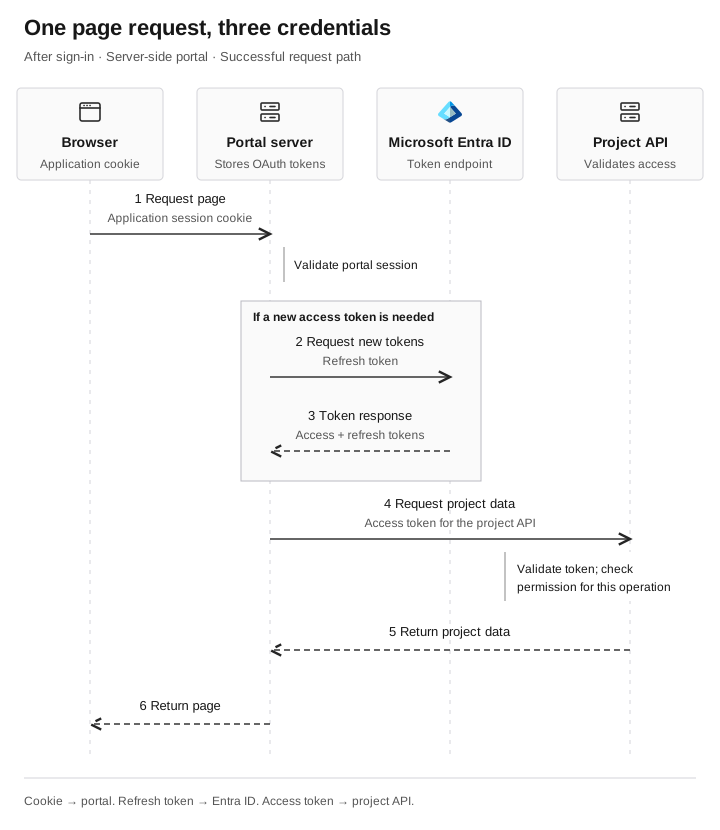
One page request, three credentials
- Browser → Portal serverRequest the page with the session cookie
The portal validates the existing application session.
- Portal server → Entra IDRequest tokens if renewal is needed
The portal sends its refresh token. Skip this exchange when a usable access token is already cached.
- Entra ID → Portal serverReturn tokens on success
The portal receives an access token and a replacement refresh token. It keeps them on the server.
- Portal server → Project APIRequest project data with the access token
The API validates the token and checks permission for this operation.
- Project API → Portal serverReturn the project data
The illustrated request is permitted. A denied request has a different result.
- Portal server → BrowserReturn the page
The response completes the original browser request.
Cookie to portal. Refresh token to Entra ID. Access token to project API.
The access token goes to the API
When the portal requests project data, it sends an access token to the project API. The API validates the token and checks whether the requested operation is permitted.
The intended resource is called the token’s audience. A token for one API does not grant access to every service. The portal, acting as the OAuth client, treats the access token as an opaque value. The receiving API is responsible for validation. Microsoft: token ownership and validation
Displaying the project list establishes that this particular read request worked. It does not establish permission to edit every project or read another team’s files.
The refresh token goes to the identity provider
When it needs a new access token, the portal can send its refresh token to Entra ID’s token endpoint. A successful response supplies a new access token and a replacement refresh token. The application should securely replace the old refresh token; Microsoft does not automatically revoke it merely because it was used. Microsoft: refresh-token handling
Refresh tokens can expire or be revoked. If renewal fails, the portal may need to start another sign-in. The refresh token stays on the server in this example. It is not sent to the project API or handed to the browser to render the page.
The session cookie goes to the website
The browser sends the portal’s cookie on matching requests. The portal looks up the session identifier and checks whether the session is still valid. It can then handle the request, including any API call it needs to make.
Here, “session cookie” means a cookie used for an authenticated application session. It does not promise that closing the browser ends that session. Cookie persistence and the application’s session timeout are separate settings. OWASP: cookies and session expiration
This is why reloading a page and refreshing an access token are different operations. The browser can still have a valid portal session while the portal needs a new token for the API.
Compare the three
| Credential | Sent by | Accepted by | What it requests |
|---|---|---|---|
Access token | Portal server | Project API | An authorized API operation |
Refresh token | Portal server | Entra ID | New tokens |
Application session cookie | Browser | Portal server | Continued use of the website session |
The browser’s cookie does not travel to the project API in this architecture. The portal makes that call with an access token. Observing only browser requests will not reveal every server-side token exchange.
What did signing out actually end?
The portal’s application session and Entra’s sign-in session are separate. For this server-stored session, a proper portal logout invalidates the server session and clears its cookie. Ending the identity provider’s session also requires the application’s supported sign-out integration. OWASP: manual session expiration, Microsoft: send a sign-out request
Entra cannot directly invalidate an application-issued session token. Revoking refresh tokens stops their future use, but it does not by itself end every application session or invalidate every previously issued access token. Access tokens can remain usable until expiry unless the resource enforces an earlier change. Microsoft: access revocation
Continuous Access Evaluation can provide earlier enforcement for supported clients, resources, and events. Do not assume an arbitrary project API supports it. Confirm the application’s implementation before treating a revocation action as immediate loss of access. Microsoft: Continuous Access Evaluation
Check a fresh request, not the page on screen
Use an authorized test account and a harmless protected operation to check logout. First confirm that the operation works, then perform the documented logout or revocation action and repeat it. A page left on screen can be cached content; it does not establish continued access.
If the protected request succeeds, inspect the intervening redirects and application logs. A new Entra sign-in followed by a new portal session means access was restored through authentication. Acceptance of the same server session points the application owner toward session invalidation. Browser traffic alone may not distinguish those paths, and HTTP 200 can describe either protected data or a login page.
Keep the action, timestamp, protected response, and session correlation together without recording raw cookies or tokens. The application owner can investigate session invalidation and cached-token handling, the identity team can verify what the Entra action revokes, and the API owner can check token enforcement.
Where PRTs fit
The preceding article on Primary Refresh Tokens explains how a supported Microsoft broker obtains tokens for single sign-on. That broker can help with an authentication experience, but its PRT is not the portal’s session cookie. The server-side flow illustrated here does not require the portal to hold a PRT. Microsoft: PRT overview
A supported broker can also help establish a new sign-in after logout. Microsoft documents a case where selecting the connected account allows a valid PRT to sign the user in without a fresh password. The absence of a password prompt alone therefore does not prove the old portal session survived. Microsoft: sign-out behavior

