

Does a Primary Refresh Token grant access to every application?
No. A supported broker uses a PRT to obtain tokens for single sign-on. The application presents an access token to its intended service, which validates the token and checks permission for the requested action. Signing in and reading a restricted file are different outcomes.
A Primary Refresh Token, or PRT, is a credential issued by Microsoft Entra ID to a supported authentication broker. The broker uses it to request tokens on the user’s behalf. Microsoft’s PRT overview
Signing in once across work apps
Single sign-on, usually shortened to SSO, lets you open work applications without typing your password for each one. In a supported Windows configuration, a PRT helps make that experience possible. A component called the Web Account Manager, or WAM, acts as a token broker: applications can ask it to obtain the tokens they need. Microsoft’s Windows PRT explanation
Three tokens with different jobs
Each token has a different job in the sign-in and access process.
A supported broker uses it to obtain tokens for SSO across applications.
Exchanged with the identity provider for new access tokens, subject to permissions and policy.
Presented to its intended API, which validates the token and checks permission for the requested action.
Microsoft describes ordinary refresh tokens as bound to a combination of user and client. They are not a universal credential that any application can freely use. An access token, meanwhile, is intended for a particular resource. That resource validates it and applies the relevant authorization checks. Microsoft’s refresh-token documentation, access-token documentation
For each request, identify the token, the component sending it and the intended service. The token and session-cookie walkthrough follows those roles through a web application’s page request.
Where the PRT fits
On Entra joined and hybrid joined Windows devices, the Cloud Authentication Provider (CloudAP) obtains the PRT during supported Windows sign-in. WAM provides the application-facing token-broker interface. When an application needs one, the broker can use the PRT in the request to Entra ID. This explanation leaves out caching and platform-specific details to focus on the participants. The PRT is opaque: it is not something you decode to inspect a readable list of permissions. Microsoft’s PRT documentation
The application then uses its access token for the intended service. Successful authentication does not establish permission to every item that service holds. Microsoft’s access-token documentation
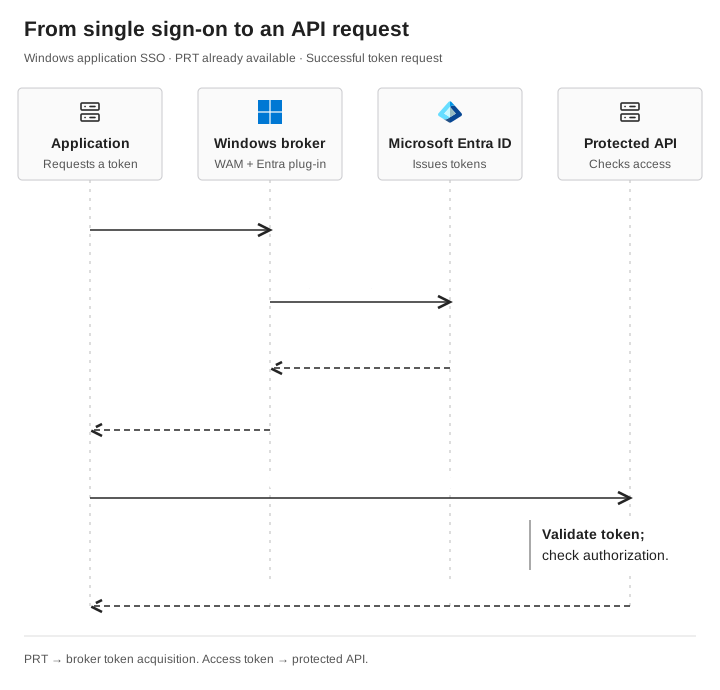
From sign-in to an API request
 Application
 Windows broker · WAM + Entra plug-in
 Microsoft Entra ID
- Protected API
- Application → Windows brokerAsk for a token
The application requests a token for its intended service.
- Windows broker → Entra IDRequest tokens using the PRT
The broker uses the existing PRT in a protected token request.
- Entra ID → Windows brokerReturn tokens if permitted
Entra evaluates the request and returns a token response on success.
- Windows broker → ApplicationReturn the access token
The application receives the access token for the requested service.
- Application → Protected APIRequest the operation
The application presents the access token with its API request.
- Protected API → ApplicationReturn the actual result
The service validates the token and checks authorization. Record whether the requested operation was allowed or denied.
The PRT supports token acquisition. The access token goes to the API.
For example, an employee can sign in to a team workspace and still be denied access to a restricted finance folder. Signing in does not add the missing folder permission.
When troubleshooting, write down both observations. “Signed in successfully” and “could read the finance folder” answer different questions.
Why security teams care
SSO makes repeated sign-ins less disruptive. It also makes the credentials and components supporting that experience important to investigate during an identity incident.
Dirk-jan Mollema’s research describes how specific authentication and device-registration flows can lead to PRT acquisition and, under additional conditions, enrollment of Windows Hello credentials. These are conditional sequences with prerequisites, not evidence that every phishing interaction produces a PRT or unrestricted access. Dirk-jan’s PRT research
Identify the authentication mechanism before attributing access to a PRT.
Check PRT status with dsregcmd
On an authorized Microsoft Entra joined or hybrid joined Windows device, run dsregcmd /status in the relevant user’s context. In its SSO State section, AzureAdPrt : YES indicates that a PRT is present for the logged-in user. Microsoft says to ignore this section for devices that are only Entra registered. Microsoft’s dsregcmd reference
Treat that as a status observation. It does not prove an attacker used the PRT, establish access to a particular application, or explain why a folder request failed. Record the application’s actual result separately. Avoid sharing the full diagnostic output publicly because it can contain identifying device and tenant information.
When investigating access, record three things:
-
Which component is obtaining the token?
-
Which resource is the access token intended for?
-
What evidence shows the requested action was allowed or denied?
Related reading: device-code phishing and account recovery.
