

Which client did the employee authorize?
The client that started the device-code request. The employee enters a user code that links their sign-in to that client’s pending request. If authorization succeeds, the client receives tokens for the resulting access.
The lure points to a real sign-in page
Microsoft’s Storm-2372 investigation described meeting invitations and messaging lures that led victims into device-code authentication. The employee authenticated with Microsoft, while the attacker had initiated the device-code request and received the resulting tokens. The website’s authenticity did not establish that the employee intended to authorize that client. Microsoft investigation
Who signs in, and who receives the tokens?
Device authorization separates the client, the software requesting access, from the browser where the user signs in. It was designed for devices with limited input, such as a television. A user can authorize that device from another computer or phone. Device-code phishing abuses this separation by persuading the user to authorize a client the attacker controls. OAuth device authorization specification
Two codes connect the exchange:
user_codeis the short code the employee enters on the verification page. It identifies the pending request they are authorizing.device_codestays with the requesting client. The client uses it to poll the token endpoint while the employee signs in.
If authorization succeeds, the polling client receives the tokens. The attacker does not have to extract them from the employee’s browser. Declining the request or allowing it to expire ends the exchange without issuing tokens. Microsoft protocol documentation
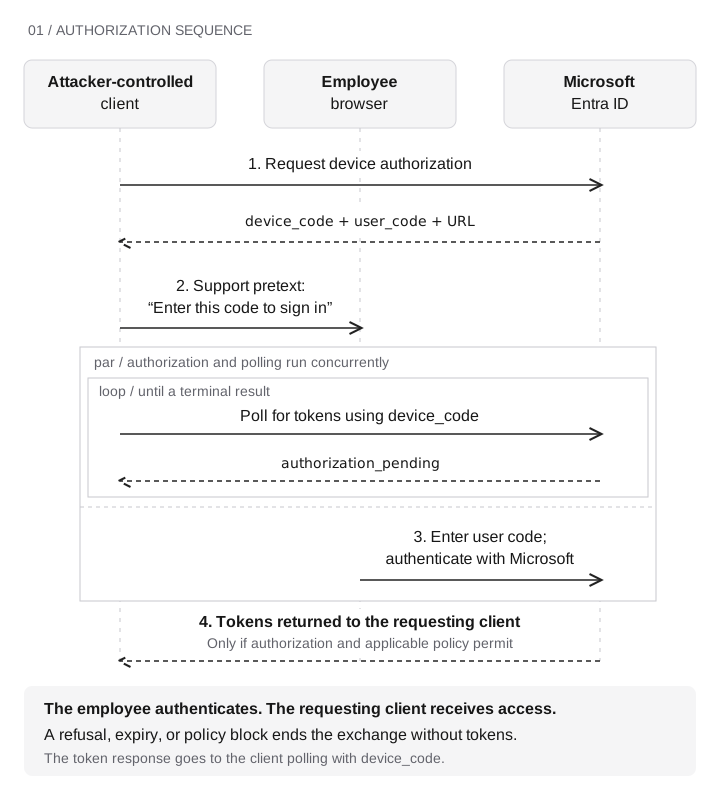
- Client → Microsoft Entra
The attacker-controlled client requests device authorization. Entra returns a device code, user code, and verification URL.
- Client → Employee
A support pretext asks the employee to enter the user code and sign in.
Authorization and polling run concurrently
- Employee browser → Microsoft
The employee enters the user code and authenticates.
- Client ↔ Entra
The client polls with the device code. Authorization pending causes continued polling until a terminal result.
- Entra → Polling client
Only if authorization and applicable policy permit, a poll receives tokens. Refusal, expiry, or a policy block ends the exchange without tokens.
The employee authenticates; the token response goes to the requesting client, not to the employee’s browser.
The employee may complete the authentication steps Microsoft requires. That establishes who signed in; it does not establish that the support request was genuine. The human check is whether the employee initiated the request, recognizes the application asking for access, and has independently verified the caller.
What the tokens can do
An access token is presented to its intended resource server, such as Microsoft Graph. The resource checks whether the token authorizes the requested operation. Successful token issuance alone does not establish that mail was read or that a directory was enumerated. Retain the result of the resource operation before reporting either outcome. Microsoft access-token documentation
A refresh token lets the client request further access tokens within the permissions and conditions supported by that flow. It is not a blanket grant to every resource. In Microsoft’s v2 device-code flow, requesting offline_access is a condition for receiving a refresh token. Device-code token response
A Primary Refresh Token (PRT) supports single sign-on and subsequent token requests through an authentication broker, a component that handles sign-in for applications. It can carry user and device context into those requests. It is not an access token to present directly to Microsoft Graph. Microsoft PRT documentation
For the normal Windows sign-in path, follow how the broker uses a PRT. The token and session-cookie walkthrough shows how the credentials differ in a web application.
When device registration enters the chain
In its February 14, 2025 update, Microsoft reported that Storm-2372 used the Microsoft Authentication Broker client ID in the device-code flow. The resulting refresh token let the actor request an access token for Device Registration Service and register an attacker-controlled device. The actor then used the refresh token and new device identity to obtain a PRT. Microsoft observed email collection in this campaign. Storm-2372 broker update
Dirk-jan Mollema’s research explains the broker and device-registration mechanics. This is a documented extension of the attack, not a capability shared by every refresh token or proof that the same path is available in a given tenant today. Original broker research
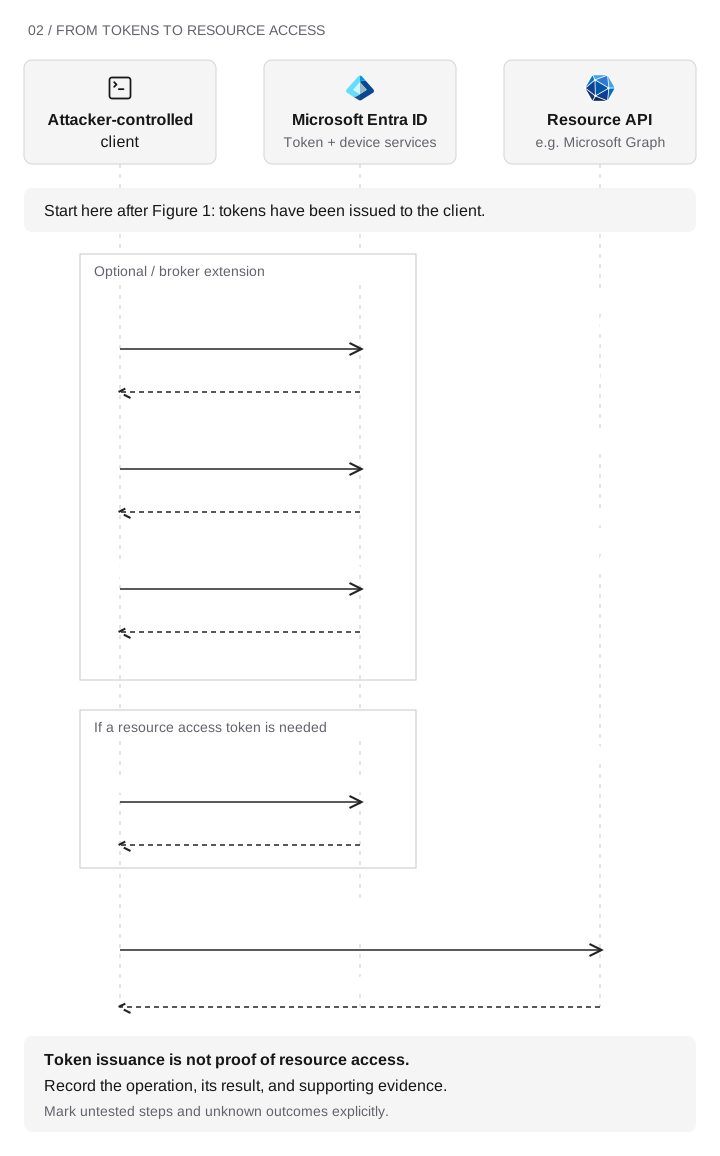
Starts after tokens have been issued to the client.
Optional broker extension
- Client → Entra device services
Use a broker refresh token to request a Device Registration Service (DRS) access token.
If a DRS token is issued
- Register the actor’s device
Use the DRS token; retain the resulting device identity if registration succeeds.
With broker refresh token and device identity
- Request a PRT
Entra may issue a Primary Refresh Token. This documented Storm-2372 path is not available to every client or refresh token.
Resource request
- Request a resource token if needed
Use a supported refresh-token or PRT path. Entra returns an access token if policy permits. Skip this step when a suitable token is already held.
- Client → Resource API
Present the access token and request an operation within granted permissions.
- Resource → Client
Returns an allowed or denied result. Retain the operation and supporting evidence.
Registration does not establish management, compliance, or ownership. Token issuance does not prove resource access. Mark untested steps and unknown results explicitly.
Record token issuance, device registration, and resource access separately. The direct access-token route may work without a new device registration. Conversely, a new device object does not prove that the actor accessed an application or compromised the employee’s endpoint.
A device review should distinguish these states:
| State | What to establish |
|---|---|
Device identity and relationship |
Which device object was created? Is it registered, joined, or hybrid joined? Record the actual relationship. |
Management |
Is the endpoint enrolled in the intended management service? |
Compliance |
Which compliance requirements were evaluated, and what was the result? |
Ownership |
Does the device match an approved asset in inventory? |
Registration alone does not establish management, compliance, or ownership. Microsoft IR has observed attacker-controlled devices registered in victim tenants and describes how misconfiguration can let them become compliant. Microsoft IR guidance
Where Conditional Access can stop the flow
Microsoft now provides an authentication-flows condition for restricting device-code flow. Inspect the policy’s users, target resources, exclusions, and enforcement state. A report-only result describes what the policy would do; it does not block the request. Policy configuration
Entra’s protocol tracking preserves the session’s device-code origin across refreshes. A later request can therefore be blocked by an authentication-flows policy even if that request uses another flow. Check Authentication protocol, Original transfer method, and the Conditional Access result together. Authentication-flows policies targeting all resources also apply to Device Registration Service. Protocol tracking and registration-service enforcement
A PRT is a separate case: Microsoft states that Conditional Access is not evaluated at PRT issuance. Obtaining one does not establish that a subsequent resource-token request will pass policy. PRT issuance
Evidence to collect at each stage
Before testing, confirm that sign-in, directory-audit, and resource logs are available for the test window. Record the test user, client/application, target resource, and timestamps so events can be correlated. The call transcript establishes the employee’s actions; it cannot establish the cloud outcome.
| Stage | Evidence to retain | What it establishes |
|---|---|---|
Support request |
Interaction record and independently obtained verification channel |
Whether the employee verified, refused, reported, or proceeded |
Authorization and token requests |
Sign-in result, client, resource, authentication protocol, original transfer method, and policy results; sanitized test-client outcome where available |
Which request succeeded or failed, and which policy applied |
Device registration |
Directory audit event, initiating identity, resulting device ID and relationship |
Whether a new device identity was created |
PRT branch |
Sanitized test-client evidence of the PRT request and result |
Whether this branch was demonstrated; a device object alone is insufficient |
Resource access |
Result of the approved test operation and corresponding resource activity where logged |
Whether that operation was allowed or denied |
Detection and response |
Expected detection, alert or case reference, timestamps, and analyst action |
Whether the observed activity produced the expected alert and response |
An IP address or nearby timestamp can help correlate records, but neither alone proves they belong to the same attempt. Keep raw tokens out of reports. Retain event identifiers, policy decisions, and sanitized request outcomes instead.
Report how far the attempt got
Example findings:
- Human verification stopped the attempt: the employee called the known help-desk number, confirmed that the request was false, and refused to enter the code.
- Policy blocked the request: the employee proceeded, but the enforced authentication-flows policy denied the token request.
- Access succeeded without a matching alert: the approved resource operation succeeded, but the expected alert did not appear in the agreed observation window. Investigate collection and detection separately.
Mark each untested branch explicitly. When evidence is missing, record Unknown rather than assuming an attack failed. Tie remediation to the observed failure: the verification procedure, the policy or exception, or the missing telemetry or detection. Retest the same operation after the change.
Download the Device Authorization Review Worksheet (CSV) to record stage outcomes, evidence references, owners, and retest dates. Agree on test identities, resources, collection, and cleanup before the exercise. Validate downstream mechanics in an isolated environment before expanding the scope.

