What should a consent-phishing review establish?
Identify the application, permission type, granted authority, affected scope, and observed activity. A permission request, an accepted grant, and a completed resource operation support different conclusions.
A caller asks an employee to “repair calendar synchronization” by approving an application. The employee signs in on a legitimate identity-provider page. The consequential decision comes next: what authority does the employee grant to that application?
Authentication and authorization answer different questions. An app approval adds another: which permissions did the user grant, and what did the app do with them? The Entra flow below is illustrative; the separately cited Salesforce campaign is a different implementation.
Which permissions is the app asking for?
Delegated permissions let an app act on behalf of a signed-in user. Microsoft Graph application permissions let it act without a signed-in user and require administrator consent. Keep those cases separate when describing who approved access and whose authority is involved. Microsoft: permissions and consent

Follow consent to API use
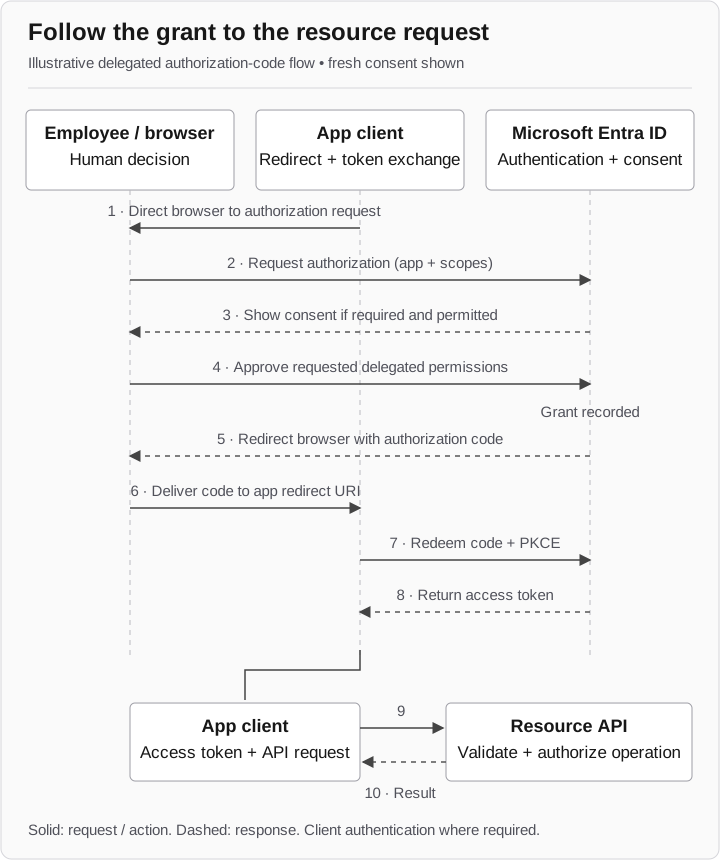
Successful delegated authorization-code flow
- App → Browser → Entra
The app directs the browser to an authorization request for its scopes.
- Entra ↔ Browser
If required and permitted, Entra shows consent. The user approves delegated permissions; the grant is recorded.
- Entra → Browser → App
Entra redirects with an authorization code, delivered to the app’s redirect URI.
- App → Entra
Redeems the code with PKCE and authenticates the client where required.
Successful validation
- Entra → App
Returns an access token.
- App → Resource API → App
The app sends a token-bearing request. The API validates the token, checks authorization, and returns the result.
A denied grant does not create this successful path. Grant approval alone does not prove API use.
The sequence illustrates a successful delegated authorization-code flow with fresh consent. Sign-in steps are compressed. Consent is shown only where required and allowed by tenant policy; a user cannot approve every permission in every configuration. The app redeems the code at the token endpoint with PKCE and client authentication where required, then presents the access token to the resource. The resource must still validate and authorize the operation. Microsoft: authorization-code flow
The authorization code is delivered through the browser to the app’s redirect URI. It is not the API credential. That distinction matters when drawing the flow: the API call occurs only after the app obtains an access token.
Compare the permissions with the task
Compare two real Microsoft Graph delegated permissions before approving a scheduling integration:
Calendars.ReadBasic permits reading calendar events while excluding properties such as bodies, attachments, and extensions. Files.Read permits reading the signed-in user’s files. A file-reading request needs its own business justification when the task is to display calendar events. Microsoft Graph: Calendars.ReadBasic, Files.Read
Record the client application identifier, intended business purpose, requested permission names, permission type, and approval authority. Compare them with the approved integration record. An unexplained file permission is a reason to stop for review; it does not by itself establish malicious intent or an observed file read.
A familiar name or verified publisher is useful context, not permission approval. Evaluate the requested authority and the intended task. Microsoft: consent-phishing hardening
Separate approval from use
Three evidence states produce different findings:
- A prompt is shown. This establishes an approval request, not acceptance.
- A grant is recorded. This establishes authority for the specified app and scope, not which data was used.
- A resource operation is observed. This establishes the particular read or change supported by that record.
To validate actual file access, use an approved test file in a dedicated, authorized test arrangement. Retain the actual response and corroborating resource record. If no operation was attempted, leave activity untested rather than turning the theoretical permission into a reported data loss.
How UNC6040 used app approval
In June 2025, Google Threat Intelligence Group reported voice-phishing activity in which UNC6040 persuaded employees to authorize a modified Salesforce Data Loader application, enabling data theft. The report describes social engineering rather than a Salesforce vulnerability. GTIG: The Cost of a Call
UNC6040 shows how a conversation can lead to application authorization. Its Salesforce mechanics differ from the Entra scopes and flow described above.
Examine the grant when responding
Identify the grant, affected identity or organizational scope, app, and permissions. Follow the approved illicit-consent response procedure, including removal of unauthorized grants and review of application activity. A password-focused action does not answer the grant question. Microsoft: illicit consent investigation
Verify current authority and resource behavior separately from prior activity. Grant removal does not establish what happened before removal, and existing token behavior can affect verification. Use the containment matrix to keep token renewal, resource acceptance, and grant state distinct.
Where employees can verify an app
Give the employee a concrete route for three checks: was the task initiated through approved support, is this the approved application, and do its requested permissions match the work? Provide an independent reporting destination so they do not need the caller to resolve the doubt.
For a simulation that stops before approval, measure whether the request was verified or escalated with enough information to identify the app. Testing actual permissions and resource access requires an agreed technical test. Carry the observed permission request and decision into the containment review when assessing a completed approval.