What should a Salesforce connected-app review establish after a support call?
Identify the exact app and account, its installed or blocked state, effective user permissions, and applicable approval policy. Check previous authorization and OAuth-flow exceptions against current Salesforce guidance, then examine the resource activity separately.
A support conversation can end with an employee authorizing an application. Start the investigation with three questions: which application did the employee approve, what could it do, and what did it actually do?
The consent-phishing article explains this distinction using Microsoft Entra. This case concerns Salesforce: how a support pretext reached connected-app authorization, and what an administrator should check before testing that route today.
How UNC6040 obtained connected-app approval
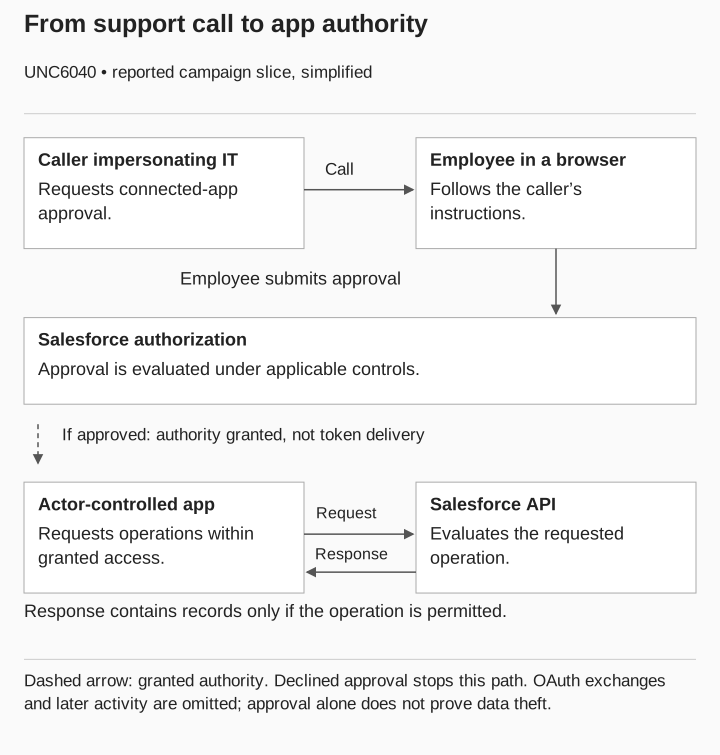
On June 4, 2025, Google Threat Intelligence Group reported UNC6040 voice-phishing activity targeting Salesforce customers. Operators impersonated IT support and persuaded users to authorize malicious connected applications, including modified Data Loader versions. GTIG reported resulting data theft and said the observed intrusions relied on social engineering rather than an inherent Salesforce vulnerability. GTIG: Introduction and UNC6040
The report’s August 5 update describes a shift toward custom applications and identifies later extortion activity separately as UNC6240. GTIG: August 5 update
Review the approval against current Salesforce configuration; the historical campaign alone cannot establish what your org permits.

UNC6040 · simplified reported campaign slice
Approval
- Caller impersonates IT
Asks an employee to approve a connected app.
- Employee submits approval
Salesforce evaluates applicable controls.
Only if approved: authority granted
- Actor-controlled app
Can request operations within granted access.
Resource use
- App → Salesforce API
Sends an operation request.
- API → app
Returns records only if the operation is permitted.
Approval alone does not prove data theft. Token exchanges and later activity are omitted.
Identify the application behind the support request
OAuth lets an application obtain limited access to a service, including on a user’s behalf. The requesting app and the service holding the data are separate actors. RFC 6749: roles
That distinction matters in this case because a familiar Salesforce page does not establish that the connected application is an approved support tool. Collect the application identifier, the affected Salesforce user, and the business owner’s record of the approved integration. Match identifiers instead of relying on the display name the caller supplied.
Ask the owner for the operation the app is meant to perform. In the review record, keep that expected operation beside the granted authority and the observed activity. “Calendar repair” is a purpose someone claimed; it is not a description of the data an application actually accessed.
Check today’s Salesforce controls
Salesforce’s own guidance describes malicious connected-app authorization and recommends reviewing connected-app access and relevant user privileges. Use its platform-specific guidance when reviewing a Salesforce environment. Salesforce: protect against social engineering, Protect your data
Salesforce announced restrictions on uninstalled connected applications for September 2025. Its guidance identifies exceptions involving previous authorization and OAuth device flow, plus the permissions Approve Uninstalled Connected Apps and Use Any API Client. The latter can bypass restrictions for blocked as well as uninstalled apps. These exceptions make the user’s effective permissions part of the review. Salesforce: connected-app usage changes
If your organization uses Microsoft Entra, treat its permission model as a separate implementation. Do not rename Salesforce records as Entra consent grants or assume an Entra policy reproduces a Salesforce control. Assign the relevant platform administrator to identify the applicable objects and controls.
Before an authorized test, have the Salesforce administrator complete this inventory from the current org configuration:
| Review item | Question it answers |
|---|---|
Connected app identifier and owner |
Which integration is being reviewed? |
Installed, uninstalled, or blocked state |
Which restriction should apply? |
Relevant user permissions |
Can this account bypass the expected restriction? |
Prior authorization and OAuth flow |
Does a documented exception apply? |
Permitted-user policy |
Which users should be allowed to use the integration? |
Salesforce identifies Connected Apps OAuth Usage as a starting point for reviewing app use and installation state. Confirm the relevant permissions and policy separately. Use current configuration evidence to set the expected outcome; a June 2025 incident does not establish how a later configuration behaves. Salesforce: review connected-app use
Follow the approval into application activity
Follow the support request through three kinds of evidence: the interaction, the authorization record, and the resource activity.
First, the interaction record establishes that approval was requested. Ask the reviewer to record the claimed purpose and the requested action. Do not assume that the employee completed it simply because the caller gave instructions.
Second, look for an administrative record establishing that a specific application received authority for the affected account. The reviewer should match the application and account to the interaction and explain what the approved authority covers. A similar display name is not enough to establish that match.
Third, ask the resource owner to establish which operations occurred. Describe each supported operation and its outcome separately from the approval. If no resource evidence is available, assign that investigation instead of filling the gap with the campaign’s known outcome.
Preserve failed and incomplete paths too. A pending approval says where the interaction stopped; it does not establish that every technical control would have blocked the application.
Assign the call, approval, and activity reviews
Assign the interaction review to the team that owns the employee or support workflow. Ask whether the request could be verified through an independent channel and whether the employee could find the approved application owner.
Assign the authorization review to the relevant platform owner. Ask them to identify the application, authority, affected scope, and applicable policy. Record both what the policy should do and what happened. A policy setting alone does not tell you the result.
Assign the activity review to the owner who can interpret the resource records. Define the time window and the specific operation being investigated. If multiple systems are involved, give each system a named evidence owner instead of describing the entire estate as reviewed.
At the handoff, require one sentence stating what the next team must determine. “Check this app” is too broad. “Confirm whether the identified app read the designated test record after the approval” gives the receiving team a question and a boundary.
Make the response question specific
If the application was unauthorized, have the incident owner choose the appropriate response using the platform’s current procedures. Record what authority was changed and what evidence supports that action. Keep the investigation of earlier activity open until its own questions are answered.
Plan any behavioral verification with the application owner. Specify the controlled account, harmless operation, expected result, and observation time. A stopped operation can support a conclusion about that tested path; it does not erase data already obtained or settle every other access path.
For a discussion-only exercise, record the proposed verification rather than claiming it occurred. For a technical assessment, retain the actual result and explain any environmental limitation. The distinction should remain visible in the final summary given to business stakeholders.
Give employees a way to check the app
The practical training question is: how do I check an application approval that arrives through a support conversation? Give employees an actual route to answer it. Link the approved app directory, support portal, or responsible team your organization uses.
Ask the employee to verify the task, the application, and the requested authority before continuing. If one is unclear, make the next step a report or escalation with enough information to identify the request. Do not make the employee reverse-engineer OAuth or identify a threat cluster during the call.
Bring one installed integration and one proposed integration to that review. Have the Salesforce administrator explain their different approval paths using the inventory above. Then give support staff the approved destination for unexpected requests involving either app.