Does a successful sign-in prove access to a resource?
Authentication establishes identity. Authorization decides whether a particular operation is permitted. Record the account, resource, requested action, and observed result before concluding what access occurred.
A successful sign-in tells you which identity the application accepted. It does not tell you whether that identity can change a payroll record, read a document, or approve an invoice. To check those permissions, test the specific operation.
If the token terminology is unfamiliar, start with what access tokens, refresh tokens, and session cookies do. To test the distinction, make two requests from the same employee account with different expected permission outcomes.
Signing in and getting permission
Authentication establishes identity; authorization determines permitted actions. An application can recognize an employee and still refuse a coordinator-only operation. That refusal is compatible with a successful sign-in. Microsoft: authentication and authorization
For an API you own, validate the access token at the resource that accepts it, then apply the application’s authorization rules. An ID token describes authentication to the client; it is not a substitute for an API access token. Clients should treat access tokens as opaque rather than depending on their internal format. Microsoft: access tokens

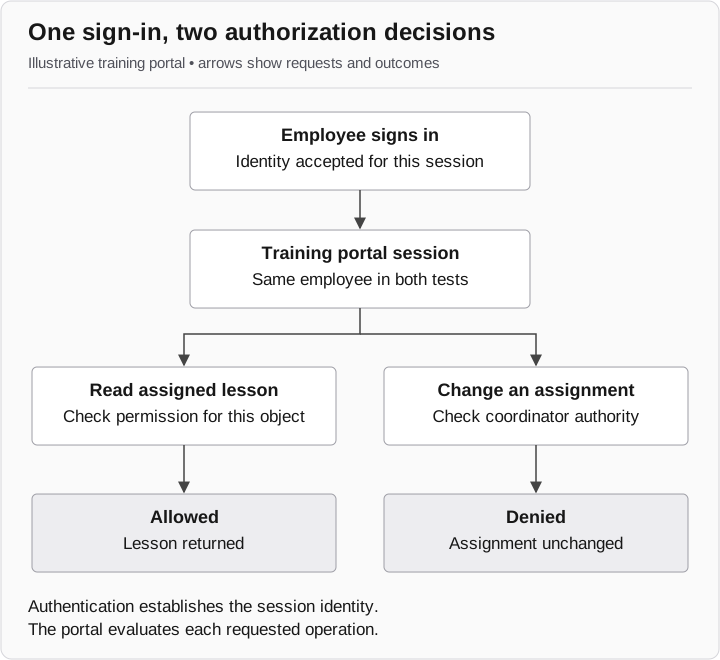
Illustrative training portal
- Shared sign-in
The training portal establishes a session for the employee.
- Request A: read a lesson
The portal checks access to an assigned lesson. Permission allows the read; the lesson is returned.
- Request B: change an assignment
The portal checks coordinator authority. That authority is absent; the change is denied.
The same session makes two independent requests.
A worked example: the training portal
This fictional portal lets employees read assigned lessons. Coordinators can also change assignments. The account, endpoints, responses, and application rules below are illustrative; they are not Microsoft Graph operations or results from a GhostEye engagement.
Prepare a test employee, one assigned lesson, and one disposable assignment record. Confirm that the employee has no coordinator role. Use the same authenticated context for both operations so that a change of identity does not explain the difference.
| Test | Expected result | Illustrative observation | Evidence to retain |
|---|---|---|---|
GET /lessons/7 |
Employee can read the assigned lesson |
200; Lesson Seven returned |
Response and application request reference |
PATCH /assignments/2 |
Employee cannot change assignments |
403; assignment unchanged |
Refusal and before/after assignment state |
Other lessons or assignments |
Outside this test |
Not tested |
No broader conclusion |
The response code is useful, but the application state matters too. A 200 response containing a login page would not establish that Lesson Seven was returned. For a denied modification, check that the selected assignment actually remained unchanged.
A minimal finding is: “The employee read assigned Lesson Seven. Its attempt to change Assignment Two was refused, and the assignment remained unchanged. Other records were not tested.” This is more useful to an engineer than “portal access succeeded,” because it identifies the rule exercised and the result to reproduce.
Identify whose permission you mean
Keep the user and client application distinct. In delegated access, an application acts on behalf of a signed-in user; the app’s permission and the user’s authority both matter. In app-only access, the application acts as its own identity. Microsoft: permissions and consent
Suppose a nightly service can update every training assignment. A successful request from that service does not contradict the employee’s denied request. They use different acting identities. Record the account or service identity alongside the client and resource before comparing results.
Record the account, action, and result
Use four entries in the test record: identity, requested operation, observed result, and untested boundary. Link the response to the application’s own record using its documented request identifier or another corroborated match. Do not assume a browser screenshot identifies the request that produced it.
For a failed authorization control, the retest must repeat the same forbidden operation with the same account role after the fix. A new sign-in succeeding says nothing about whether that permission rule changed.
The next question is about the authentication itself: when a record says MFA was satisfied, did a new user interaction actually occur? Keep that question separate from what the account subsequently did.