What does an MFA indication establish?
It supports a statement about authentication in its recorded context. By itself, it does not prove a fresh prompt, the intended authentication strength, or a later resource operation.
A successful sign-in during a suspicious support call does not prove the employee approved an MFA prompt during that call. First establish how the MFA requirement was satisfied.
Check whether MFA was satisfied by a new authentication step or an existing claim, and whether the required authentication strength applied. Use application records to check the later resource operation.
Read the claim in the right token context
A token claim is a statement carried by that token. Microsoft’s access-token reference documents amr, with values describing authentication methods, including mfa. Do not expect that claim in every token version or treat its absence as proof that MFA did not happen. Microsoft: access-token claims reference
For an investigation, use the authentication-step history and applicable policy evaluation. Parsing one claim cannot reconstruct the employee’s actions. It also cannot establish what they understood about a support request.

Which MFA interaction happened?
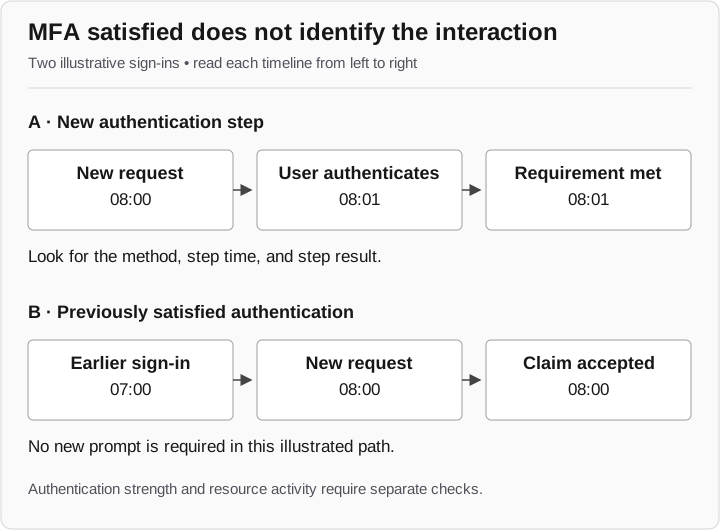
Two fictional timelines
- A: a new step
08:00 sign-in request → 08:01 user authentication. A new step satisfies the requirement.
- B: an earlier claim
07:00 authentication → 08:00 new request. An existing claim satisfies the requirement; no new prompt occurs in this example.
- Inspect the evidence
Check authentication-step time, method, and result. Assess the intended authentication strength separately.
Neither timeline proves a later resource operation.
An earlier authentication may satisfy the requirement
Microsoft documents cases where a requirement is satisfied by token claims without a new interactive prompt. The authentication details show the methods and results for the sign-in. These details can initially be incomplete while records are aggregated, so note collection time and revisit an incomplete record. Microsoft: sign-in authentication details
The two timelines are fictional. In A, a new step occurs at 08:01. In B, an earlier authentication supplies a claim accepted for the 08:00 request. Both can satisfy an MFA requirement, but only A depicts a new interaction. Neither timeline alone establishes that the employee approved the caller’s business request.
Start with the statement you are trying to support
For one sign-in, record the event identifier, user, client, resource, and time. Then answer these questions from the appropriate record:
| Proposed conclusion | Inspect | What would prevent that conclusion? |
|---|---|---|
A new authentication step happened during the call |
Authentication-step time, method, and result; correlated interaction record |
Requirement satisfied by an earlier claim, or no interaction evidence |
The application required phishing-resistant MFA |
Applicable policy, configured strength, and evaluation for this request |
Generic MFA result without the intended strength or policy scope |
The employee accessed a document afterward |
Application operation and response |
Sign-in evidence alone; no document request |
These are analyst questions, not names of universal log fields. The next investigation maps documented Microsoft Graph fields to an actual case worksheet.
Check the intended authentication strength
If an application requires phishing-resistant authentication, a generic “MFA succeeded” screenshot leaves the configured strength unresolved. Inspect the applicable policy and allowed method combinations.
Microsoft Entra has distinct built-in authentication strengths for MFA, passwordless MFA, and phishing-resistant MFA. The phishing-resistant strength includes supported FIDO2, Windows Hello for Business or platform credential, and multifactor certificate-based methods. Check the current method combinations and the policy that applied to your request. Microsoft: authentication strengths
Once the configuration is established, define an allowed test method and a disallowed test method for that application. The useful comparison is whether the intended resource request reaches the relevant policy evaluation and behaves as expected. A generic “MFA works” test misses that distinction.
Did the sensitive action require a fresh sign-in?
Method and recency are separate requirements. If a workflow requires reauthentication before a sensitive action, identify the action that reaches the evaluation point and capture its timing. An open page is insufficient evidence of a new authentication.
Sign-in frequency is a session control with application-dependent behavior. Even an “every time” setting does not mean every browser click must show a new prompt. Microsoft: session lifetime and sign-in frequency
Say what the records show
An illustrative note might read: “The 08:00 request satisfied the MFA requirement through an existing claim. The supplied evidence does not show a new prompt during the support call. The intended authentication strength and later document operation remain to be checked.”
That gives the next analyst three distinct tasks instead of an assumed attack story. Continue with the sign-in evidence case to connect the authentication record to the directory change and application activity.