How do you turn sign-in evidence into a defensible finding?
Start with a specific question. Match the account, client, resource, and time window, then separate authentication, directory changes, policy evaluation, and application operations. Assign an owner to each unanswered question.
A recovery ticket closes at 09:08. A sign-in succeeds at 09:11. Did an impersonator get access? The timeline is a starting point, but it still lacks the caller’s identity, the exact recovery action, and the application operation.
This worked investigation uses the distinctions from authentication and authorization and MFA interpretation. The case uses fictional names, times, and outcomes alongside documented Microsoft field names. Its records are training material, not exported vendor logs.
Case file: a recovery request followed by a sign-in
Northlake Training’s employee account, Learner A, uses a test application called Lesson Room. Someone reports a lost phone and asks the help desk to restore access.
| Card | Initial packet | First interpretation |
|---|---|---|
R1 |
09:00 UTC: recovery ticket opened for Learner A |
Request recorded; requester identity unresolved |
R2 |
09:08 UTC: ticket marked complete; verification attachment absent |
Completion note exists; exact change unconfirmed |
S1 |
09:11 UTC: successful sign-in involving Learner A and Lesson Room |
Authentication event recorded |
P1 |
Screenshot of a proposed report-only access policy |
Event-time applicability unconfirmed |
A1 |
No Lesson Room operation records |
Resource activity unknown |
The draft claim “an attacker bypassed MFA and downloaded records” exceeds this packet. A better initial note is: “A completed recovery ticket precedes a successful sign-in. Caller verification, the exact account change, and subsequent application activity are unresolved.”

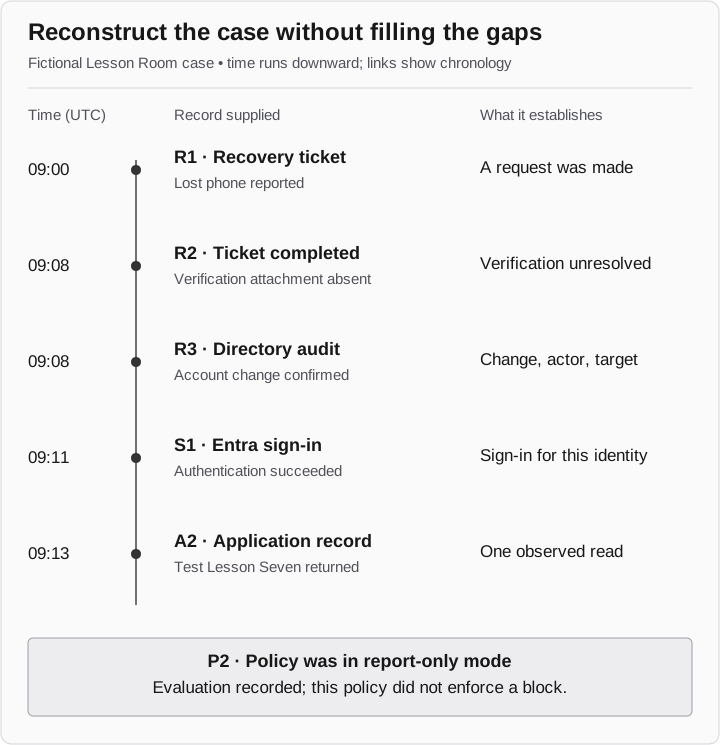
Reconstruct the case
Fictional records; UTC
- 09:00: R1 recovery ticket
The employee reports a lost phone. This establishes a request.
- 09:08: R2 ticket closed
The verification attachment is missing. The verification decision remains unresolved.
- 09:08: R3 directory audit
An account change is confirmed. Identify actor and target.
- 09:11: S1 Entra sign-in
Authentication succeeds for the recorded identity.
- 09:13: A2 application
Test Lesson Seven is returned. This establishes one read.
P2 is a report-only policy evaluation, not an enforced block. Time order alone does not prove causation.
Step one: identify the account, client, and resource
Use stable identifiers before joining records. In Microsoft Graph, the signIn resource includes userId, appId, resourceId, createdDateTime, status, and correlationId. A directory audit event has its own actor, targets, timestamp, and result. Microsoft: signIn resource, directoryAudit resource
| Record | Documented fields to inspect | Case question |
|---|---|---|
Graph signIn |
id, userId, appId, resourceId, createdDateTime, status |
Which identity, client, and resource does S1 represent? |
Graph directoryAudit |
id, activityDateTime, activityDisplayName, initiatedBy, targetResources, result |
What changed, who initiated it, and which object changed? |
Support ticket |
Your ticket system’s verification record and change reference |
What authorized the recovery action? |
Application record |
Your application’s actor, object, operation, result, and request reference |
What did Lesson Room actually return or change? |
These fields are a collection guide, not a ready-made database join. Map the tenant, account, client, and resource explicitly. The sign-in’s client application and target resource may be different entities. A matching display name alone is insufficient.
Graph sign-in downloads have licensing and permission requirements; applied Conditional Access details can require additional privileges. If a collector cannot read a field, distinguish unavailable data from a policy that did not apply. Microsoft: signIn properties and permissions
Step two: check timestamps and correlation IDs
Graph createdDateTime and audit activityDateTime are UTC timestamps. The Entra portal localizes sign-in time to the viewing administrator. Keep the source value and time zone before normalizing a mixed export. Microsoft’s documentation also cautions that a sign-in correlation ID depends on client-provided parameters and is not guaranteed to be accurate. Microsoft: sign-in details and considerations
For this case, confirm that R1’s target account matches S1’s user in the same environment. Ask for a directory audit event identifying the actual change. Time proximity can narrow that search, but it cannot establish that the ticket caused the sign-in.
Step three: inspect the recovery action
The next fictional record, R3, confirms an administrator changed Learner A’s authentication configuration at 09:08. It identifies the actor and target. The verification attachment remains missing.
That resolves one question: a change occurred. It leaves another open: whether the caller was verified. Request the approved verification record or interaction record from the help desk. Missing documentation supports a documentation finding; it does not by itself prove that no check happened.
The administrative operation also matters. A password reset, removal of a method, and a session-revocation action have different consequences. Record the operation from the audit evidence rather than treating the ticket label “MFA reset” as a technical description.
Step four: separate policy evaluation from enforcement
P2 now confirms that the proposed policy was in report-only mode during S1 and that its requirement was not met. Report-only evaluation does not enforce that block. Microsoft: Conditional Access report-only mode
If the exercise intended to demonstrate prevention, P2 does not establish it. Specify the relevant test condition, obtain approval for an enforced configuration, and collect a new event with the policy evaluation. Review other applicable controls too; this one policy’s mode does not explain every possible reason a request succeeded or failed.
Step five: request evidence of the resource operation
The application owner supplies A2: at 09:13, a retained response and matching application record show Test Lesson Seven returned to the reviewed test session. No assignment change or attachment download was attempted.
That establishes one read in the fictional case. It does not establish all the data the identity could reach. Preserve the specific object and request reference so another analyst can distinguish this operation from a sign-in or an open browser page.
Step six: check collection, alerting, and response
Collection, alerting, and analyst response are separate observations. The case has S1 and R3, but no alert or response record. For the exercise, search the agreed monitoring system for 09:00–10:00 UTC using the matched account and relevant actions. Record the search time and coverage. That window is an exercise choice, not a universal detection deadline.
If no matching alert appears, report that result for the system and window searched. Do not expand it into “nothing detected the incident.” If an alert appears, inspect its disposition before claiming someone responded.
Your final case note
| Question | Result after the added records | Next action |
|---|---|---|
Was the caller verified? |
Unknown; attachment missing |
Help desk retrieves verification evidence |
Did the account change? |
Observed in R3 |
Identify resulting methods if relevant |
Did the proposed policy block S1? |
No enforcement from this report-only policy |
Approved enforcement test if prevention was the objective |
Was a lesson read? |
Test Lesson Seven returned in A2 |
Other operations remain untested |
Was there an alert and response? |
Not established by this packet |
Complete the scoped monitoring review |
The finished note can say: “R3 confirms the account change; S1 records the subsequent sign-in; A2 establishes one lesson read. Caller verification remains unresolved. The proposed policy was report-only, and the supplied packet does not establish alerting or response.”
If the change involved a recovery pass, continue with what can remain after a Temporary Access Pass expires. That investigation follows the newly enrolled credential rather than redoing the sign-in reconstruction.
Case files for analyst practice
The CSV files reproduce the tables above for editing. Fictional case entries are examples to replace, not collected evidence.