What can remain after a Temporary Access Pass expires?
A newly enrolled authentication method may remain usable after the pass expires. Established application sessions also need their own review. Expiration of the pass alone does not establish that every resulting access path has ended.
A Temporary Access Pass can expire while a credential enrolled during recovery remains trusted. For legitimate recovery, that is often the intended result: the employee uses a temporary method to establish a lasting replacement. If the recipient was an impersonator, inspecting only the pass’s expiry misses the more consequential change.
After establishing what changed and when, inspect the replacement credential and any remaining sessions.
A temporary pass and a new credential have different jobs
Microsoft Entra’s Temporary Access Pass, or TAP, is a time-limited passcode used for onboarding and recovery. Administrators can configure single-use or multi-use behavior. Supported registration flows let the user establish another authentication method. Microsoft: Temporary Access Pass
Dirk-jan Mollema’s May 2024 research demonstrated provisioning a Windows Hello for Business key using a TAP, then using that key after the pass expired. The demonstrated path required TAP availability, authority to provision it, and suitable device and tenant conditions. The 2024 result should be read with those conditions in mind. Mollema: Windows Hello provisioning with TAP

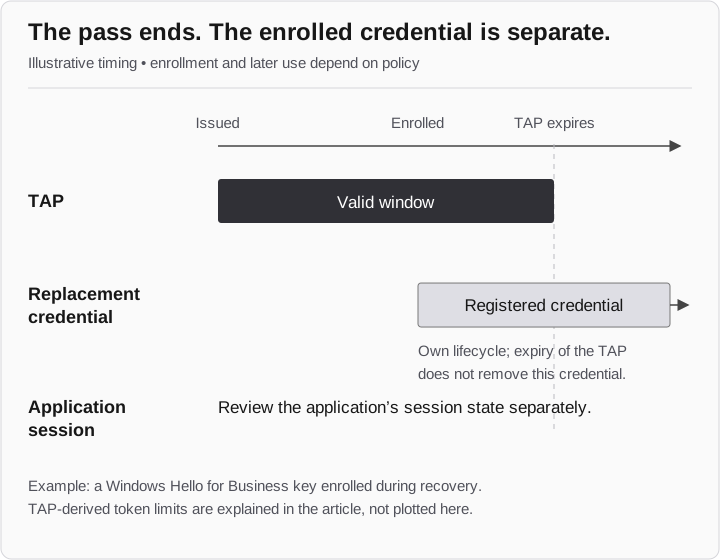
What outlives a TAP?
Illustrative recovery; policy dependent
- TAP issued
The Temporary Access Pass is usable during its validity window.
- Credential enrolled
For example, a Windows Hello for Business key is registered during recovery.
- TAP expires
The pass can no longer authenticate. The enrolled credential has its own lifecycle.
Review whether the credential remains registered and usable. Check the application session separately. This is not a token-lifetime plot; TAP-derived token limits are explained in the article.
What still works after the pass expires?
Keep the pass, the replacement credential, and the application session separate. Microsoft documents that an expired or deleted TAP cannot be used for authentication. Tokens issued during TAP sign-in have a maximum lifetime capped at the TAP expiration time at issuance. TAP expiry does not retroactively invalidate established sessions; session controls and application behavior still matter. Microsoft: TAP expiration
The diagram deliberately plots the pass and enrolled credential, not every token derived from sign-in. A bar extending past expiry means the credential has its own lifecycle. It is not a promise of perpetual access, nor does it remove the need for later policy and resource authorization.
Review the credential created during recovery
The intended result of recovery is an expired temporary pass and an approved replacement method controlled by the employee. If the employee disputes the request, investigate that surviving replacement: identify the method, its enrollment record, and the approved administrative action. Do not ask for a private key or recovery secret as proof of control.
Compare the subsequent method inventory with the authorized change and, where separately approved, test the method’s use. Verify removal if the method was unauthorized. Keep related device identity and management questions separate, and do not close an application-session investigation just because the method was removed. A fresh protected request answers the session question.
Verify the recipient before issuing the pass
Before issuing the pass, the help desk needs to verify its recipient. Use the caller-verification decision guide to design the unavailable-method branch. It turns the credential consequence described here into a support decision that staff can actually follow.