A configuration profile applies settings to an Apple device. Its contents may configure accounts or networks, install certificates, or establish device management. Downloading a profile is different from installing it, and certificate trust depends on the installation route. Verify the requested contents and management organization through your approved IT route.
Before installing a configuration profile on an iPhone, ask IT what it changes: network or account settings, certificate trust, or the organization managing the device. A request to fix email or Wi-Fi should explain why those changes are needed.
The approval screen may genuinely belong to Settings. That confirms where the change happens, not whether the sender was authorized to request it.
A profile is a package of settings
Apple uses configuration profiles to set up corporate or school networks and accounts. Its iPhone guide says the device displays information about the profile’s contents and requests permission to install it. Legitimate profiles can arrive by email or a website, so the delivery method alone cannot settle whether a request is trustworthy. Apple: configuration profiles on iPhone
A profile is not simply another document to read. Installing it applies configuration. Ask your support team to identify the expected profile and explain the settings it should contain, using the support channel you already know rather than contact details supplied by the unexpected message.
The file’s friendly name is insufficient. “Work Wi-Fi Update” tells you what its author called it. Your organization still needs to confirm what was approved and why it is appropriate for this device.
Downloading a profile is only the first step
For a profile downloaded from a website or email, Apple’s current instructions require going to Settings to install it. A download alone is therefore not the same event as installation. Apple says an uninstalled downloaded profile is automatically deleted after eight minutes. That limit is a description of the manual download workflow, not a reason to rush through an unexpected request. Apple: install a configuration profile
Devices already enrolled in a device management service can receive profiles without another user interaction. If you do not remember approving a profile, ask the administrator whether it was deployed through the existing management service. Absence of a remembered prompt does not establish that someone bypassed the device’s controls. Apple: profiles installed by device management
Management enrollment establishes an ongoing administrative relationship, with capabilities that depend on the enrollment method and platform. It should not be treated as a generic repair step. Apple distinguishes account-driven User Enrollment, designed for personally owned devices, from Device Enrollment. User Enrollment limits management to the organization’s accounts, settings, and information; Device Enrollment provides more controls. Apple: User Enrollment and device management
Our registered, joined, or compliant guide explains different Microsoft identity and device states. Those labels do not substitute for identifying an Apple enrollment method or the management service involved here.
What settings, certificates, or management would it add?
| What the profile proposes | The question for your IT team |
|---|---|
Network or account settings |
Which approved network or service will this configure, and does it match the task? |
A certificate |
What is the certificate for, who issued it, and what trust is expected? |
Device management enrollment |
Which organization and management service will administer the device, using which enrollment method? |
These categories can appear together. They are a reading aid, not a complete list of possible profile contents.
NIST’s mobile threat catalogue describes malicious profiles containing unwanted certificate-authority certificates or VPN settings, and the possibility of enrolling a device in a malicious management system. A VPN is a network tunnel; a certificate authority issues certificates used in trust decisions. An unwanted configuration can change a device’s trust or routing, which is why a seemingly routine setup deserves review. NIST: malicious configuration profiles
The effect depends on the profile’s contents, effective configuration, and the applications involved. Certificate trust also depends on how the profile was deployed.
For a certificate payload in a profile installed manually from email or a website, Apple says SSL/TLS trust is not enabled automatically. TLS protects connections such as HTTPS. Full trust requires a separate setting. Apple documents different behavior for certificates installed through Configurator, MDM, or an MDM enrollment profile. The deployment route therefore changes the question the administrator needs to answer. Apple: manually installed certificate trust
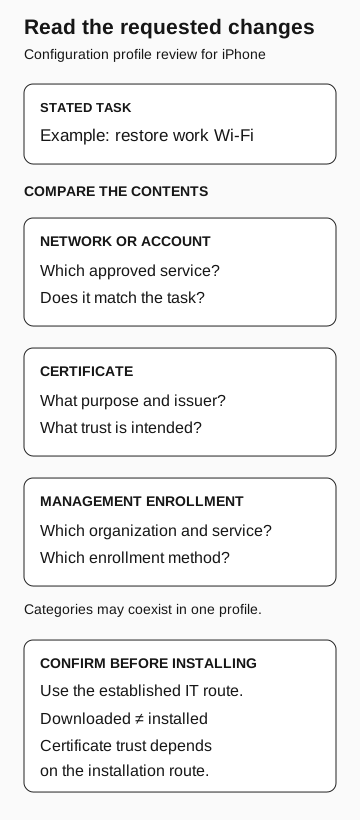
Read the requested changes
Configuration profile review for iPhone
- Stated task
For example, restore work Wi-Fi. Compare the profile’s contents with that task.
- Network or account
Which approved service is configured? Does it match the task?
- Certificate
What purpose and issuer? What trust is intended?
- Management enrollment
Which organization, service, and enrollment method?
Categories may coexist in one profile. Confirm through established IT before installing. Downloaded does not mean installed; certificate trust depends on the installation route.
What Talos observed in the 2018 MDM campaign
In July 2018, Cisco Talos reported a targeted campaign involving 13 iPhones and a malicious MDM system used to deploy altered applications. Talos explicitly said it did not know how the devices had been enrolled. It considered physical access and social engineering possible explanations. That uncertainty matters: the report supports management abuse, not a confirmed phishing entry point for those devices. Talos: malicious MDM campaign
A September follow-up demonstrated enrollment and profile abuse on a lab iPhone running iOS 11.4.1. Keep that historical demonstration separate from a claim about what every present-day iPhone permits. Current deployment guidance, the actual enrollment method, and local configuration are the basis for a current assessment. Talos: follow-up and lab demonstration
The practical lesson is to verify who will administer the device. A genuine operating-system approval screen can be part of an unauthorized request.
Match the requested change to the repair
A Wi-Fi repair and enrollment into a management organization are different changes. If a profile asks for both, the help desk should confirm why enrollment is part of the approved fix and identify the mobile-management owner. The profile’s friendly name cannot settle that question.
Planned enrollment may be legitimate. The support team needs to explain the expected service and setup process, not teach employees to reject every profile.
If installation already happened, report what was installed, approximately when, how the request arrived, and whether any additional certificate-trust or enrollment steps were completed. Preserve the message and relevant screen details through the approved channel. Never include the device passcode.
If a profile is already present
Apple places installed profiles under Settings → General → VPN & Device Management. Review unfamiliar entries with the support team. Apple warns that deleting a profile also deletes the associated settings, apps, and data, so removal on a work device needs coordination rather than an improvised cleanup. Apple: view and remove profiles
Ask the mobile administrator to identify the profile’s purpose, deployment source, and current management relationship. If the configuration is unauthorized, the response team should decide how to preserve relevant information and restore the approved state. Removing the profile confirms that it is gone. It does not tell you whether information was exposed while it was installed.