Accessibility access can let an Android app read screen content and interact with other apps on your behalf. Legitimate assistive tools need these capabilities, but an unexpected request needs a clear purpose and verified developer. Installing an app and enabling its accessibility service are separate decisions.
Installing an Android app does not settle whether it should be able to read screen content or act inside other apps. If it asks you to enable an accessibility service, have support confirm the developer, the task, and why that capability is needed.
That check must preserve access to legitimate assistive tools that employees rely on.
Accessibility has a real purpose
Accessibility features help people use their devices. An accessibility service is software that can assist a user in interacting with the phone. Google’s current Android guidance explains that accessibility access can allow an app to read content on the screen and interact with apps on the user’s behalf. It also explicitly recognizes legitimate applications designed to support people with disabilities. Google: restricted settings
The permission name cannot tell you whether the app needs that access. Check the developer and the job the app is supposed to do.
Do not teach a blanket rule that people must disable accessibility tools. Someone relying on a screen reader or another assistive service needs a working, approved path. The support team’s job is to identify the particular app and requested capability, then explain why it fits the task.
The same principle appears in our iPhone configuration-profile guide, but the mechanisms differ. An Android accessibility service is not an Apple management profile. Review the permission on the actual platform instead of importing another device’s terminology.
Installation and service approval are different
Think of the request as a sequence of questions rather than one long setup instruction.
| Decision | What the employee should establish |
|---|---|
Obtain the app |
Is this the expected developer and approved distribution route? |
Install it |
Is this software permitted on this device for the stated task? |
Enable the accessibility service |
Why does this app need to read screen content or interact on my behalf? |
Change a restricted setting, if prompted |
Has the support team independently confirmed this extra change is appropriate? |
This is a review model, not a universal Android screen sequence. Google says some settings may be restricted when an app is installed and warns against allowing restricted settings unless the developer is trusted. Its instructions also have Android-version qualifications. Device software and organizational policy can affect the available path. Google: restricted settings and version notes
A blocked setting is a reason to ask for help through the established support route. An unknown caller’s insistence that the warning is a routine obstacle is not independent confirmation. We do not need to remove the restriction to evaluate whether the request belongs to a legitimate support case.
An app may also request other capabilities. Record those separately. Accessibility access, notification access, device administration, and screen capture should not be collapsed into a single label such as “full access.” The precise combination matters when a responder assesses what could have happened.
What Brokewell demonstrated
In its 2024 Brokewell investigation, ThreatFabric described a fake browser-update page that delivered an Android malware application. The researchers found data-stealing and remote-control functionality, including accessibility-event logging and actions such as touches and swipes. They also described a separate loader associated with the developer. ThreatFabric: original Brokewell research
The useful connection is specific: a believable software task can lead to an installed application with capabilities that affect other activity on the phone. A browser-update label does not explain why that application should receive sensitive access.
ThreatFabric’s findings describe the malware it examined in 2024. Check the approval screens and controls on your deployed Android versions before using that research to assess your fleet.
The investigation also separates ways of collecting information. Its description of stealing cookies through the malware’s own embedded web view is a different mechanism from accessibility-event logging. Do not treat accessibility approval alone as proof that every browser cookie or account credential was extracted. Our remote-support guide uses the same discipline: distinguish a capability from evidence of its use.
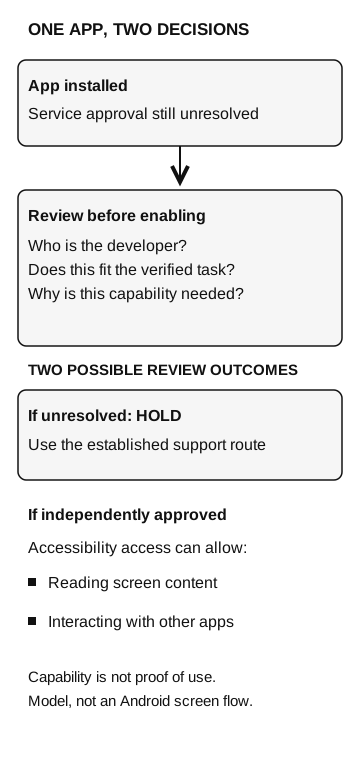
One app, two decisions
- App installed
Service approval is still unresolved.
- Review the requested service
Who is the developer? Does this fit the verified task? Why is the capability needed?
- If unresolved
Hold and use the established support route.
- If independently approved
Accessibility access can allow reading screen content and interacting with other apps.
Capability is not proof of use. This is a review model, not an Android screen flow.
Ask support why the app needs this access
Installing an app does not commit the employee to enabling its accessibility service. The help desk should be able to confirm the developer and explain why the stated task requires reading screen content or interacting with other apps. If the support ticket names no such app, ask the mobile administrator to check the request.
If someone already enabled it
Ask the employee to report the app’s displayed name, where it came from, the approximate installation time, the setting they changed, and any follow-on requests. Use another trusted device or established support route if there is concern that the phone is being monitored. Avoid continuing sensitive work on the suspect device while the response team assesses it.
The mobile administrator should identify the actual installed app and its permissions, then decide how to preserve relevant evidence and restore the device under the organization’s response process. A display name is a clue, not a reliable software identity. The incident record should distinguish an installed app, an enabled service, observed actions, and unknown exposure.
Do not ask the employee to reproduce the suspicious flow with a work account. Nor should a screenshot of a permission screen be treated as proof that information left the phone. It establishes what was requested or enabled at the time captured; data collection and account activity need their own evidence.
Google provides a separate process for removing malware or unsafe software from Android, including checking Play Protect, updates, and untrusted applications. On a managed phone, coordinate that work with the responsible administrator. Turning off one service does not by itself establish that the phone is clean or resolve any account exposure already identified.
Employees need a support route that can answer four questions: which app, from which developer, for which task, with which capability? That route should help them obtain legitimate assistive tools and resolve unexpected requests before anyone changes the setting.