Does a Microsoft Forms address prove a survey is authorized?
No. A real forms platform can host a request your organization did not authorize. Confirm who is collecting the answers, why those fields are required, and the approved form through an independent workplace contact.
Before filling in a workplace survey, check who receives the answers and why the form needs them. A familiar forms service does not establish that your employer approved the collection. Passwords and recovery codes belong in your established sign-in or recovery process, not in survey answers.
Who can read the answers?
A hosted form is a tool for collecting answers. In Microsoft Forms, the creator can review responses and open results in Excel. Designated co-authors can also view and edit response data under the collaboration permissions. Treat a submitted answer as information delivered to the people with access to that form’s results. Microsoft: view results; Microsoft: collaboration and response access
That is useful for legitimate surveys. It is also why a form can expose information without installing malware, changing an account permission, or displaying a counterfeit sign-in page. The employee can type the information directly into an answer field.
Microsoft explicitly advises form creators not to request sensitive personal information such as passwords. Its administrator guidance describes automated reviews that detect potentially malicious collection of sensitive data and temporarily block forms. These protections do not establish the business purpose of every form that remains reachable. Microsoft: Forms privacy and phishing guidance; Microsoft: reviewing potentially malicious forms
A password entered as a survey response is not a normal authentication exchange. The same caution applies to a recovery code requested as an answer. Use your organization’s established sign-in and recovery process instead of sending authentication secrets to a survey owner.
Confirm the requester, purpose and fields
Start with the requester. Which team is asking, and who owns the activity? Reach that team through your established directory, service portal, or other known workplace route. A contact address printed inside the disputed form only repeats the requester’s claim. Our callback contact-source guide explains that verification problem.
Then establish the purpose. What decision will the answers support? A room-booking preference survey might reasonably ask for a preferred location. That purpose does not explain a request for account secrets or a copy of a confidential customer list. Legitimate organizations collect sensitive information for some processes, so ask the responsible team about the specific requirement instead of declaring every sensitive field fraudulent.
Finally, confirm which form and fields are approved. Ask the owner to identify the approved form through a trusted internal route, along with the fields participants are expected to complete. “Yes, we use Microsoft Forms” confirms a product choice. It does not identify this particular survey or its owner.
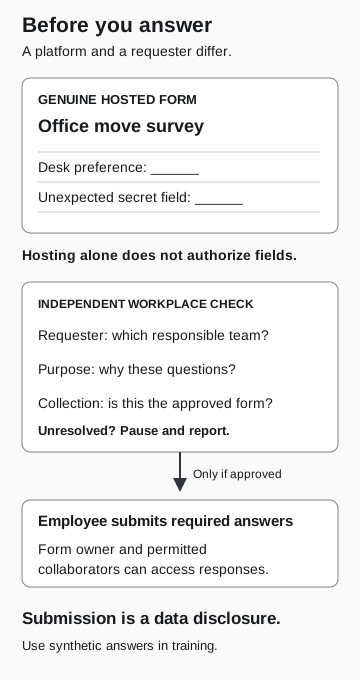
Before you answer
- Genuine hosted form
An office-move survey asks for a desk preference and an unexpected secret. Hosting alone does not authorize either field.
- Independent workplace check
Which responsible team requested this? Why these questions? Is this the approved collection route?
Only if approved; otherwise pause and report
- Employee submits required answers
The form owner and permitted collaborators can access responses.
Submission is a disclosure. Use synthetic answers in training.
Confirming the project does not approve every field
A real office move can explain an equipment survey. It does not explain a recovery-code field added to that survey. Ask the owner to confirm this form and its fields, not just that the office move is happening.
The same reasoning applies when no password is involved. A request for confidential customer contacts may require the business data owner’s approval. The form’s owner, its legitimate purpose, and permission to disclose the requested information are separate questions.
If answers were already submitted
Report what happened through your established security or privacy process. Preserve the original message, the form address, the approximate time, and the categories of information submitted. Do not paste real passwords, recovery codes, or a complete sensitive response into a general help-desk ticket.
Tell responders whether you only viewed the form, submitted answers, or followed a separate link from it. Those are different events. Viewing a form alone does not establish that an answer was sent. Conversely, a form that collected a password may require an account response even when the endpoint shows no malware.
Responders should use the approved recovery procedure for the type of secret or information disclosed. Ask the relevant owner what containment is possible and what further evidence is needed. Closing the form or having it removed does not demonstrate that information already submitted has been erased from every copy.
For suspected abusive public forms, Microsoft documents a Report Abuse option. Its availability depends on the account and form type; it is not present on every enterprise form. Continue to use the organization’s own reporting route as well. Microsoft: reporting a suspected phishing form
Make legitimate requests easy to verify
Form owners can reduce uncertainty before sending a survey. Publish the purpose, responsible team, expected fields, and trusted route for questions. Explain any approved external service through an established internal channel. If the collection changes, update that explanation rather than relying on a new urgent message.
For related situations, the file-converter guide examines uploading an existing document, while the recruiting guide examines the claimed employer relationship behind an identity-document request.