If a converter sends your document to an external service, uploading is a data-sharing decision before you download anything. Confirm that the service and account are approved for the document. A working conversion or clean output scan does not establish how the original was handled.
Before using an online file converter, check whether it uploads your document. If it does, deciding not to open the converted file will not undo that upload.
Review the service’s permission to receive the original and the safety of the returned file separately. Checking only the download can miss an earlier disclosure.
The FBI warned about uploads and downloads
On March 7, 2025, the FBI’s Denver office warned about criminal file-converter and downloader services. Its notice described tools that perform the advertised task while returning files that can contain malware. It also warned that the tools can scrape submitted documents for sensitive information, including personal details, banking information, and passwords. FBI Denver: file-converter warning
A successful conversion does not establish that sharing the source document was appropriate. The warning concerns criminal services, not every online converter.
Our search-ad download guide follows a different boundary: acquiring and running software. Here, focus on the document being submitted. No installation is necessary for an upload to send information to a receiving service.
Ask where the work happens
A tool may process a document on the device or send it to a service for processing. Do not infer the answer from the fact that its interface appears in a browser. Ask the approved software owner what the selected tool does and which data it is permitted to handle.
If the organization already supplies a suitable application, start there. For example, Microsoft documents opening a PDF in Word to create an editable copy. It cautions that conversion works best for mostly text documents and that formatting can change. This is an example of checking an existing capability, not a guarantee about every installation’s storage or connected-service settings. Microsoft: opening PDFs in Word
Tell employees which tool and account to use, and which kinds of documents they may put there. “Use a known brand” leaves those questions open. A personal account and an approved work account can have different handling arrangements; the employee needs the route that their organization has actually approved.
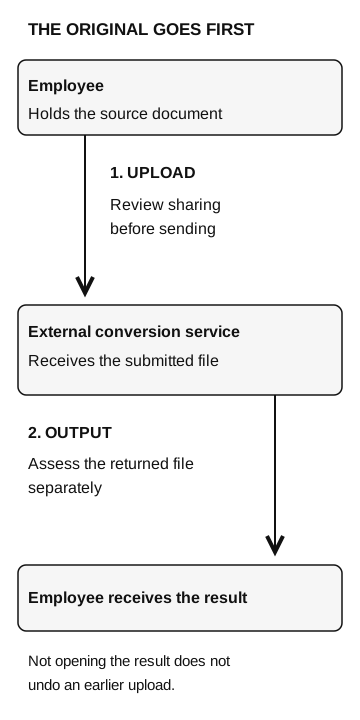
The original goes first
- Employee
Holds the source document.
Upload: review sharing before sending
- External conversion service
Receives the submitted file.
Output: assess the returned file separately
- Employee receives the result
Not opening the result does not undo the earlier upload.
Choose the route before selecting the file
A public event brochure and an internal employee roster can follow identical conversion steps while requiring different sharing decisions. Public content does not make an unfamiliar download safe, and an internal document does not become public because a converter accepts it.
If an internal file was uploaded but the result was never downloaded, report both facts. The data owner needs to assess what was submitted and where it went. Endpoint responders have an additional question if a returned file was opened or installed. If transfer completion is uncertain, say so; selecting a file alone does not establish that the service received it.
If the original went to the wrong place
Report the exact service URL, approximate time, account used, document version, and what happened afterward. Describe the categories of information in the document without attaching another copy to a broad chat channel. Use the organization’s restricted incident route for sensitive material.
Ask the data owner and response team to assess the receiving destination, available handling terms, and any supported deletion or access-restriction process. A deletion confirmation can be useful, but it does not prove that nobody accessed the document earlier. Do not promise that deletion has undone the disclosure.
If credentials were in the document, the relevant account owner should assess them through the incident process. If a suspicious output was opened, involve endpoint response too. Keep those actions tied to what was actually shared or executed rather than treating every upload as the same incident.
The HAR-file review guide applies similar questions to diagnostic exports. The difference here is that the employee chose a tool to complete an ordinary task. The organization can reduce that pressure by making an approved conversion route easy to find.
Give people a usable alternative
Publish the approved conversion route where employees ask for file help: which tool, which account, and which document types it may handle. Check that staff can complete a legitimate conversion without choosing an unfamiliar service under deadline pressure.