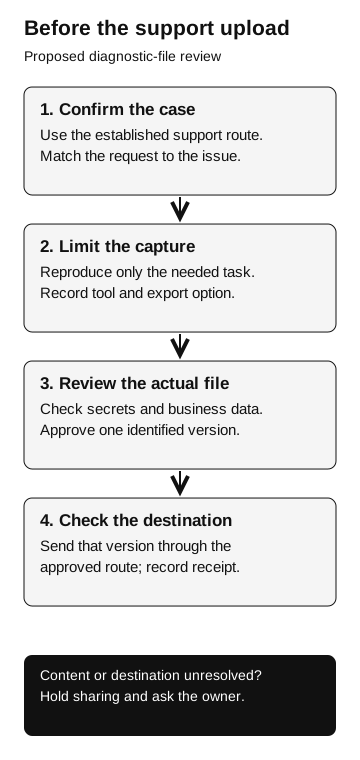
Verify the support case, review the actual export for sensitive information, and send only the approved version through the approved destination. A sanitized export label is not a complete data-sharing review.
A HAR file, short for HTTP Archive, records captured web requests and responses in a structured format. It can help a support team investigate a failed request, redirect, or slow response. Depending on the capture and export, it can also contain information that should not leave the organization. Treat it as a data export with a diagnostic purpose.
Before sharing, establish that the request is genuine, the file is suitable to share, and the destination is approved.
What the Okta incident actually showed
On October 20, 2023, Okta disclosed that an attacker had used a stolen credential to access its support case management system and view files uploaded in some customer support cases. Okta explained that HAR files could contain cookies and session tokens and said it had revoked embedded session tokens with affected customers. Okta’s incident disclosure
That was a compromise of a genuine support system. The disclosure does not establish that the customers received fake requests for their files. The lesson for this workflow is that confirming the support engineer’s identity does not answer what is safe to place in the support case.
There are two questions for a support owner: could an impersonator persuade someone to send a trace elsewhere, and what sensitive material would a legitimate trace expose if its storage were accessed? The historical incident supports the second question. The first is a scenario you can evaluate separately, with a harmless fixture rather than a live session.
What “sanitized” tells you
Current Chrome DevTools documentation describes a sanitized HAR export that excludes sensitive headers such as Cookie, Set-Cookie, and Authorization. It also documents a separate export containing sensitive data. Check which export you are about to send. Chrome: export requests data
Read that as a description of the browser’s export behavior, not approval to share any resulting file. A business identifier in a request URL or confidential information in a response can still deserve review. Chrome’s behavior also should not be assumed for another browser, an extension, or a trace generated by a different tool.
Okta’s current manual-redaction guidance warns that sanitizers can miss unusual field names or material in request bodies. It calls for reviewing the trace and all occurrences of sensitive values. It also directs customers to upload through its support portal rather than attaching HTTP traces to email. Okta: manual redaction
Record the tool and export option, then review the actual file with the application owner. Do not approve sharing based on the export label alone.
Separate secrets from other confidential data
A session cookie can connect a browser request to an existing signed-in session. An access token may authorize requests to a service. Their presence deserves attention because the question is whether another holder could use them, not whether they look like a password. OWASP: session management Our tokens and cookies explainer describes these different roles.
Do not conclude that every captured cookie is an account credential or that every credential remains usable. An application owner must establish what the value represents, its lifetime, and any protections relevant to its use. The reviewer can classify a value as potentially sensitive without replaying it against production.
Other information can warrant removal even when it grants no access: an employee identifier, customer record, internal hostname, or document content. This is why searching only for the word “password” is an inadequate review method. Ask what the application actually exchanges during the recorded task.
A practical division of responsibility is for the support owner to establish the minimum diagnostic need, the application owner to identify sensitive fields, and the approved reviewer to authorize the resulting attachment. In a small team these roles may belong to one person, but the questions remain separate.
Review one fictional export
In this fictional support case, a test account cannot open a training page after sign-in. The team captures a short reproduction and reviews these items:
| Item found in the fixture | Why it is there | Proposed sharing decision |
|---|---|---|
Failed request status and timing |
Describes the reported failure |
Retain if sufficient for diagnosis |
Account name in a request URL |
Identifies the test account |
Replace with a consistent placeholder |
Session value in a header |
Connects requests to a session |
Remove the value; retain the field name if useful |
Training-page response content |
Captured during reproduction |
Keep only the harmless marker needed for the case |
Unrelated request containing a customer reference |
Outside the reported failure |
Exclude from the sharing copy |
Agree on the fields needed for the specific support case before sending the export.
Suppose support needs to know whether two requests used the same session. The reviewer can preserve that relationship using the same placeholder in both locations. That preserves an analytical fact without supplying the credential. If changing the file would destroy the evidence needed to debug the issue, pause and agree on a narrower reproduction or an explicitly approved handling arrangement.
The reviewed attachment should remain distinguishable from any restricted original retained under the organization’s evidence policy. Give each a clear name and record which version was uploaded. Otherwise, a careful review can still end with the wrong file attached.
Before the support upload
Proposed diagnostic-file review
- Confirm the case
Use the established support route and match the request to the issue.
- Limit the capture
Reproduce only the needed task. Record the tool and export option.
- Review the actual file
Check secrets and business data. Approve one identified version.
- Check the destination
Send that version through the approved route and record receipt.
Hold sharing if content or destination is unresolved; ask the owner.
Verify the case and the destination
Open the support case through the organization’s established route. Confirm that the requested trace matches the issue, the product, and the responsible support team. An unexpected message with a ticket number deserves the same check as any other request. Our callback contact-source guide explains why a route supplied by the requester cannot independently verify that requester.
Then check where the file will go. A genuine conversation can introduce an unapproved destination, such as a personal file share or a new upload link. Ask the support owner to resolve that change through the existing case. Record the approved destination in the support case so the person uploading does not have to infer it from a chat thread.
Avoid dropping a sensitive trace into an arbitrary online viewer, public issue, or chat assistant to discover whether it is sensitive. That would create another disclosure before the review is finished. Use tooling and storage approved for the classification of the original file. If the reviewer does not understand a field, leave sharing pending and ask its owner.
If the wrong file has already been sent
Report the case, destination, upload time, account used for the capture, and the exact attachment version through the incident process. Do not spread the file further to explain the problem. The receiving support team can help restrict or remove the attachment; the identity or application owner must assess any exposed credentials separately.
Deleting an attachment is a storage action. It does not establish whether someone accessed it earlier or whether a session value remains usable. Our identity containment review provides a way to track account, credential, session, and resource actions without assuming one completes the others.
Record what the file contained, who could access the destination, whether records show anyone accessed it, and what remains unknown. A potentially reusable token in the file is a reason to investigate; it is not by itself proof of account takeover. Keep any revocation or validation work within the application owner’s approved process.
The support record should identify the approved attachment version, its reviewer, and its destination. That gives the person uploading the trace a clear instruction and leaves responders a useful record if the file later becomes part of an investigation.