Does clicking a malicious advertisement prove that malware ran?
No. A visit, a downloaded object, program execution, and subsequent activity are separate observations. Connect browser and endpoint evidence before stating how far a particular attack progressed.
An employee searches for information, finds a promising result, and downloads what appears to answer the question. There is no unexpected caller and no suspicious attachment in the inbox. The persuasion happens through the result, the destination, and the promise attached to the download.
For a security team, that changes where an investigation begins. Start with what the person was trying to accomplish. Then separate the result they selected, the object the browser retrieved, and any activity the device actually performed.
What Mandiant found in UNC2975 campaigns
Mandiant reported UNC2975 using paid search and social-media advertisements offering information about unclaimed funds. Visitors entered personal details to obtain a supposed report. The download was an archive containing a Visual Basic script, with filenames derived from the submitted values. Mandiant identified PAPERDROP and PAPERTEAR downloaders in these investigations and described subsequent delivery of DANABOT and DARKGATE through different chains. Mandiant: detecting and disrupting malvertising backdoors
The investigation connected browser history with file and process artifacts, while noting that controls could interrupt later execution. Mandiant investigation
These historical findings describe UNC2975 investigations. Similar-looking advertisements require their own attribution and execution evidence.
Follow the promise before the program
The social-engineering question is simple: why did the download appear relevant to the task? Ask the employee what they expected to receive and which part of the interaction made that expectation reasonable. Keep perceived relevance separate from the decision to open an unfamiliar object.
For an internal review, ask the employee to describe their task without making them reconstruct technical events from memory. “I was looking for a document” helps establish context. It does not establish which process ran. The responder can use that account to guide evidence collection while keeping recollection separate from collected artifacts.
This differs from fake IT support, where an impersonator asks the employee to establish a remote session. Here the employee begins the search themselves. Both paths can involve persuasion, but the owner of the first practical improvement may differ: support verification in one case, a dependable information or software acquisition route in the other.
Connect the downloaded file to what ran
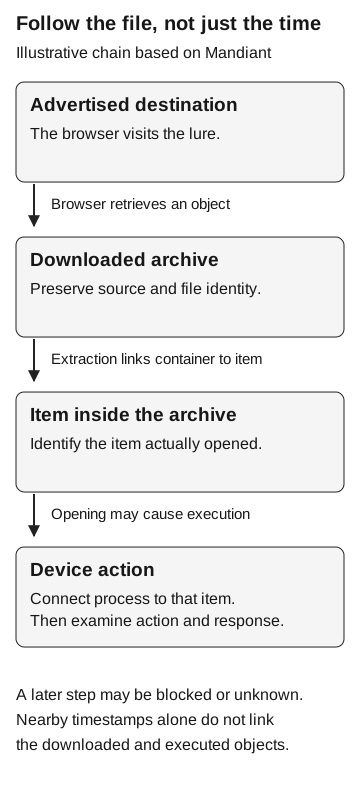
A browser visit establishes navigation. A download record identifies an object retrieved from a destination. An execution record identifies a device action. Connect those records by the objects they describe, not just nearby timestamps.
Use a file hash, meaning a value calculated from the file’s contents, when your collection provides one. Keep the original download and any extracted item distinct: an archive’s hash identifies the archive, not each file inside it. Names and paths are useful context, but a renamed file or a different copy can make a name-only match misleading. Microsoft explains that a file hash is based on content rather than the filename. Microsoft: file hashes
For a downloaded archive, record the relationship between the container and the item subsequently opened. Then ask whether a process record identifies that item, its script interpreter, or another relevant execution path. An interpreter is a program that runs instructions from a script. A browser download followed by an interpreter starting elsewhere on the device is a lead to investigate, not enough by itself to establish that relationship.
The Mandiant investigation illustrates this distinction with separate browser-download and script-execution artifacts. The following evidence map is our proposed review method, rather than a promise that every endpoint product records these fields.
| Observation | Preserve if available | What still needs establishing |
|---|---|---|
Navigation |
Destination, device, account context, timestamp |
Whether an object was retrieved |
Download |
Source, file identity, path and time |
Whether that object or an extracted item ran |
Execution |
Process identity, parent, relevant file and time |
What the action did and whether it was blocked |
Response |
Control result, alert, queue and handling times |
Which response actually occurred within the review window |
Have the endpoint owner confirm the available collection and retention before treating a missing record as a negative result. Our sign-in evidence guide applies the same distinction between event collection, alerting, and analyst response to identity activity.
Follow the file, not just the time
Illustrative chain based on Mandiant reporting
- Advertised destination
The browser visits the lure.
Browser retrieves an object
- Downloaded archive
Preserve source and file identity.
Extraction links container to item
- Item inside the archive
Identify the item actually opened.
Opening may cause execution
- Device action
Connect the process to that item. Examine the action and response.
Later steps may be blocked or unknown. Nearby timestamps alone do not link downloaded and executed objects.
When the download record is all you have
A browser record tied to an archive establishes retrieval. If the available endpoint evidence does not show what happened when the employee opened it, execution remains unverified. Ask whether the relevant collection was enabled, retained, and available for that device and time window.
A process event tied to an extracted item advances the investigation to what that process did and which controls responded. It still does not establish data theft, persistence, or movement to another system without evidence of those outcomes.
Keep sensitive browser information in the incident system. The triage ticket needs evidence references, not the employee’s full browsing history.
Give employees a reliable place to get software and information
If employees are expected to use a software catalog, make sure it contains the needed tool and is accessible. For documents, identify the expected publisher or known information source. “Be careful” supplies no alternative when someone needs information to finish a task.
A controlled mock search page and harmless document can test that acquisition decision. They cannot validate malware prevention. Technical validation needs a separately approved benign action and its telemetry. Preserve any allowlisting or other exceptions in the results: a deliberately permitted destination does not show what ordinary filtering would allow.
Choose the improvement from the finding
An unavailable acquisition route, an endpoint-control gap, and missing telemetry call for different owners. Match the correction to the observed failure. A lower click count cannot establish that an endpoint restriction works, just as a blocked payload does not explain why the advertised download seemed useful.
The investigation should leave the next reviewer able to trace the person’s task to the destination, downloaded object, device activity, and defensive response, with the unobserved steps still marked unknown.