HTML smuggling uses browser functionality to construct a file from content in an HTML page or attachment. The resulting file and any later execution are separate events that investigators must establish.
When an HTML attachment produces a download, preserve the original HTML and the resulting file as separate objects. The investigation needs to establish what the browser created and whether anyone opened or ran it. Calling both objects “the attachment” makes that sequence harder to reconstruct.
HTML smuggling is a delivery technique that uses ordinary browser functionality to assemble a file from content in a page or attachment. It can be part of malware delivery, but the appearance of a downloaded file alone does not prove that a malicious program executed.
How Microsoft observed HTML smuggling
Microsoft’s November 2021 analysis described HTML smuggling in several campaigns, including a May 2021 NOBELIUM campaign. In a separate Mekotio example, a page produced an archive containing JavaScript; the later intrusion depended on additional user actions and execution. These were particular observed chains, not an automatic outcome whenever a browser opens HTML. Microsoft: HTML smuggling research
The mechanism helps explain why the initial message may not contain the final file in its ordinary downloadable form. The browser can reconstruct that object locally. Microsoft’s report also describes detection and blocking of smuggling attempts, so “HTML bypasses every email security tool” is an unjustified conclusion from the technique. Microsoft: mechanism and defensive coverage
Browser code and an opened payload are different events
HTML is the language used to structure a web page. JavaScript can perform actions within that page. A Blob is a browser representation of file-like data. MDN’s web-platform documentation describes it as immutable raw data and explains how it can be used with object URLs. These APIs have legitimate uses; their presence alone does not identify an attack. MDN: Blob
In the smuggling pattern, script in the page constructs an object that becomes a downloadable file. MITRE’s technique description covers encoded content reconstructed on the target and notes that content filters may miss it. It does not imply that every filter does. MITRE ATT&CK: HTML Smuggling
Keep two meanings of “execution” separate. Browser script can run to create the file. A later action can open or execute the resulting payload on the endpoint. If your report says “nothing executed,” clarify which of those you investigated. Otherwise, a technically accurate statement about the payload could obscure the browser activity that produced it.
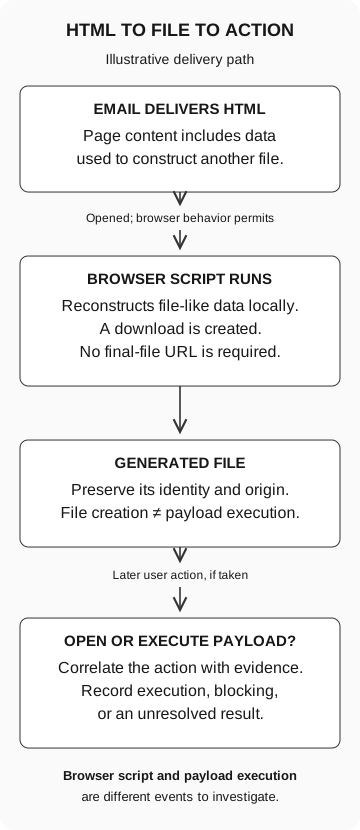
HTML to file to action
Illustrative delivery path
- Email delivers HTML
The page includes data used to construct another file.
If opened and browser behavior permits
- Browser script runs
Reconstructs file-like data locally and creates a download. No final-file URL is required.
- Generated file
Preserve identity and origin. File creation does not establish payload execution.
Later user action, if taken
- Open or execute payload
Correlate the action with evidence. Record execution, blocking, or an unresolved result.
Browser-script execution and payload execution are separate events.
The actual save behavior and controls depend on the client and its configuration.
Ask what happened after the browser opened
Begin with the employee’s account of the sequence. Did a file appear, did they open an archive, did they select an item inside it, or did a warning stop them? These are different answers. Avoid asking the employee to reproduce the sequence.
Preserve the original message, attachment reference, device, and approximate times through the organization’s approved reporting route. Have an authorized analyst inspect the suspicious material in the appropriate analysis environment. A normal employee browser is not a safe investigation environment simply because the original object ends in .html.
Connect the original message and attachment identity to the browser-generated file, then to any later process or block record. Delivery does not establish opening. A file on disk needs its origin checked. A missing process record is inconclusive if the relevant collection was absent.
A file hash identifies particular bytes. It does not say those bytes are safe. A matching name is weaker still: different files can share a name. Ask the analyst to retain the relationship between the original object, generated file, and later process evidence instead of compiling an unconnected list of filenames.
Our search-to-execution guide explains that evidence discipline for downloads reached through advertisements. Here the added question is whether the browser constructed the object from the HTML rather than retrieving an ordinary final-file URL.
Report how far the sequence actually got
If analysis connects the delivered HTML to an archive and a file-creation record, report that relationship. If endpoint execution records are unavailable for the period, later payload execution remains unknown. Neither a clean-device verdict nor a claim that the archive’s contents ran follows from those records alone.
A block event needs the same precision. Name the attempted action and control that blocked it. A later block does not establish that the original email was stopped or that no file was written earlier. The response owner should decide what additional collection or containment is needed without asking the employee to repeat the suspicious sequence.
What an attachment simulation can measure
A mock attachment click can test recognition and reporting. A harmless download can add a file-handling decision. Neither establishes whether a real smuggling attempt would be detected or whether an endpoint would block its reconstructed payload.
Technical validation needs a separately approved benign test and a defined observation point. Record any allowlisting or configuration changes used for delivery: an intentionally permitted exercise does not establish how the ordinary filtering path would behave.
Tell the next analyst what you confirmed, what you still need to find out, and who is checking it. “User opened attachment” leaves all three questions unanswered.