Does a genuine file-sharing notification make the document’s links trustworthy?
No. A real service can deliver a file shared by an attacker or a compromised account. Verify the business request and evaluate any new destination or requested action separately.
A familiar service tells you that a colleague or supplier shared a document. The notification is genuine, the file opens on the expected service, and you may even verify your identity before viewing it. Then the document asks you to follow another link.
That last request deserves a fresh decision. The service established that you could view the shared file. It did not establish that every instruction inside the file was appropriate for your work.
The practical check is whether the next action belongs to the task you expected. Security teams should preserve the invitation, the hosted content, and the destination it introduced as separate evidence.
What Microsoft observed
In October 2024, Microsoft described identity-phishing campaigns misusing services including SharePoint, OneDrive, and Dropbox. Some activity began with a compromised account at a trusted vendor. The service delivered a real sharing notification; the hosted content then directed the recipient onward to phishing. Microsoft: file hosting services misused for identity phishing
The report illustrates a SharePoint sequence in which a recipient completed a legitimate access check before viewing a document containing a malicious link. That link led to an adversary-in-the-middle phishing page. Microsoft also described restrictions such as recipient-specific access and limited availability that complicated investigation. These are historical campaign observations, not properties of every shared file. Microsoft campaign analysis
Microsoft did not assign all this activity to a single named actor. An adversary-in-the-middle page relays a sign-in interaction to the real service; our session-phishing explainer follows the resulting capture and reuse questions. Here, the boundary is the document that introduces that page.
Check the sender, host, and next action
Who initiated the business request? A notification tells you that a share occurred. Ask whether the document and requested action fit the work you expect from that person or organization. When they do not, verify through an established contact route, rather than a new number or address supplied in the document.
Where is the document hosted? Recognizing the service helps you understand the first destination. It cannot settle the first question: an unexpected request still needs context. Do not teach employees that all legitimate external sharing is suspicious, or that a familiar domain resolves every concern.
What does the document ask you to do next? A link to another site, a request to sign in again, or an instruction to authorize an application creates another decision. Each may have a legitimate business explanation; compare it with the expected task before proceeding.
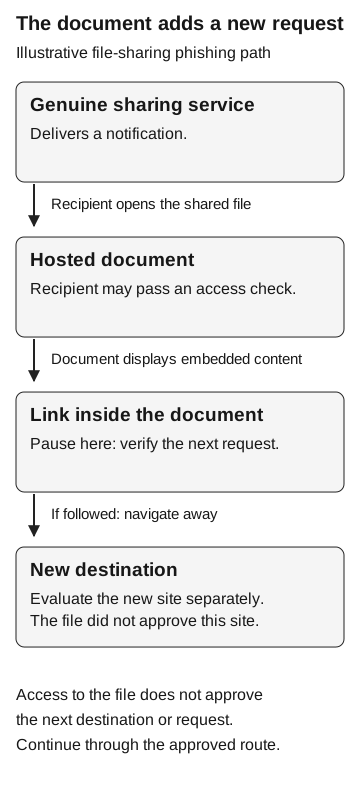
Illustrative file-sharing phishing path
- Genuine sharing service
Delivers a notification.
Recipient opens the file
- Hosted document
May require an access check.
Document displays embedded content
- Link inside the document
Pause and verify the next request.
If followed: navigate away
- New destination
Evaluate the new site separately. The document did not approve it.
Access to a file does not approve its next destination or request. Continue through the approved route.
Keep the invitation, document, and next link
For a real report, ask for the notification and the business context. Have an authorized responder preserve the document reference, relevant sharing details, and the embedded destination using approved handling procedures. Do not ask the employee to reopen a suspicious link to prove what happened.
The invitation, file access, and onward interaction answer different questions. A sharing notification identifies the recorded share; it does not validate its business purpose. A document-access record does not establish that an embedded link was followed. Even evidence of reaching the next destination leaves credential submission, session capture, or app approval to investigate separately.
A responder may be unable to retrieve a recipient-restricted or expired file. Record that limitation rather than classifying the content as clean. Ask the collaboration owner to preserve the relevant share and object information through approved administrative procedures. Do not weaken sharing controls or repeatedly sign in as the recipient to make a sample easier to inspect.
Record whether the file was available for review alongside the employee’s reported action. A missing sample should remain visible in the conclusion.
If sign-in or application activity followed, use the appropriate evidence rather than inferring it from the invitation. Our authentication and authorization explainer distinguishes proving identity from permission to act. The consent-phishing guide follows application approval through a grant and resource activity; an ordinary file invitation does not establish any of those outcomes.
Give employees a usable pause point
A short reminder can fit beside the collaboration guidance: “Expected sender, expected task, expected next step.” Ask employees to check all three when a document introduces a new action.
Make the verification route easy to find. If the employee cannot locate the supplier contact or approved workspace, fix that obstacle before expecting them to resolve the next invitation.