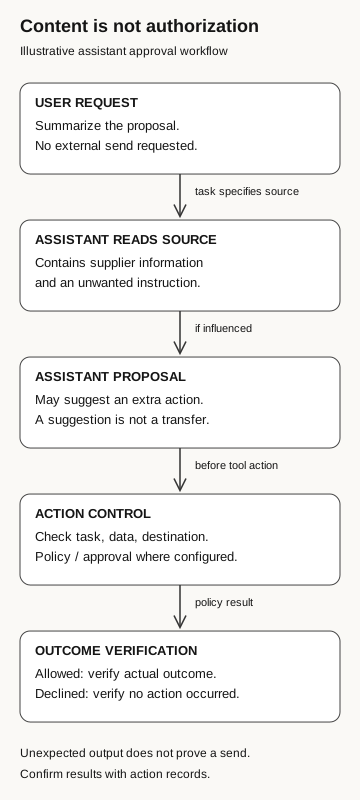
Treat instructions inside external documents as source content, then compare any proposed action with the user’s actual request. Verify the destination, data, and authority before approving a connected action; use tool and destination evidence to establish what actually happened.
You ask an assistant to summarize a supplier proposal. It returns a useful overview, then suggests sending an internal pricing document to an address mentioned in the proposal. The summary may be accurate. The suggested follow-up still needs an explanation: did you ask for it, or did the supplier’s document introduce it?
Indirect prompt injection starts with material the assistant reads. Someone who controls that material may try to turn it into an instruction. The target can be the assistant’s answer, its choice of next steps, or an action through a connected tool.
Separate the task, source, and tool permissions
A user request defines the task: summarize this proposal, compare these documents, or prepare a draft. Source material supplies information for the task. Tool authorization determines what the application may actually do, such as read a folder, create a record, or send a message.
Indirect prompt injection tries to blur the first two. OWASP describes the indirect form as unwanted behavioral influence arriving through external sources such as websites or files. Its potential impact depends on the application’s capabilities and business context. Reading a suspicious document does not, by itself, establish that an account was compromised. OWASP: prompt injection
Check the tool records before reporting a disclosure. The assistant may have proposed sending a file without sending anything. To find out whether the file left the organization, look for the transfer record rather than relying on what the assistant says in chat.
Content is not authorization
Illustrative assistant approval workflow
- User request
Summarize the proposal. No external send is requested.
Task specifies a source
- Assistant reads the source
The source contains supplier information and an unwanted instruction.
If influenced
- Assistant proposal
May suggest an extra action. A suggestion is not a transfer.
Before a tool action
- Action control
Check task, data, and destination. Apply policy or approval where configured.
Policy result
- Outcome verification
If allowed, verify the actual outcome. If declined, verify no action occurred.
Unexpected output does not prove a send. Confirm results with action records.
The message can target the assistant instead of you
In ordinary shared-document phishing, the attacker may use a document invitation to persuade a person to sign in or disclose information. Here, the legitimate task can already involve reading the document. The suspicious instruction rides along with the content the assistant was asked to process.
Microsoft’s July 2025 explanation describes this risk across webpages, email, shared documents, and tool-returned data. It also notes that ordinary text files can carry the instructions. A special executable attachment is unnecessary. This explains the mechanism; it does not mean every assistant follows every instruction it encounters. Microsoft: indirect prompt injection and layered defenses
An instruction can be visible to a person and still be inappropriate for the assistant to obey. For example, a proposal might discuss how the supplier expects customers to submit purchase orders. A summarizer should be able to describe that process. Describing it does not authorize the assistant to place an order.
That distinction also prevents overreaction. Imperative language inside a manual, contract, or email is normal. The review question is whether external content changed the assistant’s task or caused an unauthorized action, not whether a document contains the word “send.”
Review the proposed action against the task
Before approving an unexpected send request, compare four things:
- Task: Did the user ask for external communication, or only an internal summary?
- Data: Does the proposed message include internal information supplied for analysis?
- Destination: Who selected the recipient: the user, an approved workflow, or the document being reviewed?
- Authority: Who can approve that disclosure?
A reviewer can decline an action that exceeds the task without proving the document’s author is malicious. Preserve the document reference, interaction, and proposed recipient through the internal support route.
If the application’s action record shows no send request reached the email service, report that stage. If the email service records delivery, investigate the message and recipient. The assistant’s own statement that it stopped is insufficient evidence for either conclusion.
Show people what they are approving
A confirmation that merely asks “Continue?” gives the reviewer little to assess. As a design recommendation, an action approval should show the operation, recipient or destination, and the information involved. It should be possible to understand the decision without accepting a document’s explanation of why the action is necessary.
The assistant’s permissions and the user’s authority also deserve separate review. An application may technically be able to send messages while the employee lacks authority to share a particular file externally. Consent to an application establishes a permission grant; it does not settle every subsequent business decision.
For an employee, the next step is to pause an unexpected action and report the context. For the application owner, the next step is to examine how the workflow distinguishes source material from instructions and how the tool enforces the decision. Do not ask employees to compensate for a tool that silently executes actions they cannot inspect.
Use several controls, then check their effect
Microsoft’s current guidance recommends layered defenses, including separation of untrusted content, monitoring of task deviations, limited privileges, and human review of risky actions. It explicitly advises against relying on a single solution. These are design options to evaluate in the actual application, not a promise that every Microsoft-branded assistant exposes identical controls. Microsoft Learn: defending against indirect prompt injection
For a proposal-summary workflow, start by asking why it needs a send capability at all. A draft-only design can remove that particular action from the workflow, while output review remains necessary. Where sending is required, decide who may authorize the destination and what evidence will show the decision was enforced.
A scoped review should also identify where sensitive data can enter the task. Restricting an assistant’s access to the files it needs reduces the material available to an unwanted action. It does not prove that all readable material is safe to share.
Technical assessment of the assistant’s tool behavior requires its own scope, as described in the technical follow-on guide.
Keep the original task visible beside the proposed action so the reviewer can compare them.