Does attending a meeting authorize access to its entire recording?
Attendance alone does not establish that a person should receive every recorded segment or transcript. Confirm the recipient, the material they need, and the owner’s release decision, then check the actual access settings.
An external consultant messages the organizer after a call: “My recording link does not work. Could you send me the whole replay and transcript?” The consultant attended the product discussion. The same recording also includes an internal pricing conversation after the consultant left.
In this fictional scenario, the consultant genuinely attended. Before fixing the link, the organizer needs to decide which content they may receive.
The replay can contain more than the request suggests
Microsoft describes Teams recording as capturing audio, video, and screen-sharing activity. Transcription turns spoken dialogue into text. They are related records with different forms of content: a spoken customer name may appear in a transcript, while a shared screen may expose detail that nobody reads aloud. Microsoft: recording and transcription overview
Check the requested recording and transcript separately before sharing them. “Just send the text” does not establish that a transcript is less sensitive. Nor does removing access to one file establish that a separately exported copy is controlled.
Use an agenda or meeting title to locate the material, then check the actual record. A meeting called “product update” might include a confidential question, a troubleshooting screen, or an internal discussion before or after the intended session.
Check the person, approved content, and sharing permissions
Identity: Is this the intended recipient? Verify an unexpected request using an established contact route. A display name, remembered meeting title, or forwarded invitation is useful context but insufficient on its own. The callback guide explains how to avoid verifying through a number supplied only by the requester.
Entitlement: Which content does that recipient have a business reason and approval to receive? The organizer or appropriate content owner should resolve this. Being a genuine consultant does not automatically settle whether internal pricing belongs in the release.
Access: What can the chosen account actually open? The administrator or file owner can inspect the effective sharing arrangement after the release decision. Our sharing-link guide covers link audiences in more detail. Making a link work is the implementation step, not the business approval.
Review the recording’s audience
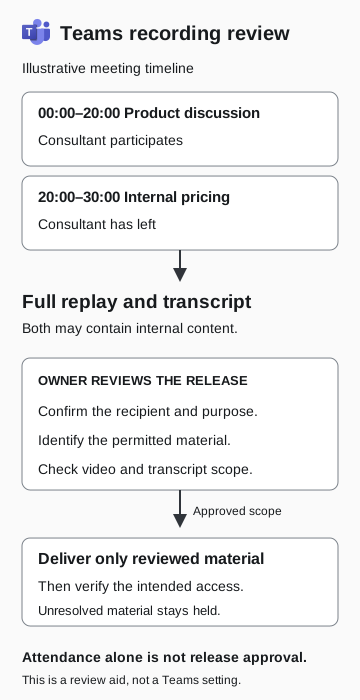
Illustrative meeting timeline
- 00:00–20:00: product discussion
The consultant participates.
- 20:00–30:00: internal pricing
The consultant has left. The full replay and transcript may contain internal content.
- Owner reviews release
Confirm recipient, purpose, permitted material, and both video and transcript scope.
- Approved scope
Deliver only reviewed material, then verify intended access. Hold unresolved material.
Attendance alone is not release approval. This is a review aid, not a Teams setting.
What the Teams settings do and do not settle
Microsoft’s current storage guidance distinguishes meeting types. Non-channel recordings generally go to the organizer’s OneDrive; channel recordings go to the channel’s SharePoint location. For scheduled meetings with external participants, the documented default requires the organizer to share the recording with those external people. An external attendee asking for access can therefore be making a legitimate request. Inspect the actual meeting and file rather than inferring fraud from the request alone. Microsoft: recording storage and permissions
For supported meetings and licensing, Teams also offers a setting for who can access the recording and transcript. Microsoft documents limits: it requires Teams Premium or a Copilot license, does not cover channel or ad hoc meetings, and is affected by later permission changes. Third-party apps are not restricted by that particular option. Check its applicability rather than treating one dropdown as a complete information-release policy. Microsoft: customize recording and transcript access
A meeting bot or third-party note-taking service introduces another recipient and storage question. Handle that through the organization’s app and meeting-admission review. A review of the recording’s sharing settings will not establish what a bot captured or where its copies went.
Resolve the request without sharing the wrong material
Return to the fictional consultant. The organizer confirms the person’s account through the established project contact and checks the recording. The requested product explanation is followed by an internal pricing segment. The organizer asks the appropriate content owner what can be provided.
Possible approved outcomes include a written answer, a separately reviewed extract, an approved presentation, or access to the full record when that is justified. These are workflow options, not a claim that every Teams editing feature removes excluded material from every underlying artifact. If an extract is used, review the delivered file itself and any accompanying transcript. Do not assume a playback boundary or an edited summary changed the original file’s permissions.
If the owner approves a written explanation, record that decision without granting access to the full recording. If the full session is approved for release, have the file owner check the recipient account and sharing settings, then verify the intended access.
If the wrong record was shared
Ask the file owner and incident-response team to review the actual grant, recipient, content, and exposure window. Preserve the request and relevant records before making changes under the approved process. State separately whether access was granted, whether available evidence shows viewing or downloading, and whether those actions remain unknown.
Removing a sharing permission can restrict that route to future access. It does not prove that a recipient has forgotten what they saw or deleted a copy. The content owner and security team should decide the next actions based on what was disclosed and the evidence available.
A clear handoff says, “This person may receive this reviewed material, and this owner approved it.” That gives the person fixing the access problem a decision they can implement.