Does sending an Anyone link to one person restrict it to that person?
No. Anyone links can be forwarded and used without authentication, where that sharing mode is permitted. Specific people links require the specified identity; the email recipient alone does not define the link’s audience.
Changing a sharing link to fix a supplier’s access problem can also widen its audience. Before choosing “Anyone with the link,” check whether the file may be shared beyond the intended recipient.
The recipient line does not define the audience
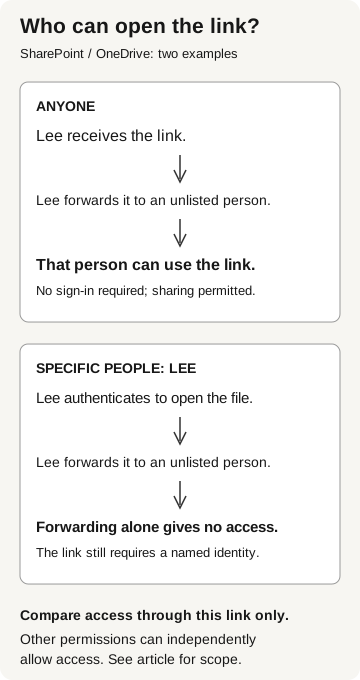
In SharePoint and OneDrive, an Anyone link permits access without authenticating. A person who receives the link can pass it to somebody else. A Specific people link instead requires the recipient to authenticate as an identity specified for that share; forwarding it does not give an unlisted recipient access through that link. Microsoft: how shareable links work
This distinction is easy to miss when both links arrive in the same email. “I only sent it to Lee” describes the delivery, not the permission. Ask the document owner to name the intended readers before choosing the sharing method.
A third option, People in your organization, permits link access for authenticated members of your Microsoft 365 organization, rather than directory guests. It is broader than selecting individual coworkers. It is not a substitute for a supplier-specific share. Microsoft: sharing-link audiences
Who can open the link?
SharePoint / OneDrive examples
- Anyone link
Lee receives and forwards the link. An unlisted person can use it without signing in, when this sharing is permitted.
- Specific people: Lee
Lee authenticates to open the file. Forwarding alone gives an unlisted person no access; a named identity is still required.
Compare access through this link only. Other permissions may independently allow access.
Which link types does your site allow?
An employee cannot assume every site offers anonymous sharing. Microsoft documents organization and site settings; a site can be equally or more restrictive than the organization. Administrators can also require expiration for Anyone links and restrict their permissions to viewing. Microsoft: manage sharing settings
Those controls answer different questions. The audience determines who may use the link. View or edit determines what the share permits. Expiration limits its useful lifetime. A short-lived, view-only link can still disclose a file to an unintended reader while it works.
When the available choices do not match the approved audience, involve the collaboration owner. Find out why access failed before relaxing the restriction. The supplier may have a genuine problem, and the employee needs an approved way to resolve it.
Resolve the invitation before widening access
When a supplier cannot open a Specific people link, first confirm that they are using the approved identity. A request to use a shared meeting-room account changes the recipient; it is not simply a repair to the original invitation. The collaboration team can help resolve the sign-in problem while the document owner decides whether another identity is appropriate.
The document matters too. An Anyone link may fit a public event brochure approved for unrestricted distribution, if the site’s policy permits it. A pricing workbook intended for a named supplier has a different audience. Choose the link for that audience, not for whichever option makes the error disappear.
Removing a link is not recalling a document
Microsoft describes sharing links as revocable. Deleting an Anyone link removes access through that link. That does not recall copies already downloaded or remove other permissions. Review those separately with the file owner. Microsoft: shareable-link behavior
If someone reports a wrongly broadened share, ask the file owner and security team to preserve the relevant details and contain access through the approved process. Record which object and link were involved, when the change was discovered, and which permission or link was actually removed. Avoid pasting a live Anyone link into a widely accessible ticket; the evidence package should not become another distribution channel.
Do not promise a named list of every anonymous reader. Microsoft’s sharing settings documentation warns that Anyone links do not provide that identity tracking. Record what the available evidence establishes and what remains unknown. Microsoft: Anyone link tracking limits
Five details to confirm with the document owner
Before changing the link, settle these details:
- The exact document and the information it contains.
- The intended readers, using established identities where required.
- The requested change in audience, permissions, or lifetime.
- An approved way to resolve the original access problem.
- Who will remove temporary access and verify the result.
Our shared-document phishing guide covers a different direction: receiving a document that introduces an unexpected next action. Here, your own organization is releasing the file. The external guest guide addresses who should be invited into collaboration. Link choice then determines which access path the particular document exposes.