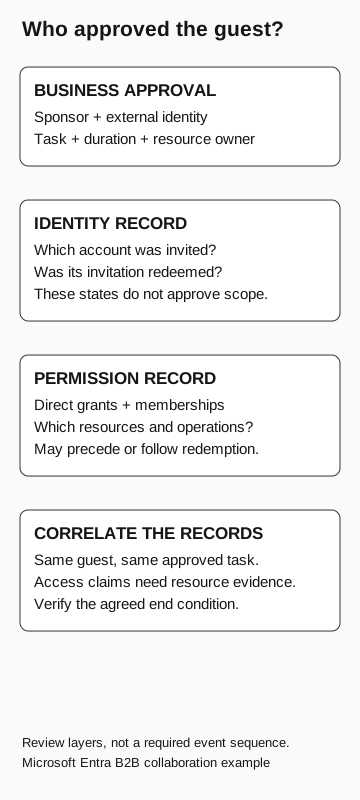
Identify the business sponsor and approved task, then review the invited identity, redemption state, and actual resource permissions separately. An accepted invitation does not establish that the business approved every assignment or that a resource was accessed.
An external guest request needs approval for three things: working with the person, inviting the intended account, and granting access to specific resources. A name, email address, and deadline do not answer all three.
Microsoft Entra B2B collaboration supports work with external identities. Your approval process still needs a business sponsor and a resource owner who can confirm the permissions. The Guest label does not tell you how much access an account has.
Why the invitation deserves a business check
Microsoft’s tenant-protection guidance explicitly warns that attackers may use social engineering to obtain invitations from legitimate internal users. It recommends controlling collaboration invitations and considering the security of external identities. Microsoft: protect tenants
The request can exploit an ordinary collaboration problem: someone needs access quickly, and the person processing it lacks enough context to challenge the destination or scope. Before sending the invitation, ask the sponsor to confirm who needs access and what work they will do.
Our shared-document guide addresses a recipient following instructions in an incoming document. This article looks in the other direction: your organization is deciding whether to admit an external person and what that person should receive.
Four records to review
Business approval establishes why a person should participate. Record the sponsor, expected organization, task, and duration. Confirm an unexpected change of contact details through an established route. These are proposed workflow checks, not automatic guarantees supplied by Entra.
Invitation and directory creation establish which external account was invited. Microsoft’s administrative workflow adds the guest account to the directory when the invitation is sent. An account can therefore exist before the person accepts. Microsoft: add B2B users
Redemption is the process in which the invited person accepts and completes the applicable sign-in and consent experience. The identity provider and redemption path depend on the identity and configuration. An accepted state is useful account evidence, but it is not evidence that the consultant’s contract or requested permissions were approved. Microsoft: invitation redemption
Resource authorization determines what that identity can do. Groups, roles, application assignments, and resource-specific permissions need their own review. Microsoft allows group and role assignments during creation or afterward, so these decisions need not occur in the tidy order of an email conversation. Microsoft: guest assignments
Our authentication and authorization guide explains the underlying distinction: establishing identity and allowing an operation answer different questions. A guest may have assignments before redeeming an invitation. A redeemed guest may still fail a particular resource access check. Inspect the specific resource rather than inferring its behavior from either state alone.
Who approved the guest?
Microsoft Entra B2B collaboration
- Business approval
Sponsor, external identity, task, duration, and resource owner.
- Identity record
Which account was invited? Was the invitation redeemed? These states do not approve scope.
- Permission record
Which direct grants, memberships, resources, and operations? Grants may precede or follow redemption.
- Correlate the records
Connect the same guest and approved task. Access claims need resource evidence. Verify the agreed end condition.
These are review layers, not a required event sequence.
Do not copy another contractor’s access by default
“Give them what the last contractor had” is a shortcut, not a permission specification. Have the sponsor confirm the external identity through the established project contact. Then ask the resource owner to compare the proposed membership with the approved task, including editing rights, unrelated projects, and duration.
Check the permissions after the administrator applies them. A discussion about narrowing permissions is not evidence that the administrator configured them. Where technical validation is authorized, use a harmless object to check the intended operation and a relevant prohibited operation. A successful read of one object establishes that read under those conditions, not that all other resources are inaccessible.
If the approved task fails, give the sponsor a route to resolve it without broadening access blindly.
Review the account you actually have
Use the guest’s stable directory reference when correlating records, alongside the invited address and resource context. Display names alone are weak join keys: two people can share a name, and a readable label does not explain which identity authenticated.
Ask the identity administrator to establish invitation and redemption state, then ask each relevant resource owner to establish effective permissions. Keep direct grants and membership-derived access visible. Do not assume one directory view contains every application’s authorization decisions.
If unexpected activity is already suspected, involve incident response. A membership record establishes a permission relationship; it does not prove a file was opened or data was downloaded. Resource logs or other appropriate evidence are needed for those conclusions. Preserve missing or unavailable evidence as a limitation rather than converting it into “no access.”
For a routine review, the sponsor should confirm whether the original work continues. If it has ended, assign an owner to remove the access and verify the intended outcome under the organization’s offboarding process. Removing one project membership may leave other grants, so define which resources the review covers.
Agree when access ends or needs another review
The sponsor should name when the collaboration ends or must be reviewed. The resource owner should be reachable when the task or address changes. Without those owners, an urgent request to copy permissions can become the default way of resolving an operational problem.