Does an allowed external Teams domain make its users authorized support staff?
No. A communication policy permits a contact path. Verify the person, assignment, and requested action through the established support record. Guest and shared-channel access require separate review.
An unfamiliar person starts a Teams chat using a display name that resembles your support desk. The employee recognizes the application. The administrator recognizes the sender’s organization as one that staff are allowed to contact. Neither fact establishes that this person is assigned to the employee’s problem.
Administrators decide which external conversations are possible. Service owners must also define how employees verify the work requested inside them.
Our remote-support guide follows screen sharing and device control. Here we stop earlier: who can reach the employee, through which collaboration model, and what that connection actually permits.
Start with the identity behind the conversation
A display name is presentation. A business relationship is a separate record. An authorization to perform a particular task needs its own confirmation.
Microsoft’s August 2023 Midnight Blizzard report describes compromised Microsoft 365 tenants being used to create support-themed identities and send Teams lures. The subsequent requests sought authentication actions from targeted employees. This historical reporting shows that a genuine collaboration service can carry a deceptive support identity. Review current settings separately from that historical campaign. Microsoft Threat Intelligence: Midnight Blizzard Teams campaign
For a current review, retain the actual sender identity and organization visible to the receiving employee, the contact time, and the requested action. A screenshot of the display name alone may omit the information needed to determine which path was used. Preserve evidence through the organization’s incident process without asking employees to forward authentication codes or other secrets.
Three collaboration models to keep separate
Teams can put different kinds of external participation into a familiar interface. The permission question depends on the model.
External access enables communication with people using Microsoft identities outside your organization. Guest access invites a person into your organization as an Entra B2B collaboration guest, with participation in the teams and resources they are granted. Receiving an external chat is not by itself a guest invitation or team membership. Microsoft: external access and guest access
Shared channels provide another route. External participants use Microsoft Entra B2B direct connect, with cross-tenant configuration needed on both sides. The external participant is added to the shared channel rather than using a guest account for that participation. The channel has its own membership boundary. Microsoft also requires Teams guest access to be enabled when inviting external participants, even though this path does not use guest accounts. Microsoft: shared channels
These distinctions are useful even for an employee who never configures Teams. “This person can message me” is a weaker statement than “this person belongs to our project team,” and neither means “this person can approve an account change.” The last decision belongs to your business process.
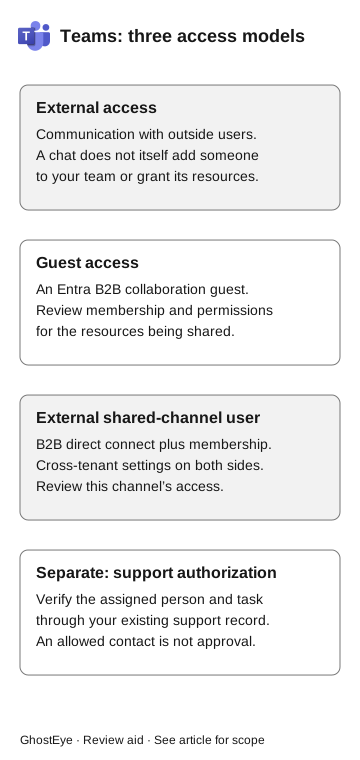
Teams: three access models
- External access
Communication with outside users. Chat alone does not add someone to a team or grant its resources.
- Guest access
An Entra B2B collaboration guest. Review membership and permissions for the shared resources.
- External shared-channel user
B2B direct connect and membership, with cross-tenant settings on both sides. Review this channel’s access.
Support authorization is a separate check: verify the assigned person and task through the existing support record. An allowed contact is not approval.
The diagram is a comparison, not a sequence in which an attacker automatically progresses through three levels. A suspicious external chat does not show that guest membership or shared-channel access followed. Investigate those states only when the request or evidence makes them relevant.
Our external guest approval guide goes deeper into invitations and resource permissions. Use it if the proposed remedy for a failed chat is to invite the person into your tenant: that would be a different authorization decision, not merely a messaging repair.
Review the setting that governs this contact
Microsoft documents both organization settings and user policies for external access. Both must permit the option for a user to use it. Domain allow and block lists govern communication with other Microsoft 365 organizations; a list of allowed domains excludes unlisted domains, while a list of blocked domains allows other domains. Personal Microsoft-account chat has separate controls. Microsoft: manage external meetings and chat
Write the review around actual roles. Who needs routine partner chat? Which partner organizations? Who owns that relationship? When should an exception expire? “External access enabled” is too broad to answer these questions.
The administrator should also name the setting’s limits. Blocking a domain in this path is not a complete statement about anonymous meeting attendance, guest membership, or shared channels. Microsoft’s guidance explicitly notes that people from blocked domains can still join anonymously when anonymous meeting access is allowed. Review those routes separately when they are in scope. Microsoft: external access limitations
Avoid turning this into a recommendation to disable every external conversation. A support provider or partner may have a legitimate reason to collaborate. The defensible objective is to make that relationship explicit and give employees a dependable method for checking the requested work.
An approved supplier can still request unauthorized work
The collaboration policy and the service contract answer different questions. A supplier approved for printer maintenance may need to chat with facilities staff. That relationship does not authorize requests to reset employee authentication methods.
Verify the partner domain independently, then have the collaboration administrator review both organization settings and assigned user policies. The support owner should separately publish the route for confirming the assigned technician and task. An unexpected account-change request belongs with the identity owner even if the message arrived from an allowed organization.
Check communication and authorization separately
A policy review should establish whether an intended partner can reach the relevant users and whether a controlled unapproved contact is restricted on the path being reviewed. Use authorized test identities, harmless messages, and an agreed observation window. Record the identity type, domain, receiving account, client, time, and result. A single blocked external chat does not establish that guest, shared-channel, or anonymous-meeting routes are blocked.
Then examine the business check: can an employee confirm the assignment, and where does an out-of-scope request go? If a message never reached the employee, do not count that as recognition of impersonation. If it arrived and was reported, keep that result distinct from policy enforcement.
Ask employees what was requested and what they did
An employee does not need to identify a threat actor. A useful report says who contacted them, which channel was used, what was requested, and what they did before stopping. Include whether they accepted a chat, opened a destination, shared information, or approved an action. Avoid compressing all of these into “clicked.”
Give employees an established internal reporting route outside the disputed interaction. The instructions should be findable while the employee is uncertain about the sender. Asking the unexpected helper to verify themselves by sending another link keeps the verification inside the same untrusted conversation.
The responder can then decide which owner to involve. An unexplained contact is a collaboration-review question. A shared document may require its resource owner. An approved sign-in or changed authentication method brings in identity response. A remote session brings in endpoint response. The reporting procedure should identify the team responsible for each of these actions.
The channel-handoff guide explains how to preserve context when an interaction moves from chat to a call or another tool. Keep the original message and subsequent employee actions linked in the incident record so the next team does not have to reconstruct the beginning.
Name the owners for chat access and support approval
The collaboration owner determines which external contact paths are permitted. The support owner makes assigned work verifiable. The owner of the requested action decides whether it is authorized. Employees need a reporting route that connects those responsibilities without asking the unexpected helper to vouch for themselves.