Does a payroll-change email prove that salary was diverted?
No. Correlate the request with the stored payroll setting and the payment disposition. A request, an approved or stored change, and a completed payment are separate findings.
Investigating a disputed payroll change takes three sets of records: the request, the stored payroll setting, and the payment outcome. An email can show what someone asked HR to do. It cannot establish which bank destination was saved or whether money reached it.
The Storm-2755 case below shows why mailbox investigators and payroll owners need to compare their findings.
A real case: correspondence hidden before the change
In April 2026, Microsoft described Storm-2755 targeting Canadian users. The report identifies likely initial access through poisoned search results or malicious advertising leading to a fake Microsoft 365 sign-in page, followed by authenticated-session abuse.
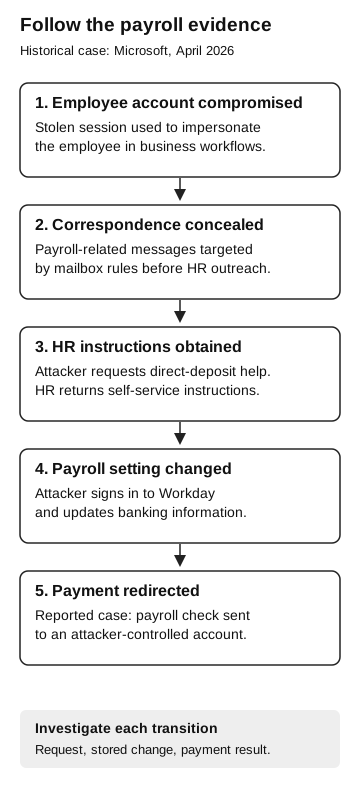
One impact case provides a particularly useful sequence. After compromising the employee’s account, the attacker created inbox rules targeting messages containing “direct deposit” or “bank.” The attacker emailed HR from the compromised account, received instructions, then signed in to Workday as the victim and changed banking information. Microsoft reports that a payroll check was redirected to an attacker-controlled account. Its defense-evasion section describes moving relevant correspondence into Conversation History and stopping further rule processing. Microsoft: Storm-2755, defense evasion and impact
Use that case to guide the investigation. Payroll products and configured approval controls vary; ask the application owner what applied to the disputed change. Our AiTM explainer covers session theft; here the question is how investigators connect mailbox activity to a payroll outcome.
Keep three records separate
A human resources information system, or HRIS, holds employee information and may expose payroll settings. The application name does not tell you whether a particular change required separate approval. Ask the HRIS owner to identify the configured workflow, the effective date, and the relevant audit trail.
A mailbox rule applies actions to messages meeting its conditions. In this case, the relevant question is whether correspondence was moved out of the employee’s normal view. A rule matching a payroll keyword is a lead for investigation. Its existence alone does not establish that it processed a particular message, that a payroll setting changed, or that money left the organization.
A payment disposition records the result of the payroll process: for example, held, submitted, rejected, returned, or confirmed paid according to the records available to the payroll team. Use that team’s actual definitions. “Submitted” and “received by the employee” should not become interchangeable in the incident summary.
Follow the payroll evidence
Historical case reported by Microsoft, April 2026
- Employee account compromised
A stolen session is used to impersonate the employee in business workflows.
- Correspondence concealed
Payroll-related messages are targeted by mailbox rules before HR outreach.
- HR instructions obtained
The attacker requests direct-deposit help; HR returns self-service instructions.
- Payroll setting changed
The attacker signs in to Workday and changes banking information.
- Payment redirected
In the reported case, a payroll check is sent to an attacker-controlled account.
Investigate each transition: request, stored change, and payment result.
Reconstruct a fictional payroll incident
The following training packet uses invented records and UTC timestamps. References such as M-11 and P-31 are local labels, not vendor log fields. In an actual investigation, retain the original timestamps and document timezone conversions.
| Time | Reference | Supplied record |
|---|---|---|
09:04 |
R-10 |
Mail administrator exports a rule targeting payroll-related terms and moving matching mail to another folder. |
09:08 |
M-11 |
A message from the employee mailbox asks HR how to update direct deposit. |
09:14 |
M-12 |
HR replies with the approved self-service instructions. A preserved copy is found in the destination folder. |
09:22 |
H-20 |
HRIS audit export records a stored change from Destination A to Destination B for Employee E-7. |
10:00 |
P-30 |
Payroll batch record lists E-7 using Destination B; status is “prepared.” |
10:06 |
P-31 |
Payroll owner records a hold before batch submission. |
“Destination A” and “Destination B” are harmless labels. The packet contains no real account numbers. Do not add banking credentials or complete financial details to a broadly shared security exercise.
Start with the strongest supported statement: the records show a payroll destination change stored before a prepared batch was held. They do not show a completed payment. That distinction makes this fictional outcome different from the reported Microsoft impact case.
Next inspect the joins. H-20 and P-30 both name E-7, but does the email address in M-11 belong to E-7? The facilitator should provide an authorized employee-directory mapping. A similar display name is insufficient. Does the rule’s condition match M-12, and is there evidence connecting its movement to rule processing? Finding the message in the destination folder supports its location, but manual movement remains a possible explanation unless further evidence resolves it.
Finally ask who performed the HRIS operation. An audit entry naming the employee account establishes the account recorded for that action. It does not by itself identify the human operating it. Review the session and device evidence available for that application, with the identity team, before assigning the action to the employee or attacker.
Say what changed and whether the payment went through
A useful initial finding for this packet would read:
Illustrative finding: Employee E-7’s payroll destination changed from A to B at 09:22. The prepared batch referenced B and was held at 10:06 before submission. A payroll-related mailbox rule and HR correspondence require correlation. The packet does not establish a completed transfer or identify the person who made the HRIS change.
Payroll can see that the batch was held; responders still need to connect the mailbox activity and identify who changed the HRIS record. The finding avoids reporting a successful financial theft when the supplied evidence shows a hold.
Now make the exercise harder by removing P-31. The correct outcome becomes “payment disposition unconfirmed,” not “payment stopped.” Assign that question to the payroll owner with a response deadline. Alternatively, replace H-20 with a change-request ticket. That proves a request existed; the investigator must still obtain the resulting stored state or an authoritative rejection record.
These small variations test whether the team reads evidence or completes the story it expects. They require no live malicious mailbox rules and no change to an employee’s real pay.
Give each owner a concrete job
The mailbox team preserves the relevant correspondence and rule evidence, then handles malicious rule removal through the incident process. The identity team investigates the affected sessions and accounts. The HRIS owner identifies the changed fields, permissions, effective dates, and any further changes. Payroll establishes whether the destination reached a batch and what happened to that batch.
Choose a coordinator to reconcile those answers. A password reset ticket should not close the payroll question, and a payroll hold should not close the account-compromise question. Our identity containment review explains why remediation needs evidence from the affected resources as well as the identity system.
For a live suspected incident, involve those owners immediately through the established response process. Preserve available evidence without delaying urgent containment or payroll intervention.
Retest the notification path too
After the immediate incident, review how the organization confirms a sensitive payroll change. If the only notice goes to the mailbox under investigation, ask what independently established route the employee and payroll team can use. The right route depends on the organization’s approved procedure and privacy requirements; it should not be supplied solely by the disputed request.
For a tabletop retest, use the same fictional employee and destinations. Introduce a legitimate change through the approved route, then an unresolved request from a disputed mailbox. Ask participants to record the decision, the approving role, and the resulting state. The goal is a supported legitimate change and a held or escalated unresolved request, with evidence for both.
Our supplier-change exercise examines finance approval boundaries. This payroll review adds the cross-system investigation: concealed correspondence, an employee record, a payroll batch, and the final disposition.
The optional payroll evidence worksheet provides a place to connect those records. Keep the last confirmed outcome and the unresolved questions visible in the incident summary.