Does a ticket number in a PIM request prove the change was approved?
No. Microsoft documents the ticket field as informational, without enforced correlation to a ticketing system. Review the actual work record and requested role separately.
“I need you to activate your admin role for an hour. The ticket is already approved.”
A legitimate colleague may need urgent help. An impersonator can use the same request to borrow the administrator’s ability to change something. The decision starts before the role becomes active: what work is authorized, who needs to do it, and what would show that the work stayed within that purpose?
Microsoft Entra Privileged Identity Management, or PIM, helps manage privileged access. This article focuses on eligible Microsoft Entra roles, rather than treating Azure resource roles or PIM for Groups as interchangeable.
Eligible means you can request activation
An eligible assignment lets a user request activation when the role is needed. Activation temporarily adds an active role assignment. That separates the ability to request a role from having its permissions available for administrative work. Microsoft describes this distinction in its activation guidance.
Being eligible is therefore useful context, but it does not establish that today’s request makes sense. An experienced administrator can be the right person for the role and still receive misleading instructions about how to use it.
PIM requires the appropriate licensing; Microsoft’s setup guidance identifies Microsoft Entra ID P2 or Microsoft Entra ID Governance. The organization must establish eligible assignments and role settings before this workflow is meaningful. A caller cannot create a legitimate assignment merely by saying that a user “has PIM.” Microsoft: start using PIM
Check the ticket behind the activation form
Microsoft Entra role settings can require justification, ticket information, approval, and authentication requirements. These controls should be reviewed according to what they actually establish. In particular, Microsoft states that the ticket-information field is informational: PIM does not enforce correlation with a ticketing system. Microsoft: role settings, ticket information and approval
A plausible ticket number needs to be opened in the organization’s established system. The approver should compare the work, requester, target, and requested privilege with that record. A ticket can exist yet describe a different task.
Meeting the MFA requirement does not decide whether the requested administrative change is appropriate. Do not teach approvers that every activation must display a fresh prompt: the current documentation explains that earlier authentication in a session can satisfy the MFA requirement. The exact controls depend on the configured role policy. Microsoft: activation authentication
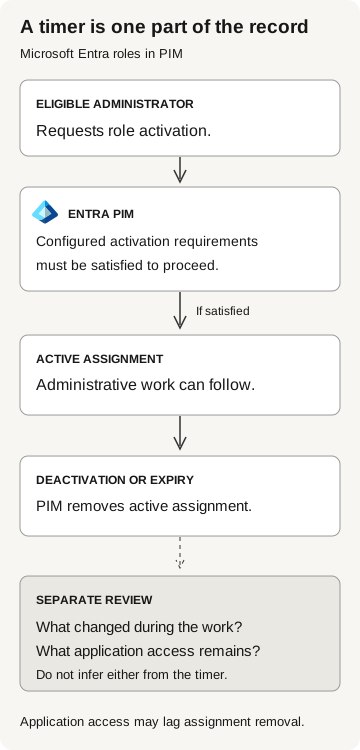
A timer is one part of the record
- Eligible administrator
Requests a Microsoft Entra role activation in PIM.
- Entra PIM
Evaluates the configured activation requirements.
Only if requirements are satisfied
- Active assignment
Administrative work can follow.
- Deactivation or expiry
PIM removes the active assignment.
Separately review changes made during the work and remaining application access. Access may lag assignment removal.
Does the ticket approve this exact operation?
Approval to review a configuration is not approval to modify it. Open the referenced ticket in the established system and compare the proposed operation with what its owner authorized. Resolve a mismatch with that owner before activation, even when the requester correctly names the project and administrator.
The approval should identify the operator, role, target, and work window. If the team cannot determine which role is appropriate, that is an operational question to resolve rather than a reason to grant broader access. The timer limits an assignment’s duration; it does not justify the work.
Check what remains after the role expires
When activation expires or is deactivated, Microsoft says PIM removes the active assignment. It also warns that applications may cache role information, so effective application access may not immediately reflect assignment removal. The behavior depends on the application. Microsoft: activation and deactivation behavior
That is one reason an expired timer is insufficient evidence of containment. There is another: the resulting configuration needs its own review. Removing an administrator’s temporary assignment is not evidence that every action they performed was reversed. A reviewer should check the resulting state of each affected object instead of assuming rollback.
For example, if the approved task involved changing an application’s credentials, the application owner should separately verify which credentials now exist and whether the intended cleanup occurred. Our app credential-change guide covers that object’s lifecycle. This example is a review recommendation, not a claim that every eligible role can modify every application’s credentials.
During an incident, the identity team should investigate the actual permissions, actions, and resulting access. Responders may need to contain more than the activated assignment. Base the response on what changed. Waiting for the timer does not investigate or undo those changes.
Connect the request, assignment, and work
PIM’s Resource audit history covers role assignment changes, activations, and PIM policy changes. Microsoft describes it as a subset of Microsoft Entra audit logs and documents a 30-day history, with routing options for longer retention. These records are useful for the activation lifecycle; they are not a complete substitute for evidence from the service where work occurred. Microsoft: PIM audit history
Start the review with the approved work record. Then correlate the request and assignment with relevant administrative activity during the work window. Preserve stable account and object identifiers, timestamps with timezone, and the original records. Do not infer that similar display names refer to the same identity.
A practical review can finish with four statements:
- Purpose: the task and target approved by the accountable owner.
- Assignment: the observed role, scope, and active interval.
- Actions: the administrative operations actually supported by evidence.
- Result: the verified configuration and any access that remains unresolved.
If you have only the first two, say that the action review is incomplete. An absent record can reflect retention, collection, or a query limitation; it is not automatically evidence that nothing happened. The sign-in evidence guide uses the same discipline for separating observations from conclusions.