What should defenders understand about RDP file phishing?
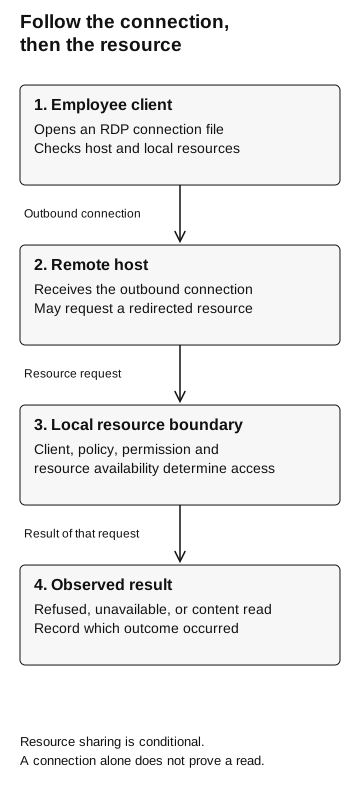
An employee can connect outward to a remote host while permitted redirection exposes selected local resources within that session. Check the destination, actual client and policy, selected resources, and observed access separately.
A remote desktop invitation asks you to connect to another computer. It may also ask to make files and other resources on your device available there. Check both before connecting.
RDP file phishing uses a remote desktop connection configuration as the lure. A user connects outward to a remote host; enabled resource redirection can make local resources available inside that remote session. Knowing which side starts the connection is essential to choosing the right controls.
Start with the direction of the connection
Remote Desktop Protocol, or RDP, lets a client interact with a remote computer. In the scenario here, the employee’s computer is the client and the destination is the remote host. The employee opens a connection file that specifies how to reach that host.
Resource redirection is the part that deserves a second look. It can make something attached to the client available in the remote session. A remote application may therefore reach a local resource even though the employee initiated the connection outward. Microsoft’s property reference defines drive redirection as making selected fixed, removable, or network drives available in that session. Microsoft: supported RDP properties
That is a different question from the fake IT remote-support flow, where the employee authorizes a support operator’s assistance. Here, ask: “Where is my client connecting, and what local resources will that session receive?” Calling both cases remote access is accurate but insufficient for deciding what to inspect.
Follow the connection, then the resource
- Employee client
Opens an RDP connection file. Check the host and local resources.
Outbound connection
- Remote host
Receives the connection and may request a redirected resource.
Resource request
- Local resource boundary
Client, policy, permission, and resource availability determine access.
Result of that request
- Observed result
Refused, unavailable, or content read? Record the actual outcome.
Resource sharing is conditional. A connection alone does not prove a read.
What Microsoft observed in 2024
Microsoft reported that Midnight Blizzard sent targeted emails containing signed RDP configuration files in October 2024. The destinations were actor-controlled servers. The files requested sensitive local resources, including drives and clipboard data. Some messages impersonated Microsoft employees or invoked familiar cloud providers and security concepts.
The report describes how redirected resources could expose information and enable writes to mapped drives. It does not mean that every recipient connected, every resource was available, or every possible follow-on action occurred. Its campaign and mitigation sections are the primary reference for this historical case. Microsoft: Midnight Blizzard RDP campaign
“An attachment was delivered” is one observation. “A connection completed with a local drive available” is another. “A file was copied from that drive” requires additional evidence. Do not collapse the three into a single successful-phishing count.
Use current warnings, not an old screenshot
Microsoft changed the Remote Desktop Connection experience starting with the April 2026 security update. Its guidance describes a security dialog before connections started by opening an RDP file, with requested local-resource access off by default until selected. A first-launch educational dialog also appears once per account after the update.
The same guidance says trusted-publisher policy can change the experience, and manually entering a computer name is outside this particular update. A signature establishes publisher identity and file integrity, not that the connection is appropriate. These details apply to the documented Windows client path; they are not a promise about every RDP client or device. Microsoft: understanding RDP security warnings
For an assessment, record the client, operating system, update level, launch method, and relevant policy. Otherwise, two employees may appear to make different choices while actually seeing different prompts. Preserve a redacted screenshot of the actual dialog shown on the test device, with the selected resources visible.
Training should teach employees to recognize the decision they are being asked to make. “I recognize the vendor name” does not answer whether the destination belongs to the expected organization or whether a task needs access to a local drive.
Review resources one at a time
Check which resources your client supports and which settings apply before reviewing these requests.
| Resource | Question to resolve before connecting |
|---|---|
Local or mapped drives |
Does this remote task require access to files on this device? Which location is approved? |
Clipboard |
Does the task need cross-session copy and paste? What sensitive content might already be copied? |
Microphone or camera |
Is audio or video part of the expected task, and who operates the remote environment? |
Authentication devices |
Is an authentication request expected in this remote session, for this service? |
Microsoft’s current warning guide describes these resource categories and their risks. Its authentication guidance includes an indication when a WebAuthn request comes from a remote session. That deserves an explicit explanation in employee instructions: receiving a familiar authentication prompt does not establish that the surrounding remote task was authorized. Microsoft: redirections and authentication prompts
Keep the exercise focused. If the control question concerns file exposure, do not add microphone access or authentication-device use just to make the scenario look comprehensive. Each extra resource creates a separate permission, observation, and cleanup obligation.
Does your policy cover this connection?
Microsoft documents drive-redirection settings for Azure Virtual Desktop, Windows 365, and Dev Box. Its guidance explains that the most restrictive applicable setting controls the result; an enabled host-pool property does not override a session-host policy that disables drive redirection. Microsoft: configuring drive redirection
This is useful for administering your own remote environment. It does not establish what an employee’s client will allow when connecting to an unrelated external host. Record the scope of a policy before treating it as protection for a different connection path.
Separate the owners in the review. The endpoint team owns the client configuration and update posture. The network team owns the permitted destination path. The remote-service owner knows the legitimate workflow. The assessment team needs an agreed evidence plan. A host-pool setting alone cannot answer all four teams’ questions.
Microsoft’s historical campaign recommendations include restricting outbound RDP to external or public networks. Treat destination restrictions as a control to verify in your environment, not a conclusion inferred from a firewall rule’s name. An inbound remote-desktop rule addresses a different direction. Microsoft: campaign mitigations
Work through one harmless test
Consider a fictional test on an organization-owned host.
A training team wants to know whether its approved Windows client permits a designated local test location to become available on an organization-owned remote host. The team creates a disposable test device containing a single harmless marker, TRAINING-FILE-ONLY. It contains no production files, mapped company shares, saved credentials, or personal data.
Before starting, the endpoint and remote-host owners authorize one connection and one attempt to read that marker. They record the expected result: the marker should remain unavailable in this selected configuration. They prohibit writes, other resource use, and any attempt to change settings after a refusal. The observer agrees which endpoint, network, and remote-host records will be collected.
The test has four checkpoints:
- Invitation: retain the exercise message and destination reference. This establishes what was presented, not that it was opened.
- Decision: record the actual client warning and selected resources. A canceled dialog is a meaningful outcome.
- Connection: establish whether the client reached the approved host and whether a session completed.
- Resource result: record the approved read result and whether it returned the expected harmless marker.
Do not record real authentication secrets in the worksheet. A reference to restricted evidence storage is enough to join the records. Give the employee a reporting path before the exercise, and stop if any production resource appears unexpectedly.
What did the test actually show?
Suppose the observer sees a completed session, but the marker cannot be read. The supported statement is that the selected read failed in that configuration. The team still needs to determine whether the intended redirection control caused the refusal, the resource was not selected, or the marker was simply unavailable.
A positive control can resolve one ambiguity. On a separately approved test configuration, confirm that the marker exists and can be accessed when the designated resource is intentionally available. Keep this control isolated and separately recorded; do not silently loosen the original test’s configuration until it succeeds.
If the marker is returned during the original test, the finding is more specific than “RDP is unsafe”: a particular configuration permitted the designated local content to be read in the remote session despite an expected refusal. That gives the endpoint owner a reproducible condition to address.
Report the result as access to the test marker under the recorded conditions; production-file access was not tested.
Join evidence before naming the outcome
A short evidence table helps reviewers avoid treating a connection attempt as proof of exposure.
| Observation | Supported statement | Still unresolved |
|---|---|---|
Message delivered |
Employee received the invitation |
Open, connection, and resource access |
Client launched |
Connection workflow started |
Session completion and resource availability |
Outbound attempt recorded |
Device attempted to reach a destination |
Successful session and file access |
Session completed |
Remote interaction was established |
Which resources were available or used |
Marker read with matching test records |
Approved test content was read |
Other resources and production impact |
In an incident, collect the employee’s account of what they saw without asking them to repeat the connection. Preserve the original message through the approved reporting process. Record the approximate time, destination shown, resources selected, and any authentication prompts they approved. The response team can then correlate that report with available telemetry.
Missing records should remain missing in the conclusion. If a session is established but file-level evidence is unavailable, report the exposure question as unresolved. A clean search in a source that never collected the relevant activity is not proof that nothing happened.
Close the test with an owner and a retest
End the test session, remove the exercise file, and restore the disposable environment according to the agreed plan. The remote-host owner confirms that the marker and any test output are removed or retained only in approved evidence storage. Record any exception rather than declaring cleanup complete by default.
For a fix, repeat the same authorized operation with the same marker and documented client path. Record the changed policy or update separately. If the retest uses a different client, destination, or resource, explain why the comparison is still useful. Otherwise, it may answer a different question.
Use our technical follow-on contract when a social-engineering exercise needs to hand off to this kind of resource check. The employee’s decision and the technical result should stay separately visible in the finding.
Download the RDP connection review card for an employee-facing pause checklist and an administrator evidence worksheet. Identify the remote destination and the local resources it would receive before approving a connection.