Does a legitimate-looking coding interview make its repository safe to run?
No. Verify the hiring relationship, identify the exact assessment version, review execution steps and editor settings, and agree on an appropriate environment before running unfamiliar code.
A take-home coding assessment may ask you to install dependencies, grant an editor workspace trust, or run a project supplied by a recruiter. Review those execution steps before using a computer with work sessions, credentials, or personal files.
Verify the hiring relationship separately from the code. Even when the recruiter is legitimate, you still need to know what will run, where it will run, and what that environment can access.
How Contagious Interview gets code running
Microsoft’s March 2026 reporting describes Contagious Interview using staged recruitment to persuade developers to execute malicious packages or commands. In the package route, fake recruiters directed candidates to clone and execute an npm project hosted on familiar code platforms. Microsoft also observed a Visual Studio Code route involving repository trust and task configuration that fetched a backdoor.
The observed intrusion requires execution; receiving a message or downloading an archive is a different event. The report concerns the coding-assessment route; it does not attribute every recruiter impersonation to this actor. Microsoft: Contagious Interview, initial access
Our new-hire impersonation article looks at an employer granting access to an alleged employee. Here the candidate already owns the computer and is being asked to run somebody else’s project. The direction of trust is different.
Four questions before the first run
Who supplied this assessment? Verify the hiring relationship through a route you establish independently, such as the employer’s published recruiting contact. A conversation on a reputable service establishes where the conversation occurred. It does not automatically establish the sender’s authority to represent the company.
What exactly did they supply? Record the repository address and the revision you received, or the archive name and a security-team-generated file hash. A revision is a reference to a particular version. A hash identifies particular file contents; neither is a safety certificate. Preserve the original invitation so that the reviewed artifact can be connected to the request.
What action is requested? Reading a file, granting workspace trust, installing dependencies, running a build, starting a debugger, and installing an extension have different consequences. Ask for the assessment’s expected steps before proceeding. “Just get it running” is too broad to serve as a review record.
Where would that action run? Identify whether the environment contains work sessions, cloud credentials, source code, browser profiles, or personal files. Use an assessment environment approved for untrusted material by the responsible IT or security team. Do not substitute a personal guess that an empty folder or an ordinary container provides complete isolation.
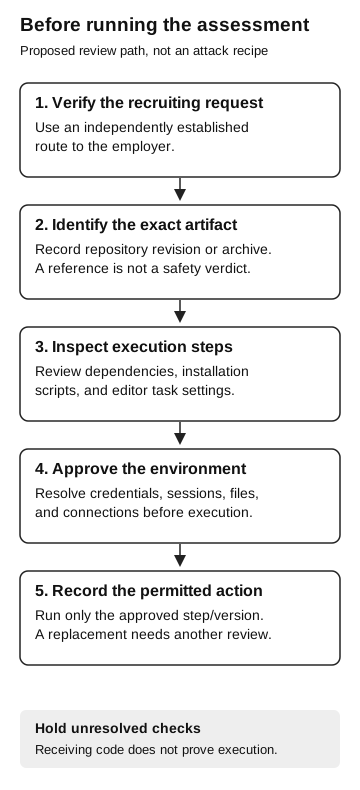
Before running the assessment
Proposed review path
- Verify the recruiting request
Use an independently established employer contact.
- Identify the artifact
Record the repository revision or archive. A reference is not a safety verdict.
- Inspect execution steps
Review dependencies, installation scripts, and editor task settings.
- Approve the environment
Resolve credentials, sessions, files, and connections before execution.
- Record the permitted action
Run only the approved step and version. A replacement needs another review.
Hold unresolved checks. Receiving code does not prove execution.
The editor is part of the review
Visual Studio Code calls its project permission boundary Workspace Trust. Current documentation explains that Restricted Mode limits features that may execute project-controlled code, including tasks and debugging. Repository task definitions live under .vscode, so settings arriving with the project can matter as much as the source file the interviewer asks you to edit.
Trust can also be inherited from a trusted parent folder. Placing an unfamiliar project under an already trusted directory may change the prompt you expect to see. Inspect the actual trust state rather than using the absence of a warning as evidence of safety. VS Code also cautions that Workspace Trust cannot prevent a malicious extension from ignoring Restricted Mode. VS Code: Workspace Trust
These controls help a reviewer keep an unfamiliar project constrained. They do not certify a repository as benign. Exact prompts and enabled features depend on the installed version, configuration, and extensions. Record that context if your security team evaluates the assessment.
Granting trust is consequential, but it is not evidence that every trusted project automatically launches a payload. In the reported attack, the repository’s task configuration mattered. To establish what actually ran on a particular machine, an investigation needs execution evidence, not just the fact that somebody clicked a trust prompt.
Installing dependencies can execute code
A dependency is another package the project relies on. Installing dependencies can feel like preparation rather than running the assessment, which makes this step easy to overlook.
npm’s documentation lists lifecycle scripts associated with installation, including preinstall, install, and postinstall, as well as other applicable lifecycle stages. The ignore-scripts setting suppresses scripts defined in package files for relevant operations, but explicit script-running commands still run their intended scripts. It is a configuration behavior, not a guarantee that an unfamiliar package is safe. npm: scripts and lifecycle order; npm: ignore-scripts configuration
For the review, ask the security team to examine installation and execution steps together. Include the package manifest, lockfile, task configuration, requested editor extensions, and any external resources those steps reference. A short visible application can still depend on material outside that file.
Reviewing the manifest does not mean every dependency and script has been reviewed. Record what was examined, by whom, and which version. If the recruiter replaces the project or asks for a new dependency after review, that new material needs a decision too.
Employer confirmation resolves the hiring relationship, not the assessment environment. If that machine contains active work sessions or mounted work folders, arrange an approved alternative or request a different assessment format. Likewise, a replacement repository revision or “quick setup fix” needs review even after the original version was approved.
If the project has already run
Stop interacting with the suspect assessment and contact the responsible security team through its established channel. Describe the actions in order: downloaded, opened, trusted, installed, ran, or granted an additional permission. “I opened it” can conceal several different actions, so use the most precise description you can.
Preserve the recruiting conversation and repository or archive reference. Record approximate times, the computer involved, and any commands or prompts you remember. Do not paste credentials or sensitive environment contents into a general recruiting email or public issue. Let the response team direct evidence collection and containment instead of rerunning the project to reproduce the problem yourself.
Investigators need to check what ran and what it accessed. An environment containing cloud credentials presents an exposure to examine; it does not prove those credentials were read. A suspicious package does not establish which payload executed. Conversely, the absence of a visible application window does not establish that nothing ran. Obtain the process, file, network, and identity evidence available for the relevant time window and describe its limits.
Our ClickFix guide follows a user instruction into execution evidence. Apply that discipline here while retaining the recruiting context and the package/editor steps that make this route distinct.
Give candidates a safe way to do the assessment
Hiring teams can reduce ambiguity by publishing the assessment owner, expected tools, exact repository version, and execution requirements in advance. Offer an alternative when a candidate cannot use the proposed environment. A request for clarification should have a named contact and enough time for a response before the deadline.
Security teams can make the same path usable internally: define who reviews unfamiliar assessments, what environment is available, and what changes invalidate a prior approval. A procedure that merely tells developers to “be careful” leaves them to resolve those questions during an interview.