What makes ClickFix different from a suspicious link?
The lure asks the person to perform a supposed repair or verification step that runs code on their device. A page visit, copied text, process execution, and later malware activity are separate outcomes requiring separate evidence.
An employee opens a page needed for work. A message says the page cannot load until they complete a verification step. The proposed fix asks them to leave the browser and run something on their computer. The employee believes they are resolving an obstacle; the security team needs to establish what that action actually did.
ClickFix connects a persuasive instruction to a device action. To assess it, follow the content from the page to the clipboard to the attempted execution, then establish where the sequence stopped.
From a webpage prompt to a device command
Microsoft’s August 2025 research describes fake repair and human-verification prompts that persuade users to run commands. Delivery included phishing and malicious advertising; the researchers also analyzed macOS targeting. ClickFix names a technique rather than a single actor or malware family. Microsoft Threat Intelligence: ClickFix analysis
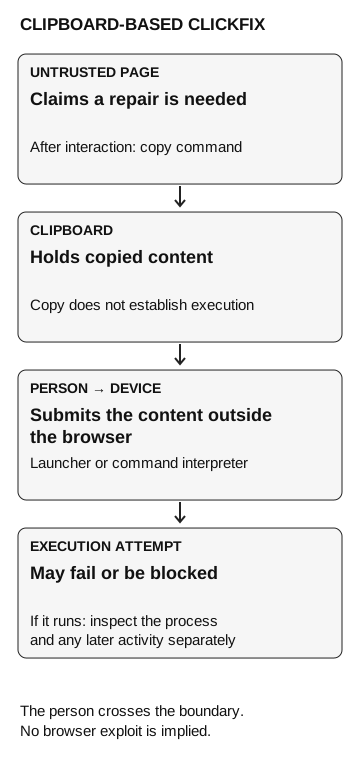
Follow the clipboard variant. A person clicks a convincing verification control. The page copies a command to the clipboard and displays instructions to run it outside the browser. The person then submits the pasted text to an operating-system launcher or command interpreter. Copying text is one event; executing it is another. Microsoft’s analyzed implementations include that click-to-copy behavior. Microsoft: landing-page implementation
The clipboard is the temporary place where copied content waits to be pasted. A command interpreter processes instructions rather than displaying them as document text. The person is taking text from a webpage and asking the computer to run it as instructions.
MITRE ATT&CK classifies malicious copy and paste as T1204.004, a sub-technique of User Execution. Its description explains that the user-mediated action can get around protections aimed at malicious downloads or browser-contained activity. This does not mean it defeats every endpoint control: the relevant question is which later action the configured control permits or prevents. MITRE: Malicious Copy and Paste
This differs from fake IT support, where someone grants a helper remote access. In the ClickFix pattern above, the employee performs the device action. A page visit, a copied command, and process execution belong in separate rows of the report.
Clipboard-based ClickFix
- Untrusted page
Claims a repair is needed.
After interaction: copy a command
- Clipboard
Holds copied content. Copying does not establish execution.
Person submits the content outside the browser
- Launcher or command interpreter
Receives the submitted content.
Execution attempt
- Device activity
The attempt may fail or be blocked. If it runs, inspect the process and later activity separately.
The person crosses the boundary. No browser exploit is implied.
What the records tell you
Start with the disputed action and request evidence that answers it. Available records will depend on the browser, endpoint product, and collection settings.
| Evidence available | Supported conclusion | Still unresolved |
|---|---|---|
A retained lure page |
The sample contains these instructions |
Whether this version was presented to the person, and whether they acted |
An approved observer records a copy interaction |
The interaction occurred |
Whether the clipboard content ran |
A matching endpoint process record |
The named process started in that user context |
What later operations completed |
A failed connection record tied to that process |
That connection failed |
Whether other activity occurred |
An alert with matching device and time |
That system raised this alert |
Whether an analyst received or acted on it |
Match the device, user, time, and process relationship before joining these observations. A browser visit near an unrelated terminal event is a lead to investigate, not enough to attribute the terminal activity to the page.
Microsoft describes the Windows Run dialog’s RunMRU registry history as one investigative artifact, but notes that failed process execution does not create that entry. Consequently, a missing entry alone cannot prove that the person never tried to execute an instruction. Microsoft: Run-dialog artifacts
Keep awareness and detection tests distinct
A harmless lab action can show that a participant followed an instruction and that endpoint collection recorded the resulting process. It cannot establish whether a real malware payload would have triggered detection. That question needs representative behavior, an expected signal, and an approved test method chosen by the detection owner.
Before any exercise, agree where it stops: the employee’s decision, or a separately authorized device action. Establish which records are available, who will review them, and how long the alert review will run. Extending the test into endpoint activity changes both the authorization needed and the conclusion the report can support. The assessment design guide covers how to keep those decisions comparable across tests.
Give employees a usable response
A practical instruction is: when an unfamiliar page asks you to run a repair or verification action on your device, pause and check through your established support route. The organization needs to make that route easy to find without using contact details supplied by the suspicious page.
Ask support to confirm the task, not merely whether the page looks familiar. An employee trying to open an invoice should not need to diagnose an encoded command to explain the mismatch. “This document page is asking me to run a device instruction” is enough information to begin the review.
The exercise should also check whether support can handle the report. Can the employee reach someone? Does the receiving team understand where the attempt stopped? Is there a route for endpoint investigation if the employee already acted? Those are process questions the test can expose without blaming the person who needed help.
If an employee pauses but cannot reach support, repair the support route. If an endpoint action lacks usable records, establish collection before evaluating alerting. If an alert reaches the wrong queue, investigate routing and acknowledgment. Each gap calls for different follow-up.