Should I paste code into my browser console because a support agent asks?
Verify the support case and have the proposed code reviewed through an approved technical route before executing it. Browser-console code can act in the open page context; a familiar website and the absence of a paste warning do not establish that the instructions are safe.
A chat agent says the account problem is easy to fix. Keep the company application open, open the browser’s developer tools, and paste a short block of text into the Console. The message calls it a diagnostic check.
That text can be a program. Before running it, separate the support conversation from the action it requests: whose code will execute, inside which page, using which account? A genuine application can be the place where an untrusted instruction takes effect.
Preserve the proposed instruction and have the application support team review it before execution.
The browser console can run code
Developer tools help engineers inspect and debug websites. The Console evaluates JavaScript, the programming language used by many web pages. Chrome’s documentation demonstrates that console statements can inspect or change the open page. Looking at a console message and executing a supplied statement are different actions. Chrome: running JavaScript in the Console
Self-XSS, short for self cross-site scripting, describes a social-engineering route in which a person is persuaded to execute malicious browser code themselves. Chrome’s original explanation includes fake fixes and promised benefits as lures. It does not require the reader to discover a software flaw in the website first. Chrome: self-XSS defenses
This differs from the operating-system commands in our ClickFix article. Here the immediate execution environment is the browser page. That distinction matters to the responder: record the page and signed-in account, not just the computer name.
A genuine page can host the wrong instructions
Verifying the application’s address does not verify code supplied in a separate support conversation. Depending on the code and application, execution may inspect page data, alter what you see, or initiate requests in the current session. The application’s own permissions and request checks still matter; code execution does not guarantee that any desired action will succeed.
Do not assume that every session cookie can simply be read by JavaScript. The HttpOnly cookie attribute prevents that form of access. Browsers can still attach such cookies to applicable JavaScript-initiated requests. Protecting a cookie from direct reading therefore does not make arbitrary code safe inside a signed-in page. MDN: HttpOnly
Our tokens and session cookies guide explains those artifacts more broadly. For this request, the practical question is what the proposed program could do in the particular page and account context.
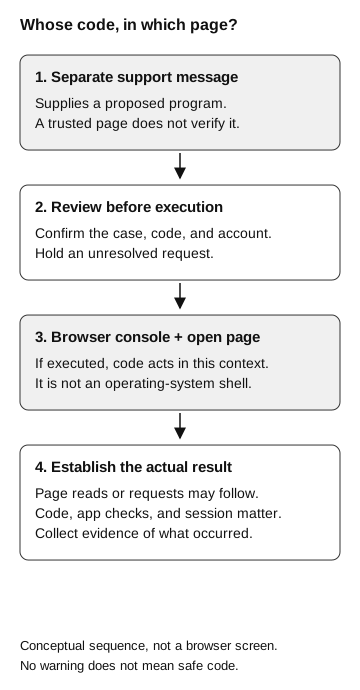
Whose code, in which page?
Conceptual sequence, not a browser screen
- Separate support message
Supplies a proposed program. A trusted page does not verify it.
- Review before execution
Confirm the case, code, and account. Hold an unresolved request.
If executed
- Browser console and open page
Code acts in this context; it is not an operating-system shell.
- Actual result
Page reads or requests may follow. Code, application checks, and session matter. Collect evidence.
No warning does not mean safe code.
A missing warning does not approve the code
Chrome describes a paste warning intended to interrupt inexperienced console users. Its behavior depends on the browser profile, including previous console use or a prior decision to allow pasting. It is not a universal prompt for every execution attempt. Chrome: warning behavior
A support procedure should therefore work whether or not that warning appears. Ask employees to pause an unexpected console-code request and use the established support route. Do not make the presence of a warning the only signal that a technical review is needed.
Legitimate developers use the Console. The useful distinction is whether the person understands and has approved the requested operation in that environment. Someone copying an unexplained program under pressure is making a different decision from an engineer debugging their own application.
Have the support team review the code
The service desk should verify that the existing support case contains the console request. An application engineer should explain what the code does, what data it involves, and which account privileges would apply in the open page. The case owner can then provide an approved execution process or another repair.
A real display bug does not validate every proposed fix. Equally, legitimate console diagnostics need a route to technical review. Employees should not have to judge unfamiliar JavaScript alone.
If the code already ran
Report the request through the established incident channel. Preserve the conversation, the proposed code as evidence, the page address, account, browser profile, and approximate time. Let the response team choose how to collect the material safely; do not run it again to see what happens or paste it into a shared chat containing sensitive information.
Describe the observed steps separately: message received, developer tools opened, text pasted, statement executed, and application behavior noticed. A screenshot of the Console is not a complete execution history. Likewise, a visible error does not establish that no earlier part of a statement ran.
The application and incident-response owners can correlate available browser, application, and account evidence. They should identify confirmed actions, plausible exposure, and gaps in logging. Follow their directions on session containment and recovery. Closing the tab or removing the original message cannot reverse an action already accepted by the application.
If support requests an exported diagnostic file, that creates a different decision about data disclosure. Our HAR-file guide covers that handoff.