A public key is shareable, but authorizing it for an account can let the corresponding private-key holder authenticate. Review the holder, account, host, restrictions, and removal plan before approving.
A public key does not need to be kept secret. Adding it as an authorized key for a server account is still an access decision. Before approving the change, ask: whose access will this enable, to which account, for what work?
What the key does
SSH, or Secure Shell, provides a protected connection to a remote system. With public-key authentication, the client proves possession of the matching private key through a signature. The server checks both whether the key is acceptable for the requested user and whether the signature is valid. It can require additional authentication. The private key does not need to be sent to the server. RFC 4252, section 7
In an OpenSSH deployment using an account’s authorized_keys file, an accepted public-key entry participates in deciding who can authenticate as that account. Other deployments use centralized key lookups or SSH certificates. Confirm which source actually governs your host before changing a local file. OpenSSH: authorized keys, OpenSSH: key lookup configuration
The key’s comment or filename is not proof of its holder’s identity. A label such as “vendor-support” tells you what someone typed, not who controls the corresponding private key. Verify the person and key fingerprint through your established vendor contact. A fingerprint is a compact identifier for the key; comparing it is useful only when the reference comes from a trusted source.
What can the connection do after sign-in?
The server’s configuration, account permissions, and applicable key restrictions shape what the authenticated connection can do. Do not describe every key addition as “full server access.” Conversely, a request for a harmless task does not automatically limit the connection to that task.
OpenSSH supports controls such as a forced command and restrictions on forwarding. These require careful configuration: a forced command alone does not necessarily prohibit forwarding. The current OpenSSH manual also documents an expiry-time option. Confirm support in the deployed version and the effective configuration; a date written in a ticket does not enforce expiration. OpenSSH: key options
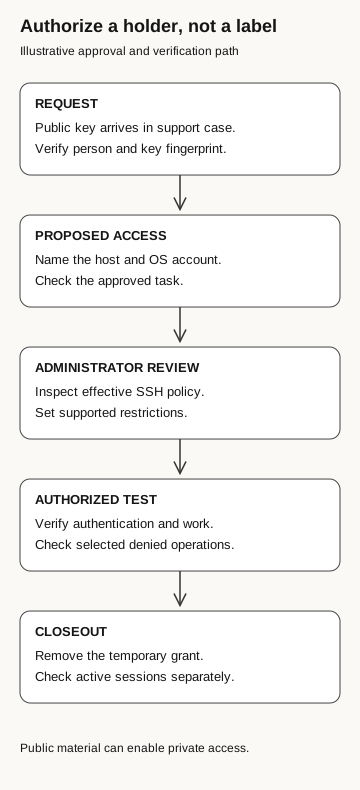
Authorize a holder, not a label
Illustrative approval and verification path
- Request
A public key arrives in a support case. Verify the person and key fingerprint.
- Proposed access
Name the host and OS account. Check the approved task.
- Administrator review
Inspect effective SSH policy and set supported restrictions.
- Authorized test
Verify authentication and work; check selected denied operations.
- Closeout
Remove the temporary grant. Check active sessions separately.
Public material can enable private access.
Approve the work before the key
A real support case does not automatically require direct server access. Check whether the agreed service can use a sanitized diagnostic bundle first. If the service owner approves remote diagnosis, review a dedicated access route with the required restrictions.
Record the host, account, key fingerprint, approved task, permitted connection features, and removal owner. Then check the effective host configuration against that approval. A successful login establishes authentication; it does not show that the intended operation is allowed or that other operations are restricted. Where a behavioral check is necessary, use an authorized test host and account to verify those outcomes separately.
If somebody already added the key
Preserve the request and configuration evidence through the incident process. Identify where the key was authorized and which account it maps to. Correlate available authentication records with host and application activity. A key present in a file is evidence of configuration, not proof that someone connected or read a file.
Have the administrator remove unauthorized access from the authoritative source and verify the effective state on affected hosts. Investigate active connections separately. Removing authorization for future authentication should not be reported as proof that an established session has ended. SSH authentication and subsequent connection channels are separate protocol stages. RFC 4254: connection protocol
Keep the holder, fingerprint, host, account, allowed work, restrictions, and cleanup evidence in the access record. Never ask a vendor to send its private key.
This is the server-access counterpart to our application credential guide. In both cases, the request may introduce a new authenticator into an identity with existing authority. The approval should name the authority, not merely the file being added.