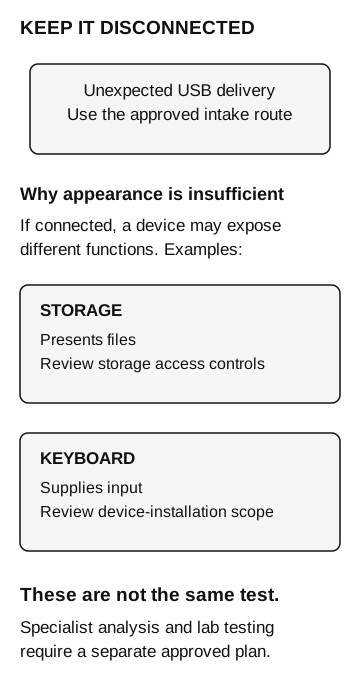
Keep an unexpected USB device disconnected and route it through the established security intake process. A thumb-drive appearance does not prove it is only storage; specialists should determine any analysis and endpoint response.
Keep an unexpected USB device disconnected and report it through the organization’s security or IT intake route. A device that looks like a thumb drive may act as something else when connected.
The Trustwave investigation below shows why checking its contents yourself can be the dangerous step.
A real package, examined by researchers
In March 2020, Trustwave SpiderLabs described a letter impersonating Best Buy, a gift card, and a USB device supposedly holding a product list. The recipient and the reporting client did not connect it to a computer. Researchers examined it separately and found that it emulated a keyboard and supplied malicious commands. In a subsequent update, Trustwave said the campaign’s indicators matched similar FIN7 campaigns. Trustwave SpiderLabs: original analysis and March 27 update
This historical case supports a specific lesson: the recipient did not have to open a document for the device’s keyboard behavior to matter. An unexpected device still requires its own analysis and attribution.
The most useful detail for a workplace team is that the recipient paused and specialists performed the analysis. The employee had a way to report the package without investigating its contents personally.
The connector does not tell you the device’s role
USB is a connection technology used by different kinds of devices. A storage device exposes files. A keyboard supplies input. A device that resembles a thumb drive can present a different function to the computer. In the Trustwave case, the relevant function was keyboard emulation.
“I will plug it in but won’t open anything” does not address that behavior. It addresses opening files, while the documented device supplied input. Similarly, a statement that removable storage is blocked needs its scope checked before anyone treats it as protection against every USB peripheral.
Microsoft distinguishes Windows device-installation controls from Defender for Endpoint controls over device access. Its walkthrough includes a policy scoped to removable storage and separate observations of connected devices and blocked access. Those distinctions are useful questions for your endpoint team: which device classes and operations does the deployed policy cover, and what evidence confirms the policy applied? Microsoft: device control overview · Microsoft: device control walkthrough
Do not interpret this as a recommendation to block every keyboard immediately. Endpoint owners need to preserve legitimate peripherals, accessibility equipment, and support paths while evaluating the relevant controls. The reception procedure can be simple even when the technical policy is more detailed.
Keep it disconnected
- Storage function
May present files if connected. Review storage access controls.
- Keyboard function
May supply input if connected. Review device-installation scope.
Appearance does not establish function. These are different tests. Use the approved intake route for an unexpected device; specialist analysis and lab testing need a separate approved plan.
Preserve the package and the decision
Use the contact route already published internally. Record where and when the package arrived, the named recipient, the claimed sender, and whether anyone connected the device. Keep the letter, packaging, and device together according to the responder’s handling instructions. Do not connect it to discover a serial number or identify its owner.
For example, reception could report: “An unsolicited package addressed to our office arrived this morning. The letter asks us to connect the enclosed USB device to view a gift catalog. It has stayed disconnected. Reception has the package and is waiting for the security team’s handling instructions.”
If somebody already connected it, report that promptly and say which computer and approximately when. Include any remembered prompts or unexpected behavior without recreating it. Let the response team direct isolation and preservation. Trying it on another laptop would add another endpoint to investigate.
The response team can then separate questions that are often collapsed: was a device connected, what function did the operating system recognize, did a policy prevent an operation, and did any process or network activity follow? Missing telemetry should remain an investigation limit. A report showing no file opened does not settle the keyboard-input question.
The intake route matters before the device control
Reception and support should know who accepts an unexpected package and who covers for that owner. They should also be able to confirm an expected equipment shipment through the internal record. A brand name or the sender’s reassurance cannot replace that confirmation.
Endpoint validation is separate work for qualified owners in an approved lab. Use known test devices and vendor-supported procedures, not the suspicious package, to examine a control. Record the device function, policy, endpoint, and observed result. A storage restriction supports a conclusion about that tested operation, not every USB function.
Our laptop custody guide covers who receives and operates approved company equipment. The technical handoff guide explains where a human decision exercise ends and endpoint validation begins.