Does delivering a company laptop establish who is operating it?
No. Delivery, device enrollment, and successful sign-in answer different questions. Connect the approved worker and recipient to the assigned device, then investigate unapproved remote access or unresolved custody changes.
Completing a hire, delivering a laptop and enrolling it in device management still leave one question: who is actually using the machine?
The person approved for the role, the person accepting the delivery, and the person operating the laptop may be different people. Sometimes that has an ordinary explanation, such as an approved receiving desk or a documented support session. Sometimes the separation is how unauthorized work gets through the process.
Connect the approved worker to the recipient, assigned device and permitted use. Base the review on those records, not nationality, accent or appearance.
The laptop can be the bridge
In May 2024, the FBI described U.S.-based facilitators receiving company laptops for fraudulent North Korean IT workers. Facilitators enabled remote connections to the devices or reshipped them overseas. The device’s location could therefore differ from the operator’s location. The advisory recommends reviewing address changes between hiring and delivery and monitoring prohibited remote-access software. FBI: May 2024 advisory
KnowBe4’s July 2024 first-person incident report describes hiring someone using a stolen identity, shipping a workstation, and detecting suspicious activity on it. The company says its new-hire environment was restricted and no data was lost or exfiltrated. That account is useful because it separates a convincing hiring process from what happened after the device arrived. It should not be retold as a confirmed KnowBe4 data breach. KnowBe4: incident report
The FBI’s October 13, 2026 update adds an important limit: no single indicator reliably identifies these workers, and aggressive filtering can harm legitimate applicants. It describes both remote-access software and external hardware used to control employer devices. A clean software inventory therefore does not settle who operates a laptop. The advisory calls for collaboration across HR, IT, security, and management. FBI: October 2026 update, Identity in Depth
These reports do not make every address change or remote session malicious. They explain why a shipping receipt alone cannot close the identity question. An authorized operator can also use remote support; the review needs the permission and context for that use.
Our new-employee pretext article asks who authorizes initial access or recovery. Our coding-interview article concerns a candidate running a recruiter’s project. Here the employer has already hired somebody and is handing over an asset.
Keep four records connected
Start with the approved worker record. Record its reference, the sponsor or manager, the role, and the procedure used to verify the person. Keep sensitive identity documents in their existing restricted system; a shared review worksheet needs a reference, not another copy.
Next, retain the approved delivery destination and any change request. Who requested the change, who verified it, and who approved it under the organization’s procedure? An address supplied in a late email should not silently replace the original record and erase the change history.
Then join the shipment to the asset. Use the tracking reference to check delivery, then the asset identifier to match the shipment to the laptop IT manages. Device enrollment establishes a management relationship; it does not prove that the approved worker personally possesses the computer.
Finally, review the permitted operating arrangement. Identify any approved support provider, remote-access tool, and relevant ticket. When activity conflicts with that arrangement, the security team needs the device and session evidence to investigate. An unfamiliar connection warrants a question; it does not by itself identify an actor.
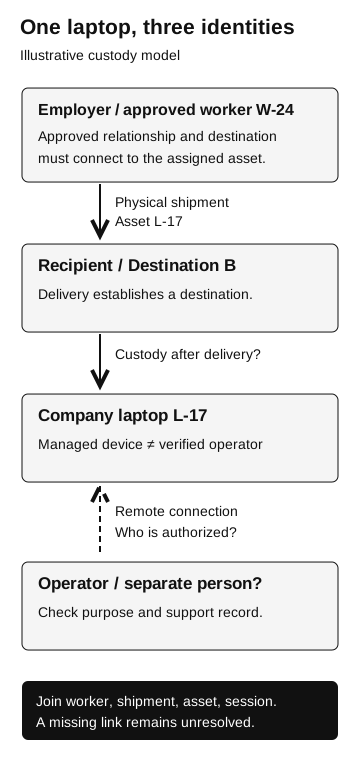
One laptop, three identities
Illustrative custody model
- Employer-approved worker W-24
Connect the approved relationship and destination to the assigned asset.
- Physical shipment
Asset L-17 reaches Recipient / Destination B. Delivery establishes a destination, not subsequent custody.
- Company laptop L-17
A managed device does not establish a verified operator.
- Remote connection
Who is authorized? Check the operator, purpose, and support record.
Join worker, shipment, asset, and session. A missing link remains unresolved.
Bring HR, fulfillment and IT records together
HR may own the verified worker contact, fulfillment the delivery exception, and IT the support arrangement. Name a coordinator who can join those answers. Otherwise each team may close its own ticket while nobody establishes who received and operates the device.
An approved receiving arrangement and a matching support ticket can explain a delivery change and remote connection. Match the technician, tool, asset and session window rather than treating the existence of any support ticket as sufficient.
If the worker cannot be reached through the established route, the destination change lacks approval, or the remote session has no matching support record, record those gaps and invoke the incident process. They warrant investigation without establishing who controlled the laptop, where they were, or whether data was taken.
Investigate the activity as well as the paperwork
The FBI’s January 2025 update recommends least privilege, restrictions on remote-desktop installation, and monitoring unusual remote connections. It also calls for identity verification throughout employment and review of staffing-firm practices. These recommendations extend the inquiry beyond an interview or delivery checkpoint. FBI: January 2025 update
For a suspected incident, let the response team direct device isolation and evidence preservation under its established procedure. Retain the asset reference, relevant times, shipping-change history, and available endpoint and identity records. Avoid asking the suspected operator to reproduce activity or install a tool as an improvised verification step.
Separate the conclusions. A device connected, a person operated it, a file was read, and a file left the environment are different findings. Record the evidence for each and the period it covers. Missing logs create an investigative limit, not proof that an event did or did not happen.
Close the gap between teams
A useful review ends with a named owner and a specific change. For example, fulfillment might require the verified worker-record reference and exception approval before changing a delivery destination. IT might require a matching support record before treating a remote session as expected.
Retest that decision with an ordinary approved change and an unresolved change. The legitimate worker should have a clear way to complete onboarding; the unsupported request should remain pending with an owner who can resolve it. A test that blocks every change tells you little about whether the process works.