An antivirus exception changes protection for a defined scope. Verify the failure and requester, identify the precise control and affected devices, and require a bounded review and cleanup plan before approval.
Before approving a vendor’s antivirus exception request, the endpoint team needs to establish what failed, whether protection caused the failure, and exactly what the proposed exception would change. Verify the support contact through the existing vendor relationship.
The examples below use Microsoft Defender Antivirus on Windows. Check the corresponding exclusion behavior before applying them to another platform or product.
Diagnose the failure before accepting the repair
Ask for the failed operation, application version, affected device, time, and relevant alert or error reference. Obtain the records through the organization’s approved support process, without uploading sensitive diagnostic data to a destination supplied by an unknown caller.
An application failure does not tell you what caused it. Even an antivirus alert at about the same time may concern a different file. Have the endpoint owner check whether protection blocked the failed operation before proposing a policy change.
Microsoft advises establishing the root cause before creating an exclusion or allow indicator, and lists investigation and false-positive submission among the alternatives. Microsoft: alternatives before exclusions
Verify the vendor request using the existing contract or support case. Do not let the same message establish the diagnosis, supply the approval contact, and choose the exception. The authorized service owner decides whether the business task warrants the change; the endpoint owner determines its technical effect.
“An exception” is not a precise control name
Microsoft’s Windows antivirus guidance distinguishes file or folder exclusions from process exclusions. File and folder exclusions can affect scheduled, on-demand, and real-time scans. A process exclusion concerns files opened by that process; it does not automatically exclude the process executable itself. Microsoft: custom exclusions
Ask the requester to identify the actual setting. “Whitelist the tool” is insufficient for a decision record.
| Requested change | Question for the endpoint owner |
|---|---|
Specific file or folder exclusion |
What content matches, and who can place new content there? |
Extension exclusion |
Does the matching scope extend beyond the affected application? |
Process exclusion |
Which files does the process open, and what other controls are affected? |
ASR rule exclusion |
Which attack surface reduction rule needs an exception? |
Alert suppression |
Does this only change handling of a known alert, or also change prevention? |
The first three rows concern antivirus exclusions. ASR and alert handling require separate review.
Antivirus, ASR, and EDR need separate answers
Attack surface reduction, or ASR, rules target risky software behavior. Endpoint detection and response, or EDR, provides endpoint investigation and detection capabilities. Neither term is interchangeable with an antivirus scan.
For Windows, Microsoft’s documentation says antivirus exclusions do not exclude files from EDR. It also says some ASR rules honor antivirus exclusions. Process exclusions can affect network protection, so their effects cannot be reduced to a single scan checkbox. Review the precise rule and platform before asserting which controls remain. Microsoft: exclusion scope and interactions
An EDR alert after a change does not demonstrate that antivirus prevention remained active for the excluded content. Conversely, the absence of an alert does not establish that nothing ran. Record which capability was evaluated, what evidence you expected, and the observation window.
A review can resolve the request without changing any production setting. If technical validation is necessary, its authorization and isolation need to be explicit.
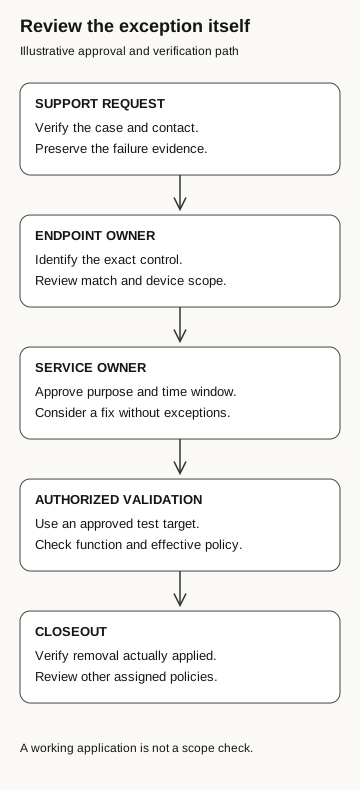
Review the exception itself
Illustrative approval and verification path
- Support request
Verify the case and contact. Preserve failure evidence.
- Endpoint owner
Identify the exact control, match scope, and device scope.
- Service owner
Approve the purpose and time window. Consider a fix without an exception.
- Authorized validation
Use an approved test target. Check application function and effective policy.
- Closeout
Verify removal applied and review other assigned policies.
A working application is not a scope check.
Test the proposed exception
A diagnosed failure on one device does not justify an exception across the fleet. If investigation establishes a false positive affecting an approved component, pursue vendor remediation or a false-positive submission, then assess whether a narrowly scoped temporary exception is needed while that work proceeds.
For an authorized disposable test environment, the endpoint owner records the baseline configuration, application version, expected failure, and success criterion. Any proposed change is reviewed for its exact match scope and assigned only to the approved test target. Use synthetic business data and approved benign validation material. No unknown attachment from the caller belongs in that exercise.
The test needs two observations: whether the intended operation recovered, and whether the effective policy matches the approved scope. A successful export does not establish that an exception was necessary if other variables changed at the same time. If the evidence cannot isolate the cause, record that uncertainty rather than calling the trial conclusive.
Check that the temporary exclusion is removed
An expiry date in a ticket is a reminder unless the management system actually enforces it. Name an owner and the method for checking removal. Where several policies can affect a device, inspect the resulting configuration rather than assuming that deleting one policy removed every equivalent entry.
Microsoft’s current Intune guidance says exclusions from assigned policies merge into a superset on a device. That means another assigned policy can preserve the same exclusion. Verify this against the organization’s actual management route; the statement should not be generalized to every product. Microsoft: Intune exclusion policy behavior
Before closing the ticket, record the policy now in effect, whether the application works, which exceptions remain approved, and what still needs investigation. If the repair depends indefinitely on an exception, route that fact to the service owner as an ongoing risk decision. A repeatedly extended ticket is not evidence that the dependency disappeared.
If the change already happened
Preserve the request, approval trail, relevant policy versions, device scope, and available endpoint records. Have the incident lead coordinate with the endpoint and application owners. Unexpected exceptions deserve investigation, but their presence alone does not prove malware executed or data left the device.
Establish when the policy took effect and which endpoints received it. Then review activity during the relevant period through the normal incident process. Do not treat “the management console accepted the change” as proof that every target applied it, or treat removal as proof that prior activity was harmless.
Our fake IT support guide follows the decision to permit remote assistance. Our ClickFix guide examines deceptive execution instructions. This review starts at a different boundary: an employee or administrator is asked to change the control that would inspect or constrain activity.
Give the help desk a usable handoff
The employee does not need to become an antivirus engineer. They need to preserve the request, avoid approving the exception on the vendor’s behalf, and route it to the endpoint owner with enough context to investigate.
The endpoint owner should leave the next reviewer a diagnosis, the exact exception scope, evidence of its effect, and a verified removal date. Without those, the ticket records a request rather than a controlled change.