An approval should identify the extension, business purpose, browser profiles, permissions, and review owner. When an update or publisher incident changes the context, check the deployed version and observed activity rather than treating the original approval as a permanent assurance.
An extension’s original approval tells you why it was installed. After a publisher reports a malicious update, the browser administrator needs to establish which version actually ran, in which profiles, and what it could access.
A developer’s approval can reach other people’s browsers
In January 2025, Sekoia published an investigation of a campaign against Chrome extension developers. Its researchers obtained phishing emails claiming that extensions violated store policy. The emails led developers toward a malicious OAuth application’s request for publishing authority. After approval, the attacker could upload a changed extension. Sekoia analyzed injected code aimed at collecting sensitive information from users’ browsers. Sekoia: extension supply-chain investigation
There are two different audiences in that sequence. The publisher’s developer made the deceptive app-approval decision. Downstream users already had the extension. Do not describe every exposed employee as someone who approved the attacker’s app or installed an obviously fake add-on.
Our consent-phishing guide covers the permission grant. Here the question starts after that upstream decision: how does an organization discover that an approved software dependency has changed, and what can its records establish about the people using it?
GitLab’s February 2025 research provides a separate example. It identified a cluster of malicious extensions and assessed that the actor acquired at least some from their developers, rather than compromising them. GitLab also stated that it had only partly reproduced the attack chain. Keep that acquisition route and its evidentiary limits separate from Sekoia’s phishing investigation. GitLab: malicious browser extensions
Both reports justify reviewing ongoing ownership and behavior. They do not establish that all publisher changes are malicious, or that the same actor conducted both campaigns.
Approval needs an identity and a version history
A friendly display name is useful for a conversation. For an inventory, record the extension’s identifier, publisher, distribution source, installed version, browser profile, and business owner. Add the reviewed purpose and the date of the review.
The browser profile matters because the relevant working context may contain different signed-in services and allowed sites. The same person can use more than one profile. “Installed on Morgan’s laptop” is less precise than identifying the managed work profile in which the extension was enabled.
Keep the original approval record, but avoid treating it as a claim about every future release. Ask the business owner which changes should trigger another review: a reported publisher incident, an unexpected ownership change, new capabilities, or an unexplained destination associated with the extension. A trigger starts an investigation; it is not a verdict.
Chrome’s current documentation describes automatic update checks and explains that installation can wait until an extension is idle. Enterprise policy can also change update behavior. Consequently, an available store release and a deployed fleet version are different observations. Check the actual version distribution. Chrome: extension update lifecycle
A permission prompt is one signal
Chrome distinguishes API permissions, host permissions, and optional permissions granted at runtime. Host permissions concern matching sites and can be required alongside an API permission. Read the actual combination when assessing what an extension is allowed to do. Chrome: declare permissions
For a browser utility, ask whether the task needs access to one service or many sites. Broad permissions deserve review, but they do not tell you which pages the extension actually read.
Chrome documents warnings for certain permission changes and explains that an extension can be disabled pending acceptance of a new warning-triggering permission. Some permission combinations do not produce an additional warning. A missing prompt therefore cannot certify unchanged behavior: code can change while working within authority already granted. Chrome: permission warnings
In a managed environment, ask the administrator to interpret the effective configuration. Do not ask employees to bypass management or accept a warning just to restore a business task. Give them a support route that can distinguish a legitimate update from an unexplained request.
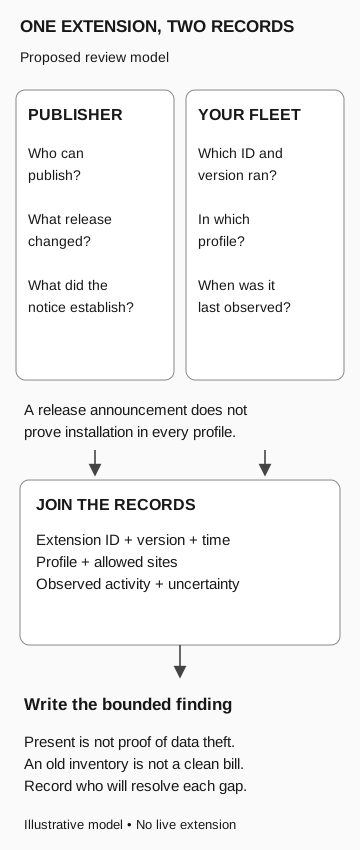
One extension, two records
Proposed review model
- Publisher record
Who can publish? Which release changed? What does the notice establish?
- Fleet record
Which extension ID and version ran, in which profile, and when was it last observed?
- Join the records
Correlate extension ID, version, time, profile, allowed sites, observed activity, and uncertainty.
A release announcement does not prove installation. Presence does not prove theft; an old inventory does not establish absence. Assign each evidence gap to an owner.
Was that version actually installed?
An inventory collected before the suspicious release will not tell you whether the update arrived. Check the version currently installed in each profile; stale or missing records leave that question open. Compare observation times with the incident window before counting profiles as unaffected.
Then separate deployment from behavior. A reliably attributed outbound request can establish a connection by the extension. Its destination and timing may matter, but the connection alone does not establish which data left. To say which data left, you need the payload or other evidence that identifies it.
Report the coverage of the inventory alongside the affected versions. That tells the response team which profiles need fresh checks and which need investigation of activity.
Who checks the browsers, and who checks the exposed sessions?
The browser administrator can establish deployment and effective configuration. The business owner can identify the necessary function and a temporary alternative. The response team can preserve evidence and assess what the affected version did. The identity or application owner can decide what action is needed for any potentially exposed session material.
Removing or disabling an extension addresses its continued presence or execution. It does not retrospectively establish what it collected, and it does not by itself resolve every credential that may have left the browser. Use the identity containment review to keep those follow-on questions separate.
Avoid reinstalling a suspicious release to check whether the report is true. Let the response team decide how to preserve and analyze the relevant package or records. The employee’s useful contribution is often the profile, approximate time, unexpected prompt, and task they were trying to finish.
For a corrected release, obtain a fresh version observation and record the approved return-to-service decision. A publisher’s announcement is an input to that decision. The administrator still needs to establish the state of the organization’s deployment.