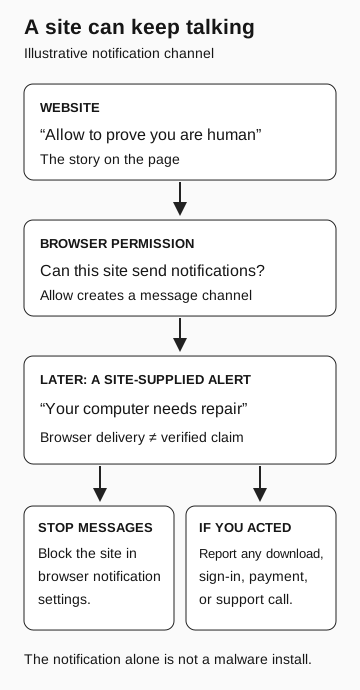
A website can send notifications after receiving permission. A warning displayed by the browser is still content from that site, not proof that the operating system detected a threat. Check the originating site, block its notification permission through browser settings, and report any further actions you took.
A warning appears in the corner of your desktop: your subscription expired, your files are at risk, or a security scan found a problem. You closed the website a while ago. Why is it still talking to you?
One possibility is a website notification permission you granted earlier. The browser provides the delivery channel; the website supplies the message. That distinction explains why an alarming notification can appear outside the page without becoming a trustworthy system diagnosis.
Read what the Allow button actually permits
A page can tell you to press Allow to prove you are human. The browser’s permission request may actually ask whether that website can send notifications. Read the permission itself before following the page’s explanation.
Microsoft documented this exact mismatch in July 2023. Its Edge team showed a deceptive verification prompt followed by fake warnings from the site that received permission. The warnings urged the recipient to buy software. The team distinguished the messages themselves from the harm that could follow if someone acted on them. Microsoft Edge: fighting notification spam
This differs from ClickFix, which persuades someone to execute instructions on their computer. A notification permission creates a way to send messages. It does not, by itself, mean that software was installed or that someone obtained remote control.
Microsoft’s current support guide says website notifications can appear even while Edge is closed. Closing the original tab therefore should not be your only response. The guide also distinguishes notifications from pop-up windows, which have separate controls. Microsoft: manage website notifications
A site can keep talking
Illustrative notification channel
- Website
“Allow to prove you are human” is the story on the page.
- Browser permission
The actual question is whether this site can send notifications.
If allowed: a message channel exists
- Later site-supplied alert
“Your computer needs repair” remains the site’s claim. Browser delivery does not verify it.
Block the site in browser notification settings to stop messages. If you acted, report the download, sign-in, payment, or support call. A notification alone is not a malware install.
Stop the sender without accepting its help
Use the browser’s own settings, opened independently of the warning. There is no need to click the notification’s repair button or revisit the suspicious page to manage its permission.
In Chrome on desktop, open Settings → Privacy and security → Site Settings → Notifications. Review the sites allowed to send notifications and remove the unwanted site’s permission. Google’s August 2026 explanation also describes automatic revocation and other protections against abusive senders. Those protections help, but you can still review permissions yourself. Google: Chrome’s notification defenses and settings
In Edge, use Settings → Privacy, search, and services → Site permissions → All sites. Select the relevant site and set Notifications to Block. On a managed work computer, ask support if the setting is controlled by your organization or you cannot identify the sender. Microsoft: notification settings
Changing the notification permission addresses that message channel. If you also installed something, entered a password, paid, or allowed remote access, include that in the report. The fake IT support guide explains why ending one interaction does not answer every question about a remote session.
Tell support what you actually did
Report the originating site, the approximate time, and what you did after the warning appeared. A screenshot with the site visible can help support identify the sender. Send it through the approved reporting channel.
Be specific about any follow-on action: opening a page, entering information, downloading a file, running it, or calling the displayed number. If you only blocked the notification permission, say so. Support needs that sequence more than a verdict about whether the device is infected.