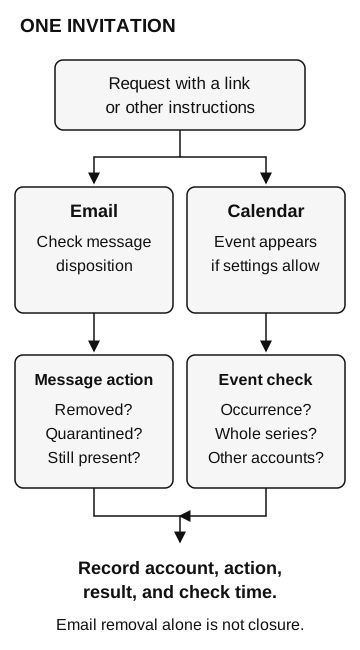
Check both the message and the event or recurring series in the affected calendar. Removing or quarantining an email alone does not establish calendar cleanup; record the account, action, and observed result.
After removing a suspicious invitation email, check the calendar too. Depending on the product and settings, the invitation may also appear as an event, where the employee could encounter the request again.
Calendar phishing uses an invitation or event to carry a deceptive request. Cleanup needs to cover both the message and any event it created.
One invitation, two places to encounter it
In September 2026, Sublime described a Google Calendar invitation using a financial pretext. Following its link led to a page offering a supposed credit note, which delivered an installer for a maliciously configured remote-management tool. The calendar entry was a route to the payload; receiving the invitation was not the same as installing the tool. Sublime: observed calendar attack
The distinction matters when somebody reports an incident. “I saw the meeting” and “I installed what its link downloaded” require different follow-up. If a remote tool was installed or a session started, the fake IT support guide explains the additional evidence to preserve.
The report also describes the cleanup gap: an email security action can catch the message while leaving a calendar entry available. Treat that as a behavior to check in your environment, rather than a universal claim about all security products. Some products explicitly remediate both objects. The employee should not need to guess what a particular quarantine action covered.
Unlike a website notification permission, this reminder comes from a calendar event. Turning off browser notifications would not establish that the event was removed. The remaining invitation could still be encountered inside the calendar application.
Check what your invitation setting actually does
Google Calendar currently offers three choices under Settings → Event settings → Add invitations to my calendar: invitations from everyone, only known senders, or only after an email response. For the known-sender option, Google includes contacts, people in the organization, and people the user has interacted with. Work administrators can restrict available options. These settings apply to new invitations. Google: manage invitations
Changing the setting does not remove the need to check for an existing suspicious event. And “known sender” means Google recognizes a relationship with that account, not that you should follow every request it sends.
Ask support to identify the setting and account being reviewed. A personal calendar, work calendar, and shared calendar may be different places to inspect. Keep the investigation tied to where the unwanted event actually appeared; avoid deleting unrelated appointments or changing somebody else’s calendar as an improvised fix.
One invitation, two surfaces
The original invitation may include a link or other instructions.
- Email
Check message disposition: removed, quarantined, or still present?
- Calendar
An event appears if settings allow. Check the occurrence, whole series, and other accounts.
Record account, action, result, and check time. Email removal alone is not closure.
Report the request before following it
Use the organization’s established reporting route. Include the event title, organizer address as displayed, approximate receipt time, scheduled time and time zone, affected account or calendar, and whether it repeats. Preserve the original invitation where the reporting process supports it. A screenshot can help locate the event, but it may not contain the full message or event identifiers.
Tell support the last action you took: viewed the event, followed the link, entered information, downloaded a file, or opened it. Do not revisit the destination to reconstruct the story. Avoid forwarding a live invitation to a broad group, where it could create confusion or more exposure.
For Google Calendar events, Google’s documented Report as spam action removes the event from your calendar; for recurring events, it removes the series. Google says this reporting option applies to events sent from Google Calendar, not events created by another provider, app, or service. Use support’s approved route when the option is unavailable. Google: report inappropriate invitations and events
Removing an event from your calendar also does not establish removal from every other recipient’s calendar. The administrator coordinating the response should define which accounts were checked and whether the message, event, and recurrence were addressed. Record the result rather than treating one user’s successful removal as an organization-wide result.
Check the message and recurring event
To validate the process, use an approved training account and an inert recurring invitation with no external link. Record the invitation setting first. Check the message and the event or series independently after remediation, noting the reviewed clients, account, and time. If the event never appeared, the test tells you about creation, not removal; do not change the setting merely to force a failure.
An unchecked recipient remains outside the result. Also confirm that an ordinary approved invitation can still be received and answered, so the cleanup process does not leave the employee unable to use their calendar.
Assign one owner to confirm both the message disposition and the calendar result before closing the incident.