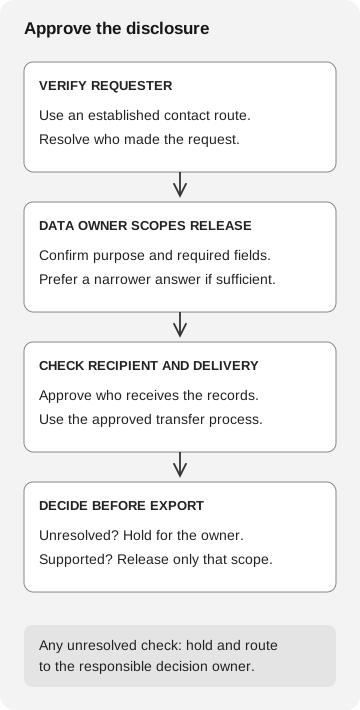
Verify the requester through an established route, then have the responsible data owner approve the purpose, records, recipient, and delivery method. A recognizable executive name does not by itself authorize a bulk employee-data release.
Before exporting employee tax statements, confirm who approved the release, which records are needed, and who may receive them. For a US employer handling Forms W-2, recognizing the CFO’s name on the request is only the start of that review.
This US example does not replace the privacy, employment and reporting requirements that apply to your organization.
How the W-2 scam reaches payroll
In March 2016, the IRS warned that criminals were posing as company executives and persuading payroll or HR staff to email employee information, including W-2 records containing Social Security numbers. The warning described actual reported victimization, not merely suspicious messages. Its examples included requests for company-wide tax statements and employee details. IRS: 2016 payroll and HR warning
Our payroll incident article follows a changed payment destination. Here, the risk is sending employee information to someone who should not receive it. A salary payment can remain correct while the underlying tax records are disclosed to an unauthorized recipient.
Check the request before making the export
A data owner is the role your organization authorizes to decide how the relevant records may be used and released. Identify that role in the actual HR or privacy procedure. A job title on an incoming message should not determine it.
Use four questions:
- Requester: Does an established verification route connect this request to the named person? Use a directory or trusted record, not only a number added to this message.
- Purpose and scope: What business task requires the data? Would an aggregate total or narrower set of fields satisfy it?
- Recipient: Who is approved to receive the records, including an external adviser or alternate address?
- Delivery: Which approved system and access settings will deliver only that scope to that recipient?
Apply your organization’s privacy and access requirements to each answer. The owner should resolve unusual requests; the payroll operator should not have to invent a disclosure policy under deadline pressure.
An encrypted attachment or protected portal can help implement an approved delivery method. It cannot decide whether the recipient should receive the information. Similarly, verifying that an executive made a request settles the identity question, while the purpose and permitted disclosure still need review.
Approve the disclosure
- Verify the requester
Use an established contact route. Resolve who made the request.
- Data owner scopes release
Confirm purpose and required fields. Prefer a narrower answer if sufficient.
- Check recipient and delivery
Approve the recipient and transfer process.
- Decide before export
If unresolved, hold for the owner. If supported, release only the approved scope.
Any unresolved check stays with the responsible decision owner.
A confirmed request can still be too broad
If the business task is an expense review, ask whether an aggregate payroll total meets it before generating individual W-2 PDFs. The data owner can approve the narrower report through the existing workspace. Payroll can decide what information the task requires while security investigates who sent the suspicious message.
If the requester genuinely needs individual records for an external adviser, verify the adviser and the exact release under the organization’s procedure. “CFO confirmed” should not silently become “all fields and destinations approved.”
Record a decision without copying the sensitive file
Keep a reference to the request, the verifying route, the authorized scope, the owner, and the delivery decision. Use restricted references rather than copying W-2s, Social Security numbers or the payroll export into the approval ticket.
If you rehearse this decision, use synthetic records and a fictional internal requester, not an IRS impersonation. The IRS explicitly says it does not grant permission to use its name or logo, including imitations, in phishing exercises. IRS: reporting and exercise guidance
If records were already sent
Escalate promptly through the organization’s incident and privacy process. Preserve the request and available disclosure evidence, including the actual recipient and scope, while restricting access to the sensitive material. Let the designated responders coordinate containment and required notifications.
The current IRS instructions distinguish a W-2 scam received without a reply from an actual W-2 data loss. For a loss, they direct businesses to report the loss and the scam, and explicitly say not to attach employee personally identifiable information. Use that official page for the current destinations and requested details; do not send the stolen records again as supporting evidence. IRS: W-2 business email reporting
The callback contact-source guide covers independent requester verification. If someone proposes an unfamiliar upload tool, check the destination before using it; the file-converter review explains that disclosure risk.