Does a saved forwarding rule prove that email left the organization?
No. A saved rule describes configuration. Applicable controls may block delivery. Correlate the message trace and destination evidence before stating what was sent.
“Forward my work email to this temporary address until the migration is finished.” The request sounds like a short repair. The setting could keep copying future correspondence after the conversation ends.
Before approving it, establish which messages would move, who controls the destination, and what will end the arrangement. The Exchange Online example below follows a request from approval through delivery and removal.
Forwarding sends a copy elsewhere
A mailbox delegate works with permissions on the mailbox. Automatic forwarding sends messages onward. The mailbox delegation guide covers reading and sending rights; this review concerns the destination of copied correspondence.
Microsoft documents user-created Inbox rules and administrator-configured mailbox forwarding as two automatic forwarding paths. Keeping a local copy is configurable for mailbox forwarding. A message still appearing in the employee’s inbox therefore does not establish that it stayed inside the organization. Microsoft: configure mailbox forwarding
Ask the mailbox owner to describe the proposed scope in ordinary language. “All incoming messages for a week” is a different business decision from “the approved project correspondence for this contractor.” A migration label does not resolve that difference.
Check which forwarding controls apply
Microsoft’s current guidance says Automatic - System-controlled can behave differently across organizations. It changed to disabled in 2021 for new organizations and existing organizations that were not actively using that value. Organizations already using it can retain enabled behavior. The guidance recommends explicitly choosing On or Off to avoid ambiguity.
The same documentation explains that remote-domain settings and mail flow rules can also block forwarding. An allow in one place does not defeat an applicable block elsewhere. These outbound-policy controls concern automatic external forwarding, not forwarding between internal users. Microsoft: external forwarding controls
For the review, have the email administrator identify the effective policy for the named mailbox and destination. Do not ask the employee to infer it from a screenshot of a saved rule. The rule tells you where mail is meant to go; delivery records tell you what happened to a message.
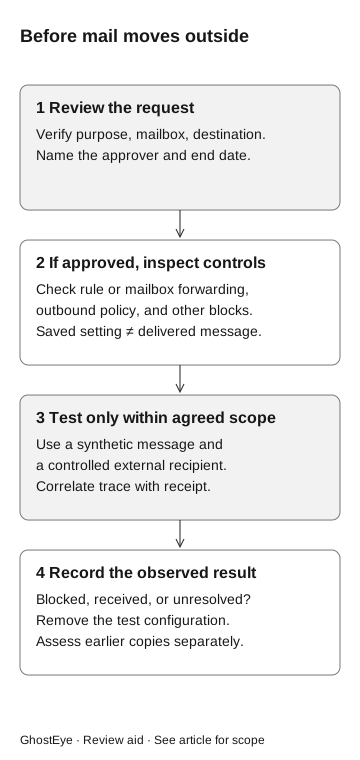
Before mail moves outside
- Review the request
Verify purpose, mailbox, and destination. Name the approver and end date.
If approved
- Inspect controls
Check rule or mailbox forwarding, outbound policy, and other blocks. A saved setting does not prove delivery.
Test only within agreed scope
- Controlled message
Use a synthetic message and controlled external recipient. Correlate trace with receipt.
- Record the result
Blocked, received, or unresolved? Remove test configuration. Assess earlier copies separately.
Review a temporary exception
Confirm the migration or project through an existing internal record. The owner may require an approved collaboration workspace rather than forwarding. If the business owner has not authorized forwarding, hold the change; that decision does not require a message-delivery test or proof of the caller’s intent.
For an approved exception, the email administrator still needs to check the implementation:
- Purpose: the task that requires forwarding and the independently contacted owner.
- Scope: the source mailbox, matching conditions if applicable, and approved destination.
- Custody: who controls the receiving mailbox and how that was established.
- Duration: the removal date and named person responsible for checking it.
- Evidence: the configuration record and the result of an authorized harmless test.
Leave message contents and personal information out of broadly circulated tickets unless the investigation requires them through an approved evidence process.
Test delivery without forwarding real correspondence
For a separately authorized technical check, use a dedicated mailbox, a controlled external recipient, and a synthetic message with a unique reference. Agree on the expected result before changing anything. A conversation-only assessment should stop at the approval decision.
Microsoft’s message trace can show whether the service received, rejected, deferred, or delivered a message and what happened during processing. Ask the email administrator to correlate the test’s sender, recipient, identifier, and time window. A trace result needs interpretation in its delivery context. Microsoft: message trace
A saved forwarding setting alongside a trace showing rejection establishes that the synthetic test message was rejected on that path. It does not prove the setting is absent, every mailbox has the same policy, or manual sending is impossible.
If the controlled recipient receives the test, retain its unique reference and the matching trace. That confirms delivery of the test message to the mailbox, though not that anyone read it. If neither receipt nor a conclusive trace is available, mark delivery unresolved and assign the missing check.
Remove forwarding and investigate earlier delivery
Remove the temporary configuration through the approved process and inspect the resulting state. Run a second harmless test when technical testing is authorized. The expected outcome after removal is no further forwarding on that tested configuration; record the actual result and observation window.
For suspected real misuse, route the request to incident response and the email owner promptly. Review both forwarding configuration and relevant activity. Our payroll inbox investigation examines rules that conceal correspondence, a separate behavior worth checking when a mailbox is compromised.
Turning off future forwarding does not retrieve copies already received elsewhere. Ask the response lead and information owner to establish the affected messages, destination, and next containment steps from available evidence. Do not interpret an empty current configuration as proof that nothing was sent earlier.
Assign owners for any remaining configuration changes and investigation of earlier delivery before closing the request.