Should I give an app Full Disk Access to fix a problem?
Confirm the actual application, its approved purpose, and why broad file access is necessary. Full Disk Access can expose protected data; a familiar name or icon does not identify the software, and granting permission does not prove any particular file was read.
Before granting Full Disk Access on a Mac, confirm which application would receive it and why its job requires broad access to protected files. A familiar name or icon in System Settings is not enough to identify the software.
That distinction matters when an unexpected repair prompt directs you to a real settings screen.
What Full Disk Access changes
Apple describes Full Disk Access as allowing broad access to files, including data associated with other applications and backups. It sits alongside more specific privacy categories such as Files & Folders, Contacts, and Photos. The requested scope deserves its own explanation. Apple: Privacy & Security settings
The permission is part of macOS’s protection of private data. It should not be translated into “the app becomes an administrator” or “every file is guaranteed readable.” Other controls, including filesystem permissions and application sandbox restrictions, can still matter. Apple’s technical discussion distinguishes these layers. Apple Developer Technical Support: filesystem protections
The setting changes an application’s potential access. Responders need activity evidence to establish which data it collected.
Nor does this setting mean the app may use every other sensitive capability. Screen capture, microphone access, and other privacy permissions have their own categories. Record the actual settings involved instead of reducing the incident to a vague phrase such as “full control.”
Some applications have a legitimate reason
A backup application may need to collect data across locations. Security software may need to inspect files that ordinary apps do not need to read. Microsoft, for example, documents Full Disk Access in its Defender installation guidance for scanning files on a Mac. Microsoft: installing Defender
An organization should be able to connect an expected request to an approved application and its documented purpose. That gives the employee something more useful than a blanket instruction to refuse all permissions.
For a work Mac, start with the IT or device-management owner. Ask whether the exact software and permission are part of the approved deployment. If they are, follow that managed process. Do not independently disable a known security agent because a general article warns that permissions can be abused.
The review also differs from an antivirus exclusion request. An exclusion changes what a security product examines. Full Disk Access can expand what an application can access. They can both appear in troubleshooting, but they change different controls.
The fake Finder request in PamStealer
Jamf Threat Labs’ July 2026 PamStealer investigation described malware impersonating the Maccy clipboard manager. One component later presented a fake alert claiming that Finder had lost access to protected data. It directed the person toward Full Disk Access settings, where a malicious bundle used the name and icon of Finder.
In Jamf’s tests, the prompt could appear after a delay, sometimes around forty minutes. The delay varied in the samples Jamf tested. The significant mechanism is the use of a familiar label to encourage approval of a different program. Jamf: original PamStealer investigation, “A push for full disk access”
This does not show that Apple’s genuine Finder was malicious or that the legitimate Maccy application was responsible. It shows why a displayed name and icon cannot be the entire identity check.
Identify the app before the permission
The employee can supply what they saw: displayed name, request text, approximate time, and how the software was obtained. The technical owner should establish the actual application, its location, and the identity information relevant to the organization’s deployment process. Compare those details with the approved software record.
Avoid asking employees to interpret signing details they have never been trained to assess. Route that work to someone who can do it. A recognizable publisher or an expected path is useful evidence to evaluate, not a standalone guarantee that the application is harmless or that its permission request is necessary.
Then review purpose and scope. Which task requires the access? Is a narrower documented option available? Who approved this installation? What should the employee do if the request appears outside the expected setup process? A vague “needed for compatibility” explanation leaves the important decision unresolved.
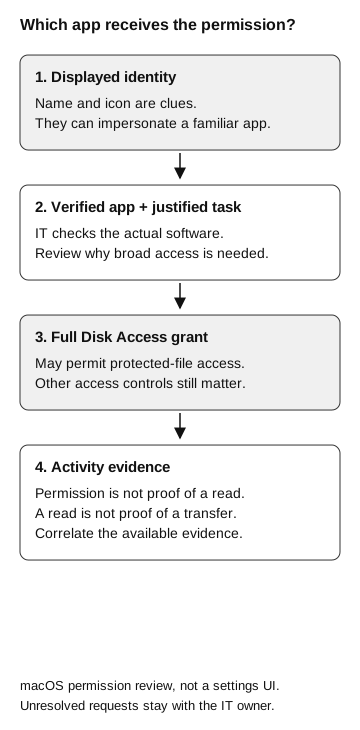
Which app receives the permission?
- Displayed identity
A name and icon are clues; they can impersonate a familiar app.
- Verified app and justified task
IT checks the actual software and why broad access is needed.
Only if approved
- Full Disk Access grant
May permit protected-file access. Other controls still matter.
- Activity evidence
Permission does not prove a read; a read does not prove a transfer. Correlate evidence.
Unresolved requests stay with the IT owner. This is a macOS permission review, not a settings UI.
If someone already approved it
Ask the person to stop following the unexpected instructions and contact the established security or IT channel. Preserve the conversation, installation source, timestamps, displayed app name, and the settings they changed. Follow the response team’s guidance before removing software or collecting additional material.
The device-security team should identify the application and relevant process activity, examine available evidence, and decide how to contain the device and restore an approved configuration. If the request involved credentials as well, record that separately. A privacy-permission change and disclosure of a password are different events.
Revoking an inappropriate grant can be part of containment. It does not erase data already copied or transferred, establish that no other access exists, or by itself demonstrate that the device is clean. The investigation should state the observation window and what could not be established.
Check the macOS version your team actually uses
On October 2, 2026, Apple announced plans for additional Full Disk Access controls requiring more explicit user action. That announcement did not identify a release date or operating-system version. Treat it as announced direction, not proof that a particular Mac already has a new protection. Apple: Full Disk Access announcement
Maintain your procedure against the versions and management policies actually deployed. Record the date of the review and the owner responsible for updating it when behavior changes. The employee-facing message can stay simple: confirm the application and its purpose through the approved route before granting broad file access.