Check who authored the underlying conversation and verify the security claim through the vendor or your software owner. A genuine GitHub notification delivers content; it does not authorize a proposed download, permission grant, or diagnostic reply.
A genuine GitHub notification can carry a security warning written by another user. Before following the proposed fix, identify the author of the underlying conversation and check the product’s security guidance independently.
Fake VS Code warnings reached GitHub inboxes
On March 25, 2026, Socket described fake Visual Studio Code security warnings posted in GitHub Discussions. The posts impersonated maintainers or researchers, mentioned developers, and promoted external downloads as urgent fixes. Socket reported that notifications extended the posts’ reach into inboxes.
Socket was explicit about what it could observe. The examined landing flow collected browser information; Socket did not observe a visible second-stage payload or credential capture in that script. The report supports the notification lure and observed reconnaissance, not a claim that every recipient installed malware. Socket: original campaign analysis
Find the conversation behind the email
GitHub documents subscriptions to repository activity and individual conversations. Mentions, participation, and watch settings can explain why an item reaches you. Delivery depends on notification configuration; a post does not necessarily email every person who has ever used the repository. GitHub: about notifications
Start from your usual GitHub entry point and inspect the relevant conversation. Record the repository owner, the issue or discussion, and the account that posted the request. Ask whether that account has a reason to direct this particular security change. A familiar project name establishes context; it does not answer who wrote a particular comment.
Notification headers can help an investigator connect an email to that context. GitHub documents a repository identifier in List-Id and notification reasons including mentions and security alerts. These fields are useful routing evidence. Reading a displayed sender or copied header alone does not authenticate a message, and a genuine notification still does not validate everything in its body. GitHub: notification headers
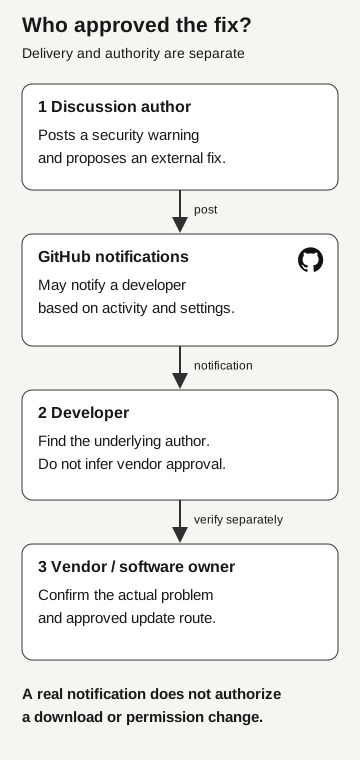
Who approved the fix?
- Discussion author
Posts a security warning and proposes an external fix.
Post
- GitHub notifications
May notify a developer based on activity and settings.
Notification
- Developer
Identify the underlying author. Delivery does not establish vendor approval.
Verify separately
- Vendor or software owner
Confirm the actual problem and approved update route.
A real notification does not authorize a download or permission change.
Verify the problem without accepting the proposed remedy
A warning can contain a real product name or a real vulnerability identifier and still recommend the wrong action. Treat the problem statement and the requested remedy as two items to resolve.
For the problem, use the vendor’s security information or your organization’s vulnerability-management process. Match the product and affected version to the installation you actually manage. Do not rely on the message’s urgency. If you cannot find a public advisory, ask your established security contact to check; the report may be private.
For the remedy, use your normal managed update route. If the message asks you to depart from it, identify who can authorize that exception. A file-sharing link, a new application authorization, or a request to paste commands needs its own review. None becomes approved because the accompanying paragraph describes a security problem.
This is where the distinction from a recruiting-code assessment matters. There, the invitation asks you to execute a project. Here, the first challenge is deciding whether a user-authored warning has authority to change your security workflow. The downstream action may be execution, account access, or simply further correspondence.
Be careful with replies, too
A developer may avoid the link but reply with configuration details to ask for help. GitHub documents that replies to notification emails can become comments on the associated issue, pull request, or discussion. The destination is a collaboration thread, not necessarily a private support exchange. GitHub: replying to notifications
Before responding, check the thread’s audience. Keep credentials, private repository details, customer information, and diagnostic material in the approved internal channel. Use a sanitized reference when reporting a public post. Do not treat automatic stripping of some email content as a confidentiality control.
Report what happened, at the right stage
If you only received the warning, preserve its reference and report the suspicious request. If you followed a link, downloaded something, granted access, or ran a proposed fix, say which actions occurred and approximately when. Those actions create different investigation questions.
A browser visit does not establish code execution. A downloaded archive does not establish that its contents ran. Conversely, closing a page does not explain any permission already granted. Let the response team correlate the available browser, identity, and endpoint evidence instead of repeating the action to see what it does.