

What should an MFA recovery review establish?
Who was verified, what the administrator changed, and what the recipient could do afterward. Follow the recovery through enrollment and a named application test. If the change was unauthorized, check that the new methods and relevant sessions were addressed, then retest access.
A support call can change who gets access
Mandiant reports that UNC3944 operators have impersonated employees when calling corporate service desks to obtain credential and MFA resets. Caller verification therefore belongs in an identity-security review: a conversation can authorize a change that other systems subsequently trust. Mandiant’s technical analysis of vishing
Follow one recovery through five checkpoints: verification, authorization, enrollment, access, and cleanup. Each answers a different question. The support record explains why a change was made; identity and application evidence establish what followed.
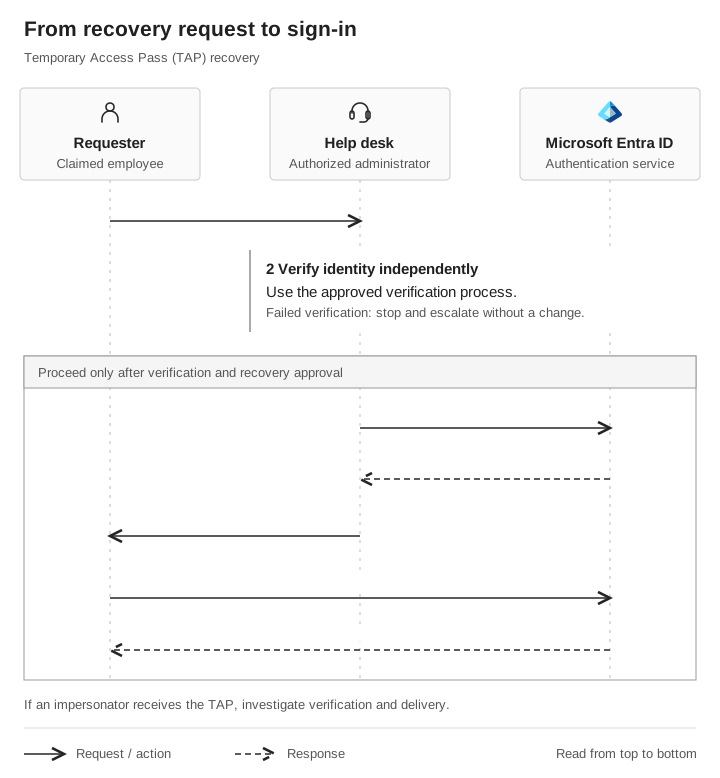
From recovery request to sign-in
 Requester
 Help desk
 Microsoft Entra ID
- Requester → Help deskRequest account recovery
The caller claims to be an employee who needs recovery access.
- Help deskVerify identity independently
Complete the approved check. If it fails, stop and escalate without changing the account.
- Help desk → Entra IDCreate a TAP for the user
Proceed only after verification and recovery approval. Entra returns the TAP value and settings.
- Help desk → Verified recipientDeliver the TAP securely
Use the approved delivery channel for the verified recipient.
- Recipient → Entra IDAuthenticate with the TAP
Entra returns a sign-in result subject to TAP settings and applicable policy.
If an impersonator receives the pass, investigate verification and delivery.
Find out exactly what “reset MFA” changed
A ticket labeled “MFA reset” can conceal several administrative actions. Removing a method, requiring registration again, and issuing a recovery credential change different parts of the account.
In Microsoft Entra, Require re-register MFA deactivates hardware OATH tokens and removes phone numbers, Microsoft Authenticator apps, and software OATH tokens. It is not a command to remove every authentication method. Inspect what remains. Session revocation is a separate administrative action. Microsoft’s authentication-method management guidance
Record the exact change the agent can make and the evidence required before making it. A useful recovery record answers:
- Who requested the change, and how was that person verified?
- Who approved it, and which administrator performed it?
- What changed, and when?
- How was the recovery credential delivered, and to whom?
Keep the verification result and the administrative change in the same review record. The ticket’s completion status alone cannot answer these questions.
Verify the person before authorizing the change
The recovery procedure needs to work when a caller cannot use their usual authenticator. Give the agent an approved verification path and an escalation route if the caller cannot complete it.
Mandiant recommends positive identity verification before account modifications, with additional verification for high-risk changes. This can include contacting the employee or manager through a known channel. Use contact information obtained independently of the caller. Mandiant’s service-desk recommendations
In an assessment, compare the time verification completed with the time the consequential action occurred. Verification performed after recovery access was issued cannot protect that earlier decision.
Check what the recipient can enroll after recovery
If an impersonator receives the recovery pass in Figure 1, they may be able to register a credential they control. Figure 2 follows one Windows Hello enrollment path; the account, device, and policy prerequisites still have to be met.
A Temporary Access Pass (TAP) is a time-limited Microsoft Entra passcode used for recovery and registration of passwordless methods. The method must be enabled, the user must be included in its policy, and creation requires appropriate administrative authority. An MFA reset does not automatically create one. Microsoft’s TAP documentation
When recovery uses a TAP, examine what the recipient can enroll. Dirk-jan Mollema demonstrated provisioning a Windows Hello for Business credential, a key-based sign-in credential associated with a user and device, that remains usable after the TAP expires. His flow also requires a suitable device identity and completion of the relevant enrollment operations. Treat those as prerequisites to validate in the environment under review. Original TAP research
For a concrete Windows path, Microsoft supports TAP authentication during Entra device join and Windows Hello setup. Already-joined and hybrid-joined devices have different sign-in prerequisites, so the same sequence does not apply to every device. Microsoft’s Windows setup requirements
The recovery credential and the credential enrolled using it have separate lifecycles. Review newly added methods and devices against the ticket, and confirm that the intended employee controls them.
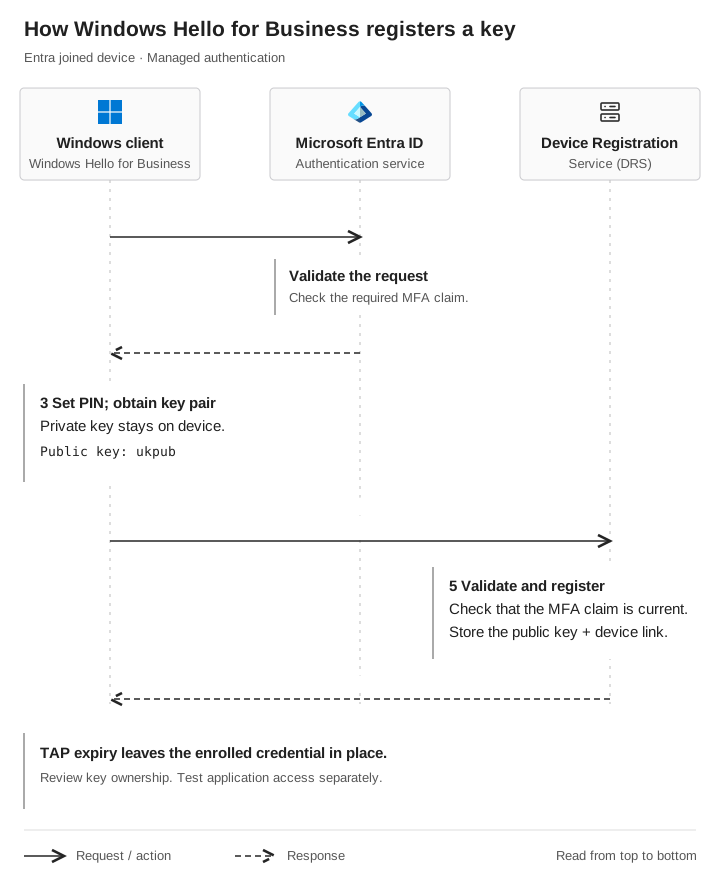
Windows Hello key registration
 Windows client · Windows Hello for Business
- Microsoft Entra ID
 Device Registration Service (DRS)
- Windows client → Entra IDRequest a DRS token
The provisioning app requests a token for Device Registration Service.
- Entra ID → Windows clientReturn the DRS access token
Entra validates the request and required MFA claim before issuing the token.
- Windows clientSet a PIN and obtain a key pair
The private key stays on the device. The public key is called ukpub.
- Windows client → DRSRegister the user key
Send the DRS token, public key, attestation, and device information.
- Device Registration ServiceValidate and register
Check that the MFA claim is current. Store the public key on the user with its device association.
- DRS → Windows clientReturn the key ID
The returned key ID confirms successful registration.
TAP expiry leaves the enrolled credential in place. Review ownership and test application access separately.
Windows Hello uses the enrolled key for later sign-ins. The PIN or biometric gesture unlocks use of the private key locally; Entra verifies signed authentication data against the registered public key. This is why checking TAP expiry alone misses a credential created during recovery. Microsoft’s Windows Hello authentication flow
Check what access actually followed
For an authorized assessment, name the resource and expected outcome in advance. For example: should the recovered account be able to open an approved test application from an unmanaged device?
Record the application result and the policy decision that applies to that attempt. Enrollment alone cannot demonstrate unrestricted access or a Conditional Access bypass. Conditional Access evaluates access requirements, such as a requirement to use a compliant device. Microsoft’s Conditional Access overview
Example: caller verification failed, but the application blocked access
In this illustrative example, the test scope permits a TAP recovery, enrollment, and an access attempt against one test application.
- Verification
- The interaction record shows that the approved identity check was not completed before recovery. The account-change record shows that an administrator issued a TAP to the test caller.
- Enrollment
- The before-and-after method inventory and enrollment record show a new test-controlled sign-in credential. Retain its identifier and creation time, not its private material.
- Access
- The attempt to open the named test application was denied. The matching sign-in record identifies the enforced compliant-device requirement that blocked this attempt.
- Finding
- Caller verification failed and an unauthorized method was enrolled. The tested application's device requirement still blocked access. Other applications were not assessed.
- Action
- The help-desk owner fixes the recovery exception; the identity owner removes the test credential and reviews relevant sessions. Repeat the verification test and the same application attempt, recording both results.
Correlate the records using the scoped account, administrator, method or device identifiers, application, and time window. Where available, retain request or correlation IDs. Nearby timestamps alone are insufficient to establish that two events belong to the same attempt.
This finding gives each owner a specific failure to address without discarding the control that worked. If the application result or applicable policy cannot be established, mark that outcome Unknown.
Verify cleanup instead of assuming it
If recovery was fraudulent, review the changes and access that followed it. Remove unauthorized methods and address any associated device identities through the incident-response process.
Microsoft states that TAP expiration does not retroactively invalidate established sessions; their duration depends on session controls. An application may also maintain its own session, which Microsoft Entra cannot directly revoke. TAP expiration guidance, Microsoft’s access-revocation guidance
Assign an owner to method removal, identity-session actions, and any application-specific session actions. The token and session-cookie explainer shows how to distinguish a surviving session from a new sign-in. Then repeat the scoped access attempt. Record which paths were tested, what stopped working, and what remains unresolved. A closed support ticket or an expired recovery pass is insufficient evidence of closure.
Take one recovery ticket to your next review
Review the ticket with the help desk, identity team, and response owner. For each check, retain an evidence reference, result, owner, and follow-up. Mark stages Verified, Gap found, or Not assessed.
| Check | Suggested owner | Evidence to retain |
|---|---|---|
Verify before acting |
Help desk |
Approved verification method and completion time; trusted contact source |
Record the authorized change |
Help desk |
Exact action, approver, administrator, intended recipient, and timestamp |
Escalate exceptions |
Help-desk lead |
Decision when required verification cannot be completed |
Review enrollment |
Identity team |
Expected versus observed method and device changes |
Check subsequent access |
Identity and SOC |
Named application, expected result, and observed policy outcome |
Investigate suspicious activity |
Response owner |
Alert, report, or investigation reference; observation window |
Verify closure if unauthorized |
Control owner |
Removal, session actions, retest result, and unresolved access paths |
Download the MFA Recovery Review Card (CSV) to record scope, ticket or test identity, evidence, corrective actions, and retest dates. Keep passwords, TAP values, tokens, and private keys out of the record. Mark stages you did not observe Not assessed.
Start with one completed ticket. Can the help desk show who was verified and what changed? Can the identity team trace any enrollment and access afterward? Use the missing evidence to define the next review. An authorized support simulation can test whether the account remains unchanged when a caller cannot establish their identity; scope downstream identity testing separately.

