A request to enable macros asks Office to permit code, not merely display a document. Verify the business workflow and let the endpoint owner review the exact file, policy, and requested trust change.
A supplier’s spreadsheet says its figures will appear after you enable content. When that does not work, the sender offers a fix: change a trust setting so the report can run.
The task has changed. You started with a document to read; you are now being asked to authorize software behavior. A legitimate workbook may use automation, but its own instructions cannot establish that the automation is approved.
The behavior described here applies to Office desktop applications on Windows. Escalate the specific file, business task, and requested trust change to the responsible application or endpoint owner.
How attackers used the “enable macros” request
Proofpoint’s April 2022 Emotet research described TA542 experimenting with delivery methods beyond macro-enabled attachments as Microsoft tightened macro behavior. It also explained the familiar social-engineering premise: recipients were persuaded that enabling macros was necessary to view the content. Those are historical observations, not evidence that today’s blocked spreadsheet belongs to TA542. Proofpoint: Emotet tests new delivery techniques
A macro is code that automates application tasks. VBA, Visual Basic for Applications, is one Office automation language. A business reason to view a workbook does not itself answer whether its code should run.
Editing and running code are different decisions
Protected View opens potentially unsafe files in a restricted, read-only mode. Leaving it enables editing where permitted. That action is not a general approval of every active component in the file. Microsoft documents that active content, including macros, can remain disabled after leaving Protected View. Microsoft: Protected View; Microsoft: trusted documents and active content
For supported Office applications on Windows, current Microsoft guidance describes default blocking of VBA macros in files identified as coming from the internet. Mark of the Web is the Windows origin information used in that assessment. The newer blocking banner does not simply offer the old Enable Content button. App version, file origin, existing trust, and organizational policy matter; do not teach one screenshot as universal behavior. Microsoft: internet macro blocking
An employee who reports a blocked macro may therefore have encountered a control working as intended. A help-desk ticket should preserve that result rather than immediately treating it as a fault.
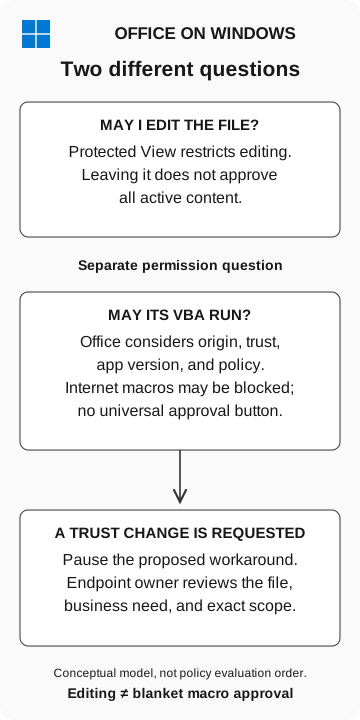
Two different questions
Office on Windows
- May I edit the file?
Protected View restricts editing. Leaving it does not approve all active content.
- May its VBA run?
Office considers origin, trust, app version, and policy. Internet macros may be blocked; there is no universal approval button.
- A trust change is requested
Pause the workaround. The endpoint owner reviews the file, business need, and exact scope.
Editing does not imply macro approval. This is a conceptual model, not policy evaluation order.
The proposed fix can be broader than the file
Ask what the sender wants changed. Moving material into a Trusted Location can enable active content and bypass several document protections. Microsoft recommends tightly controlling these locations and the people who can put files there. A folder is a scope of trust, not merely a convenient place to save a report. Microsoft: Trusted Locations
A trusted publisher is another scope. Microsoft explains that trusting a signing certificate allows macros validly signed with it to run; this can affect more than one document. Signature validation and publisher trust are administrative decisions, not proof that a particular business request is appropriate. Microsoft: trusted publishers
The help desk does not need to solve every application policy during intake. It needs to avoid accepting “make it open” as authorization for a broader change. Our antivirus-exception guide uses the same separation between a real business problem and the scope of a proposed repair.
Resolve the business task without accepting the workaround
Ask the business owner to confirm the supplier and expected information through the established relationship. A static export or approved portal may satisfy the request without running workbook code. Using that alternative resolves the business task; it does not establish whether the original workbook was malicious.
For a legitimate automation requirement, the endpoint and application owners should review the exact version, origin, business need, and effective policy. Approval should identify the supported workflow, its distribution route, and who can change the code. An unsolicited sender’s workaround is insufficient evidence for that review.
What to send the help desk
Preserve the original message and file through the approved reporting channel. Include:
- The expected business task and independently established contact.
- The application, version if known, device, and exact warning.
- Whether you only viewed the file, enabled editing, or changed another setting.
- The requested trust change and whether it has already happened.
Do not reopen the attachment or repeat the change to obtain better screenshots. If a macro may have run, tell the response team what you remember and when. Permission to run and evidence of execution are different facts; the endpoint investigation determines what actually occurred.
Route legitimate automation requirements to the application owner, and keep unexplained trust changes on hold.