Why review federation settings after a privileged account compromise?
A privileged account may be able to change which external identity provider the organization trusts. Review the trust configuration, affected identities, and subsequent activity separately; restoring the administrator account does not establish that every configuration change has been addressed.
An identity incident can leave behind a change to who is allowed to vouch for a user. Recovering the administrator’s account is important. Reviewing what that account changed is a different task.
With inbound federation, an organization accepts authentication from an external identity provider. After a privileged account compromise, check whether the configured providers and identity mappings still match the approved business relationships.
Start with the legitimate relationship
An identity provider, or IdP, authenticates users. With inbound federation, a target organization can accept a user’s authentication from a source IdP. For example, a company might let employees of an acquired business use their existing identity system to reach shared applications. Okta documents this arrangement alongside routing, enrollment, and application sign-in policies. Okta: integrate an external IdP
The source authenticates its user. The target decides which local account that user maps to and what access requirements apply. When reviewing the target, check who operates the source IdP and which users the relationship is meant to cover.
An assertion is a statement about authentication or identity passed between systems. In a SAML federation, the recipient must be configured to accept the appropriate issuer and verify its signed assertions. That cryptographic check establishes whether the message meets the configured trust requirements. It does not independently establish that the business approved the configuration. Okta: SAML IdP configuration
That distinction is the reason to review federation changes as security-sensitive administrative actions. A perfectly ordinary feature can enforce an unauthorized trust decision if someone with sufficient privileges changes its configuration.
What Okta observed in 2023
Okta’s August 2023 advisory described service-desk social engineering against privileged users. In the reported activity, attackers compromised Super Administrator accounts and configured an attacker-controlled source IdP. They manipulated a username at that source to match a real user in the target organization, enabling access to target applications as that user. The advisory also described changes to privileges and authentication policies in some cases. Okta: cross-tenant impersonation
The prerequisite was highly privileged access in the target. An arbitrary external tenant cannot simply declare itself trusted by yours. Nor does the historical report mean that every current federation permits the same outcome. The accepted source, account-matching configuration, relevant policies, and application permissions matter.
Separate matching, creation, and permission
A source identity and a target account are not automatically the same object. Account linking associates an external identity with an existing account. Just-in-time provisioning, or JIT, can create an account when a new external user signs in. Those are distinct behaviors. Okta’s current developer documentation describes both and lists account linking as disabled by default for newly created IdPs in the documented configuration. Check the actual tenant, especially older or modified relationships. Okta: account linking and JIT
Do not reduce this review to comparing two email addresses. Ask what identifier the target matches, whether a persistent identifier is used, and what linking rules apply. A familiar-looking name is not evidence of the correct relationship.
Then review permission separately. A successful mapping does not mean the user can open every application. Our authentication and authorization explainer separates proving an identity from granting an operation. Record the source relationship, matched account, application assignment, policy result, and resource action separately.
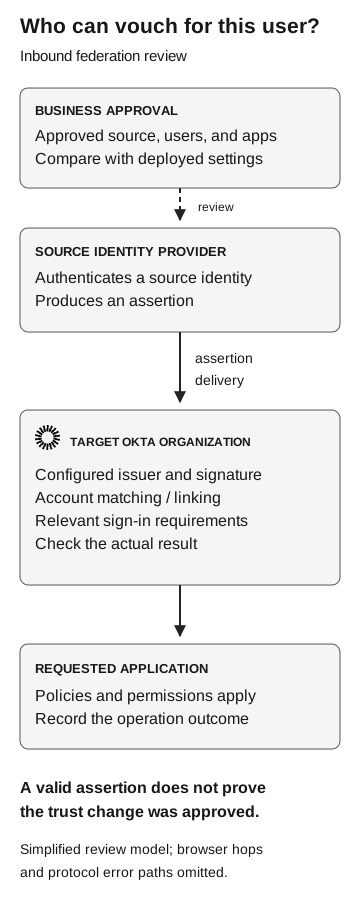
Who can vouch for this user?
Simplified inbound-federation review
- Business approval
Approved source, users, and apps. Compare with deployed settings.
Review
- Source identity provider
Authenticates a source identity and produces an assertion.
Assertion delivery
- Target Okta organization
Checks configured issuer, signature, account matching or linking, and relevant sign-in requirements.
Check the actual result
- Requested application
Policies and permissions apply. Record the operation outcome.
A valid assertion does not prove approval of the trust change. Browser hops and protocol error paths are omitted.
Review one federation relationship at a time
Start with a named business owner and the intended population. “Partner access” is too broad. A useful record says which organization operates the source, which team needs access, which applications are included, and who can approve changes.
Collect references to the configuration before and after the disputed change, if available. The reviewer needs stable object identifiers as well as display names. A name that resembles an approved partner does not establish that the endpoint or signing material belongs to that partner.
Collect the following records:
| Record | Question it answers | What it cannot establish alone |
|---|---|---|
Business approval |
Which relationship and population were authorized? |
Whether the deployed configuration matches |
Source and trust configuration |
Which issuer and signing material does the target accept? |
Whether the business approved that source |
Matching and linking settings |
How can an incoming identity map to a target account? |
Whether a particular sign-in used that mapping |
Change history |
Which administrative change happened, by whom, and when? |
Whether the actor’s account was under legitimate control |
Sign-in and policy records |
Which identity and policy outcome were observed? |
Which business records were subsequently read |
Application activity |
Which operation occurred on the named resource? |
Every action across other applications |
Ask the identity owner to resolve missing configuration details before making a broad exposure claim. If there is no prior snapshot, document that limit and use the available audit trail. A current configuration can describe what is possible now; it may not reconstruct the configuration at the incident time.
What the Okta events actually tell you
Okta’s event catalog documents system.idp.lifecycle.create and system.idp.lifecycle.update for IdP creation and updates. It also documents user.authentication.auth_via_IDP for authentication through an IdP. These are useful starting points for a scoped review, not a complete detection rule. Okta: event types
A creation event is evidence of a configuration operation. Review its outcome and affected object, then compare that object with the approved relationship. An authentication event needs its own outcome, identity, and relevant context. Do not infer successful file access from either event name.
The same catalog explicitly says user.authentication.sso can appear even when application sign-on is unsuccessful. That makes the outcome essential. For a claim that a document was read, ask the application owner for the corresponding resource evidence. Record collection gaps and the time window rather than treating an empty search as proof that nothing happened. Okta: SSO event semantics
Review current controls rather than copying an old checklist
Current Okta Identity Engine guidance for SAML IdPs describes account matching, linking restrictions, username filters, and security best practices. Its integration guidance recommends disabling account linking where possible. Have the identity owner compare the deployed settings with the appropriate current documentation and legitimate business need. Okta: SAML settings and security guidance, Okta: integration best practices
For a change review, ask three practical questions. Who can modify the trust? Who approves the external identity population? Who verifies the deployed result? Where one person performs all three roles, make that visible to the security owner rather than assuming a second review exists.
For incident response, track restoration of the administrator account and remediation of unauthorized configurations as separate work items. Let the incident and application owners decide the response sequence, evidence preservation, and treatment of existing sessions. Removing a trust relationship should not be reported as proof that previously issued application sessions are unusable without verifying the relevant behavior. The containment review offers a way to record those separate outcomes.
Check that approved access works and excluded access fails
Use an approved test environment and harmless accounts to verify a defined relationship. Name an intended source identity, a permitted application, and an excluded identity or resource. Agree on the expected policy result before testing. Retain the source, target account, configuration version, application result, and time for each case.
A useful retest demonstrates both that the approved relationship still works and that the excluded case is refused for the expected reason. A timeout or unavailable application does not prove that the trust restriction worked. If a behavioral test cannot safely be performed, report which configuration checks were completed and which outcomes remain untested.
The federation review packet keeps the configuration, identity and application evidence together. Close the finding only for the relationship and access paths you actually verified.